

For many years, Selenium IDE was one of the easiest entry points into automation testing. It allowed testers to record actions in the browser, replay them, and create simple test cases without writing complex code. For manual testers and beginners, this made automation feel less intimidating. Instead of starting directly with programming, they could see how user actions such as clicking buttons, entering text, submitting forms, and navigating pages could be converted into automated test steps.
However, the testing world has changed significantly. Modern web applications are more dynamic, release cycles are faster, and companies now expect automation tools to work smoothly with CI/CD pipelines, cloud testing platforms, version control systems, and advanced reporting tools. As a result, many teams have moved toward code-based automation frameworks such as Selenium WebDriver, Playwright, Cypress, and other modern testing tools.
This shift has created a common question among testers: Is Selenium IDE really dead?
The truth is more balanced. Selenium IDE is not completely dead, but its role has changed. It is no longer the main tool for building large and professional automation testing projects. At the same time, it can still be useful for beginners, quick test recordings, basic browser automation, and understanding how automation works at a practical level. In this blog, we will understand what Selenium IDE is, why people think it has become outdated, where it still makes sense, and which alternatives are better for testers who want to build a strong automation testing career in 2026.
What is Selenium IDE and Why Was it So Popular?
Selenium IDE is a browser-based automation tool that allows users to record, edit, and replay test cases. In simple words, it works like a recorder for browser actions. When a tester opens a website, clicks on buttons, fills forms, selects dropdowns, or submits information, Selenium IDE can record those steps and convert them into a test case.
This made Selenium IDE very popular, especially among manual testers and beginners who wanted to learn automation without immediately writing code. At a time when automation testing felt highly technical, Selenium IDE gave testers a simple way to understand how automated testing works.
The biggest advantage of Selenium IDE was its ease of use. A tester did not need to be an expert in Java, Python, or JavaScript to create a basic automation test. They could simply perform actions on the website and let the tool capture those actions.
Selenium IDE became popular because it solved a real problem for beginners:
- It made automation testing easier to understand.
- It helped manual testers take their first step into automation.
- It allowed quick creation of basic test cases.
- It reduced the need for coding in the initial learning stage.
- It helped testers record repetitive browser actions.
- It was useful for demos, practice, and simple testing workflows.
For example, if a tester wanted to check whether a login page was working correctly, they could record the steps of entering a username, entering a password, clicking the login button, and verifying the result. This made Selenium IDE useful for simple and repetitive tasks.
However, Selenium IDE was never designed to replace complete automation frameworks. It was best suited for small test cases, learning purposes, and quick browser recordings. As testing requirements became more advanced, companies started looking for tools that could handle complex logic, reusable code, data-driven testing, reporting, and integration with development pipelines.
This is where Selenium IDE slowly began to lose its position as the main automation tool. It remained useful for beginners, but professional automation testing started moving toward more powerful tools like Selenium WebDriver, Playwright, Cypress, and other modern frameworks.
Why did Selenium IDE Lose Popularity?
Selenium IDE lost popularity because the needs of software testing changed. Earlier, many websites were simple, and basic record-and-playback testing was enough for small tasks. But today, web applications are more dynamic, complex, and fast-moving. Companies now need automation tests that are stable, scalable, reusable, and easy to maintain.
The biggest limitation of IDE is that recorded tests can break easily. For example, if a button name changes, a page layout is updated, or an element loads slowly, the recorded test may fail. This becomes a serious problem when teams have hundreds of test cases and frequent releases.
Another issue is limited flexibility. Professional automation testing often requires conditions, loops, reusable functions, test data, reporting, debugging, and integration with CI/CD pipelines. These things are much easier to manage in code-based frameworks like Selenium WebDriver, Playwright, or Cypress.
Here are the main reasons Selenium IDE lost its earlier popularity:
- Recorded tests are often fragile and difficult to maintain.
- It is not ideal for large and complex automation projects.
- It gives limited control compared to coded automation frameworks.
- Debugging failures can become difficult in bigger test suites.
- It is not the best choice for advanced test logic.
- Modern teams prefer tools that work well with Git, Jenkins, Docker, CI/CD, and cloud testing platforms.
- Companies now expect automation testers to know programming and framework design.
For example, a simple login test may work well in Selenium. But if the same test needs to run with multiple users, different browsers, different test environments, database validation, screenshots, reports, and pipeline integration, Selenium IDE becomes less practical. This is why Selenium IDE slowly shifted from being a primary automation tool to being more of a beginner-friendly or quick recording tool. It did not disappear, but it became less relevant for serious enterprise-level automation testing.

Is Selenium IDE Really Dead in 2026?
The simple answer is: Selenium IDE is not completely dead, but it is no longer enough for serious automation testing.
Selenium IDE still exists as part of the Selenium ecosystem. The official Selenium documentation describes Selenium IDE as a browser extension that records and plays back a user’s actions in the browser. It is also available for major browsers such as Chrome, Firefox, and Microsoft Edge.
So, technically, Selenium IDE is not dead. It has not disappeared. It is still known as a record-and-playback tool for creating browser automation tests. The Selenium IDE GitHub page also describes it as an integrated development environment for Selenium scripts, mainly used for recording and playback.
However, when people say “Selenium IDE is dead,” they usually mean something different. They mean that Selenium IDE is no longer the first choice for professional automation testing. In modern testing teams, companies usually expect testers to work with tools that support coding, reusable frameworks, CI/CD integration, debugging, reporting, cross-browser execution, and long-term test maintenance.
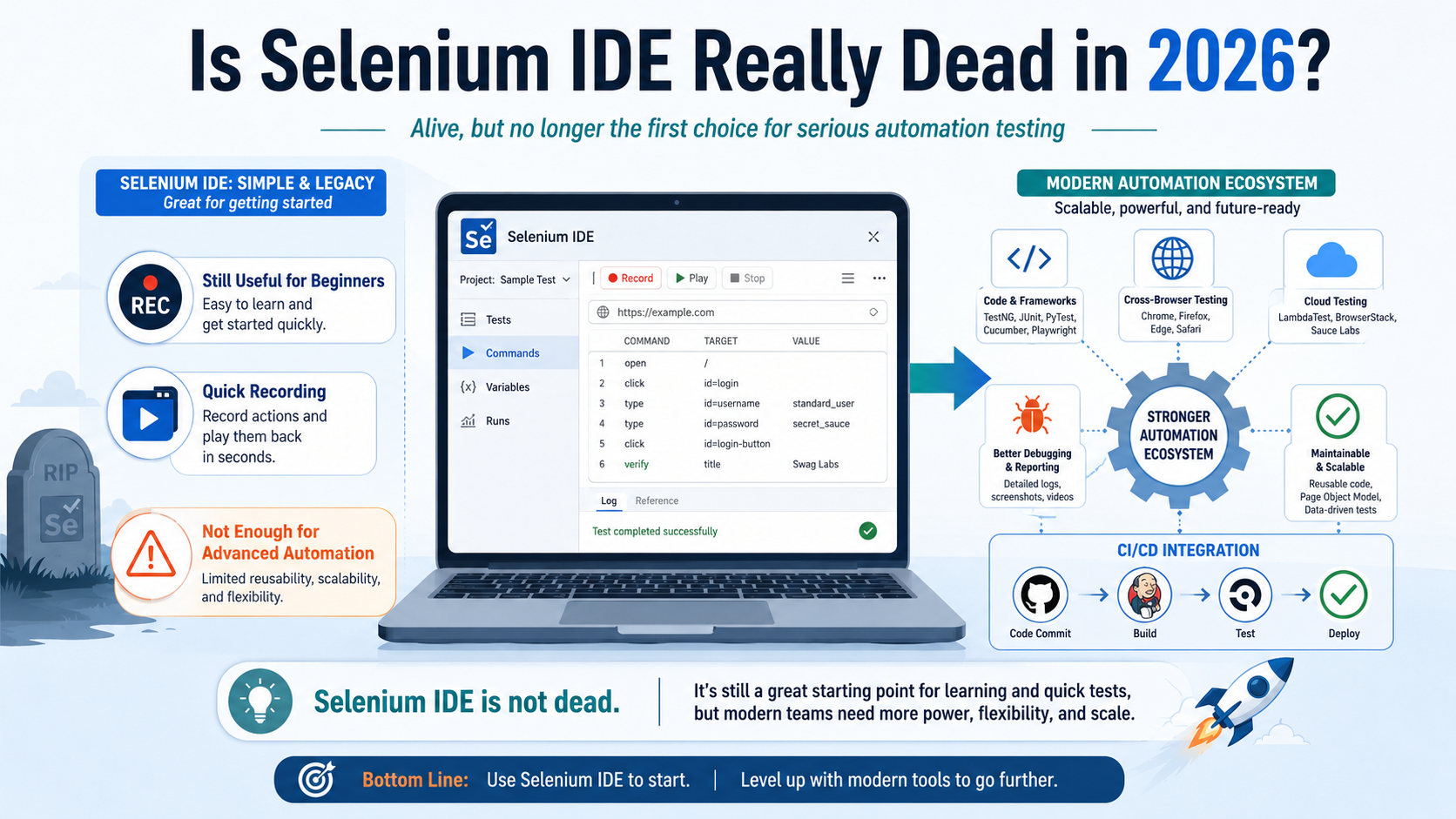
This is where Selenium IDE becomes limited.
For beginners, Selenium IDE can still be useful. It can help them understand how browser automation works. It can show how clicking, typing, selecting, and verifying elements can become automated test steps. But for real-world automation jobs, learning only Selenium IDE is not enough.Selenium IDE is alive as a learning and quick-recording tool, but it is not enough as a complete automation career skill.
It can still be used for:
- Learning the basics of automation testing
- Recording simple browser actions
- Creating quick demo tests
- Understanding Selenium commands
- Building rough test flows before converting them into proper scripts
But it should not be treated as the final destination for automation testers. Anyone serious about automation testing should move beyond Selenium IDE and learn tools like Selenium WebDriver, Playwright, Cypress, API testing tools, and CI/CD-based automation frameworks. So, Selenium IDE is not dead. It has simply moved from being a main automation tool to being a supporting tool. Its value is still there, but its importance has reduced in professional testing environments.
Where Selenium IDE Still Makes Sense?
Even though Selenium IDE is no longer the first choice for professional automation testing, it still has value in some situations. It can be useful when the goal is not to build a large automation framework, but to create quick, simple, and easy-to-understand browser tests.
Selenium IDE still makes sense for beginners who are just entering the world of automation testing. It gives them a visual way to understand how automation works. Instead of starting with complex programming concepts, they can record browser actions and see how each step becomes part of a test case.
It is also useful for quick testing tasks. For example, if a tester wants to record a simple login flow, form submission, or page navigation, Selenium IDE can help create a basic test quickly. This can save time when the task is small and does not require advanced logic.
Selenium IDE can be useful in the following cases:
- To learn the basics of test automation
- To understand browser actions and test steps
- To record simple workflows quickly
- To create demo tests for training sessions
- To prepare rough test flows before writing proper automation scripts
- To help non-technical users understand how automation works
- To automate small and repetitive browser tasks
For example, a trainer teaching automation testing can use Selenium IDE to show how a user action becomes an automated step. Similarly, a beginner can use it to understand commands like click, type, open, verify, and assert before moving to coded frameworks.
However, Selenium IDE should be used with realistic expectations. It is not suitable for complex, long-term, enterprise-level automation projects. If a project needs reusable code, test data management, parallel execution, CI/CD integration, advanced reporting, or strong debugging, then Selenium IDE will not be enough.
In simple terms, Selenium IDE still makes sense as a starting tool, not as a complete career tool. It can help testers understand automation, but they should eventually move toward more powerful tools like Selenium WebDriver, Playwright, Cypress, or other modern automation frameworks.
Best Alternatives to Selenium IDE in 2026
If Selenium IDE is useful only for basic recording and learning, the next question is simple: what should testers learn instead?
In 2026, automation testing is no longer limited to recording browser actions. Companies now look for testers who can create stable test scripts, manage test data, run tests across browsers, connect automation with CI/CD pipelines, and generate useful reports. This is why testers should explore stronger alternatives that offer better flexibility, scalability, and long-term career value.
Here are some of the best alternatives to Selenium IDE:
| Tool | Best For | Coding Required | Why It Is a Good Alternative |
| Selenium WebDriver | Professional browser automation | Yes | Best for testers who want to build serious automation frameworks using Java, Python, C#, or JavaScript |
| Playwright | Modern end-to-end testing | Yes | Useful for fast, reliable testing across Chromium, Firefox, and WebKit browsers |
| Cypress | Frontend and JavaScript-based testing | Yes | Popular for testing modern web applications, especially React, Angular, and Vue apps |
| Katalon Studio | Low-code test automation | Low to medium | Good for testers who want more structure than Selenium IDE without starting fully from scratch |
| Testim | AI-assisted automation testing | Low to medium | Useful for teams that want faster test creation and easier test maintenance |
| Ui.Vision RPA | Browser automation and RPA tasks | Low | Good for simple record-and-playback workflows, browser tasks, and basic automation |
| Robot Framework | Keyword-driven automation | Medium | Useful for testers who want a readable and structured automation approach |
| TestCafe | Web testing with JavaScript | Yes | Suitable for teams working on browser-based testing with a developer-friendly setup |
Among these, Selenium WebDriver is the natural next step for anyone who starts with Selenium IDE. It gives testers much more control over browser automation. Instead of only recording steps, testers can write proper scripts, handle dynamic elements, use test data, create reusable functions, and design complete automation frameworks.
Playwright is another strong alternative, especially for modern web applications. It is becoming popular because it is fast, reliable, and designed for current web development practices. It also handles many common automation problems, such as waiting for elements and managing browser contexts, more smoothly.
Cypress is also a good option for testers who want to work closely with frontend development teams. It is especially useful for JavaScript-heavy applications and gives a clean debugging experience.
For testers who do not want to move directly into heavy coding, Katalon Studio and Testim can be good middle-ground options. They provide more features than Selenium IDE while still being easier to use than fully coded frameworks.
The best choice depends on your goal:
- If you want automation testing jobs, learn Selenium WebDriver.
- If you want to work with modern web apps, learn Playwright.
- If you are comfortable with JavaScript, explore Cypress.
- If you want low-code automation, try Katalon Studio or Testim.
- If you want simple browser task automation, Ui.Vision RPA can be useful.
The main point is that Selenium IDE can help you begin, but these alternatives can help you grow. For a serious testing career in 2026, testers should not stop at record-and-playback tools. They should gradually move toward tools that support coding, debugging, reporting, and real-world automation workflows.
Selenium IDE vs Selenium WebDriver vs Playwright vs Cypress
To understand the real position of Selenium IDE, it is useful to compare it with the tools that are commonly used in automation testing today. Each tool has a different purpose, and the right choice depends on the type of testing you want to do.
- Selenium IDE is mainly a beginner-friendly tool. It is useful when you want to record and replay simple browser actions. It does not require strong coding skills, which makes it easy for manual testers to start learning automation. However, it is not the best option for building large, reliable, and maintainable automation projects.
- Selenium WebDriver is much more powerful. It allows testers to write automation scripts using programming languages such as Java, Python, C#, and JavaScript. It gives more control over browser actions, test data, validations, reusable functions, and framework design. This is why Selenium WebDriver is still widely used in professional automation testing.
- Playwright is a modern testing tool designed for today’s web applications. It is known for fast execution, strong browser support, and better handling of dynamic elements. It is especially useful for testing applications that need reliable end-to-end testing across different browsers.
- Cypress is also a popular modern testing tool, especially for JavaScript-based applications. It is often preferred by frontend developers and QA teams working with React, Angular, Vue, and similar frameworks. Cypress provides a smooth debugging experience and allows testers to see what happens at each step of the test.
Here is a simple comparison:
| Tool | Best Use Case | Skill Level | Main Advantage | Main Limitation |
| Selenium IDE | Basic recording and playback | Beginner | Easy to use without coding | Not suitable for complex projects |
| Selenium WebDriver | Professional automation frameworks | Intermediate to advanced | Flexible and widely used | Requires programming knowledge |
| Playwright | Modern end-to-end web testing | Intermediate | Fast, reliable, and handles dynamic apps well | Requires coding skills |
| Cypress | Frontend and JavaScript testing | Intermediate | Excellent debugging and developer-friendly workflow | Mainly preferred for JavaScript ecosystems |
For beginners, Selenium IDE can be a good first step. It helps them understand how automation works without the pressure of writing code immediately. But once they understand the basics, they should move toward Selenium WebDriver, Playwright, or Cypress.
A simple learning path can look like this:
| If Your Goal Is | Learn This |
| To understand automation basics | Selenium IDE |
| To get automation testing jobs | Selenium WebDriver |
| To work on modern web application testing | Playwright |
| To work with frontend teams and JavaScript apps | Cypress |
| To build a long-term testing career | Selenium WebDriver + Playwright or Cypress |
In short, Selenium IDE is useful for learning, but Selenium WebDriver, Playwright, and Cypress are better for real career growth. A tester who wants to stay relevant in 2026 should not depend only on record-and-playback tools. They should gradually learn coding-based automation because that is what most professional testing roles now demand.
Selenium IDE Is Not Dead, But it is Not Enough
Selenium IDE is not really dead. It still exists, and it can still be useful for recording simple browser actions, learning automation basics, creating quick demos, and helping beginners understand how test automation works. For someone completely new to automation testing, Selenium IDE can be a comfortable starting point because it does not require immediate programming knowledge.
However, Selenium IDE is no longer enough for serious automation testing. Modern testing teams need tools that can handle complex applications, dynamic web elements, reusable test scripts, debugging, reporting, version control, cross-browser testing, and CI/CD integration. This is where Selenium IDE becomes limited.
For beginners, the right approach is not to ignore Selenium completely, but to use it wisely. It can help you understand the foundation of automation, but it should not be your final skill. Once you understand the basics, you should move toward Selenium WebDriver, Playwright, Cypress, Robot Framework, or other modern automation tools.
In 2026, companies are not just looking for testers who can record and replay tests. They want professionals who can design reliable automation frameworks, understand application behaviour, write maintainable scripts, and support faster software releases.
So, the truth is simple: Selenium IDE is alive, but its role has changed. It is no longer the main tool for professional automation testing, but it can still be a useful learning and support tool. If you want to build a strong career in automation testing, use Selenium IDE as your starting point, not your destination.