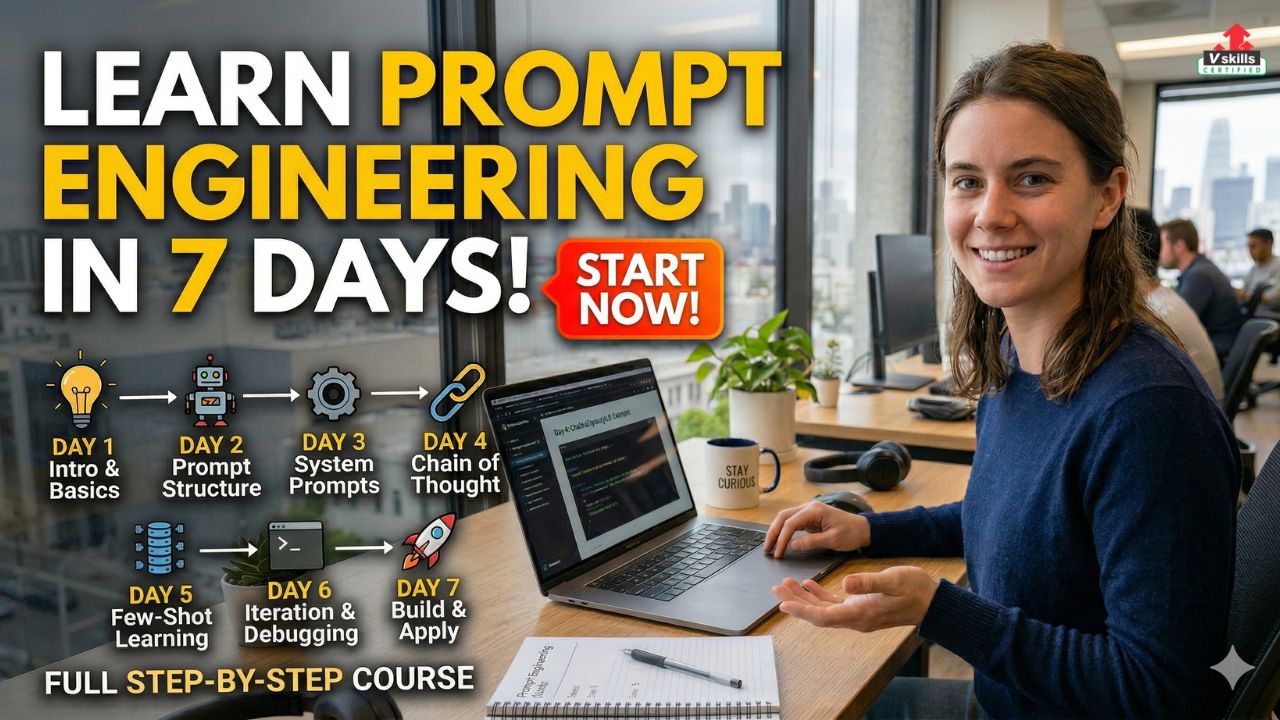
Prompt engineering has quickly become one of the most useful skills in the world of artificial intelligence. As AI tools are increasingly used for writing, coding, research, brainstorming, customer support, and business productivity, the ability to give clear and effective instructions has become more valuable than ever. This is exactly where prompt engineering comes in. It helps users communicate better with AI systems so they can get more accurate, relevant, and useful results.
The good news is that prompt engineering is not a skill that takes years to begin learning. While mastering it requires regular practice, the basics can be understood much faster than many people expect. With the right structure, even a beginner can build a solid foundation in just seven days. The goal is not to become an expert within a week, but to understand how prompts work, how to improve them, and how to use them effectively in real tasks.
This makes prompt engineering an excellent skill for students, working professionals, freelancers, content creators, and even non-technical learners who want to use AI more productively. Whether you want to write better content, solve problems faster, improve research, automate repetitive tasks, or explore career opportunities in AI, learning prompt engineering can be a strong starting point.
Why Learn Prompt Engineering?
Prompt engineering has become an important skill because it helps people use AI tools more effectively. As artificial intelligence is now being used in education, business, marketing, software development, research, and customer support, knowing how to guide these tools properly can make a big difference in the quality of results. Instead of giving vague instructions and hoping for the best, prompt engineering teaches you how to communicate with AI in a clear, structured, and purposeful way.
- One of the biggest reasons to learn prompt engineering is that it improves productivity. A well-written prompt can save time, reduce repeated effort, and generate more useful outputs in fewer attempts. Whether you are drafting content, summarising a report, solving a coding issue, or brainstorming ideas, better prompting helps you work faster and more efficiently.
- It is also a highly practical skill because it is useful for both technical and non-technical people. You do not need to be a programmer to benefit from prompt engineering. Writers, students, researchers, marketers, teachers, freelancers, and business professionals can all use it to improve the way they interact with AI tools.
- Another reason this skill matters is that it is becoming relevant in the job market. As more organisations adopt AI tools in their workflows, they increasingly value people who know how to use them well. Even if you do not want to become a full-time prompt engineer, learning this skill can still strengthen your profile and make you more effective in your current role.
- Most importantly, prompt engineering helps you move from being a casual AI user to someone who can actually direct AI with intention. That shift can make AI far more useful in real-world tasks and open up new learning, freelance, and career opportunities.
What You Need Before You Start?
One of the best things about learning prompt engineering is that you do not need a very advanced background to begin. Unlike some technical skills that require deep programming knowledge from day one, prompt engineering is more accessible. What matters most in the beginning is your willingness to learn, experiment, and improve through practice.
Before starting your 7-day learning journey, it helps to have a few basic things in place.
Access to AI tools
- To learn prompt engineering properly, you need at least one AI tool to practise with. Tools like ChatGPT or similar generative AI platforms can help you test prompts, compare outputs, and understand how small changes in wording affect the results. The more you practise, the more comfortable you become.
Curiosity and willingness to experiment
- Prompt engineering is a hands-on skill. You will learn best by trying different instructions, changing phrasing, adding context, and observing how the output improves. A curious mindset is very important because much of the learning comes through experimentation.
Basic communication skills
- Since prompting is all about giving instructions clearly, it helps to be comfortable expressing your thoughts in a structured way. You do not need perfect writing skills, but you should be able to explain what you want, what kind of output you need, and how the response should be shaped.
Logical thinking
- Prompt engineering often involves breaking tasks into smaller steps, adding direction, and guiding AI toward a specific goal. This means that having a logical and organised way of thinking can be very helpful, even for beginners.
Patience to refine results
- The first prompt does not always give the best answer. Sometimes you need to revise your wording, add details, or ask follow-up questions to get a better output. That is why patience is important. Learning prompt engineering is not about getting perfect results instantly. It is about improving gradually.
A real purpose for practice
- It becomes much easier to learn prompt engineering when you connect it to real tasks. For example, you might want to use AI for writing, studying, brainstorming, coding, summarising reports, or preparing emails. Having a purpose makes your learning more practical and more interesting.
The good news is you do not need a specialised degree, a technical job, or years of experience before starting prompt engineering. If you have access to an AI tool, a willingness to practise, and an interest in learning how better prompts lead to better results, you already have enough to begin. Let’s now start with our 7-day plan.
Day 1: Understand What Prompt Engineering Really Means
The first day of learning prompt engineering should focus on building a clear understanding of what the skill actually means. Many beginners assume prompt engineering is simply about asking questions to AI, but it is much more than that. Prompt engineering is the process of designing instructions in a way that helps AI produce better, more accurate, and more useful outputs.
In simple terms, a prompt is the input you give to an AI tool. But not all prompts are equally effective. A vague or incomplete prompt may lead to weak results, while a clear and detailed prompt can produce a much better response. This is why learning prompt engineering starts with understanding how wording, structure, and context influence the output.
What is prompt engineering?
Prompt engineering is the practice of creating well-structured prompts that guide AI systems toward a desired result. It involves more than just typing a request. It often includes:
- giving clear instructions
- adding relevant context
- specifying the format you want
- defining the tone or audience
- refining the prompt when the first output is weak
This makes prompt engineering both a communication skill and a problem-solving skill.
Why does wording matter?
AI tools respond based on the instructions they receive. If your prompt is too short, too broad, or unclear, the output may be generic or inaccurate. On the other hand, if your prompt clearly explains the task, the audience, the style, and the expected format, the response is usually much more useful.
For example:
- Weak prompt: Write about climate change.
- Better prompt: Write a beginner-friendly 300-word explanation of climate change for school students. Use simple language and include three major causes and two effects.
The second version gives the AI much more direction, so the output is likely to be clearer and more relevant. A strong prompt often includes a few key elements:
- Task – what you want the AI to do
- Context – background information that helps the AI understand the task
- Format – how you want the answer presented
- Tone – the style or voice you want
- Audience – who the output is for
Once you understand these parts, writing better prompts becomes much easier.
What should you do on Day 1?
Your goal on the first day is not to master prompt engineering. It is to understand how prompts shape AI responses. Spend time doing simple exercises such as:
- Comparing weak prompts with improved prompts
- testing how different wording changes the output
- observing how adding context improves answers
- noticing how format instructions affect structure
This will help you build the foundation for the rest of the 7-day plan.
Day 1 takeaway – By the end of Day 1, you should understand that prompt engineering is not just about using AI. It is about guiding AI with clarity and purpose. Once you learn how prompts influence output quality, you will be in a much better position to improve your prompting skills over the next few days.
Day 2: Learn the Types of Prompts
Once you understand what prompt engineering means, the next step is to learn the different types of prompts you can use. This is important because not every task needs the same style of instruction. Sometimes you need a simple, direct prompt, while other times you may need a role-based or step-by-step prompt to get better results. Learning these types early will help you use AI more effectively across different situations.
Why prompt types matter?
Many beginners make the mistake of using the same kind of prompt for every task. This can limit the quality of the output. Different prompt types help AI respond in different ways. For example, a creative writing task needs a different prompt style than a coding task or a summary request. By learning prompt types, you start understanding which format works best for which use case.
Common types of prompts you should know
Here are some of the most useful prompt types for beginners:
Direct prompts
These are simple and straightforward prompts where you directly ask the AI to do something.
Examples:
- Summarise this article in 100 words.
- Write a formal email requesting leave.
- Explain inflation in simple terms.
Direct prompts are useful for basic tasks and quick results.
Role-based prompts
In this type, you ask the AI to respond from a specific role or perspective.
Examples:
- Act as a career coach and suggest interview tips for freshers.
- Act as a teacher and explain photosynthesis to a class 6 student.
- Act as a marketing expert and write a product description.
Role-based prompts often improve tone, relevance, and context.
Creative prompts
These prompts are used for imagination-based tasks such as storytelling, brainstorming, or idea generation.
Examples:
- Write a short story about a future city powered by AI.
- Suggest 10 creative blog topic ideas on digital marketing.
- Create a catchy slogan for an eco-friendly brand.
These are useful for writers, marketers, and creators.
Analytical prompts
These prompts ask AI to compare, evaluate, explain, or interpret information.
Examples:
- Compare online learning and classroom learning.
- Analyse the pros and cons of remote work.
- Explain the difference between machine learning and deep learning.
Analytical prompts are useful for study, research, and professional work.
Step-by-Step prompts
These prompts ask AI to explain something in stages or break a process into clear steps.
Examples:
- Explain how to create a resume step by step.
- Show me how to solve this maths problem step by step.
- Describe the process of starting a blog in simple steps.
These are especially helpful for beginners learning a new concept.
Few-shot prompts
In this style, you give the AI a few examples before asking it to do the task. This helps guide the format or style of the answer.
Example:
- Here are two examples of polite customer replies. Now write a similar reply for this complaint.
- Few-shot prompting is useful when you want consistency in tone or structure.
What should you do on Day 2?
On Day 2, your goal is to experiment with these prompt types and see how they affect the output. Pick one simple topic and try asking for it in different ways.
For example, choose a topic like “time management” and test:
- a direct prompt
- a role-based prompt
- a step-by-step prompt
- an analytical prompt
Then compare the outputs. Notice how the style, depth, and usefulness of the answers change depending on the prompt type.
Day 2 takeaway
By the end of Day 2, you should understand that prompt engineering is not only about writing better prompts, but also about choosing the right kind of prompt for the task. Once you learn how different prompt types work, you will be able to communicate with AI more strategically and get better results.
Day 3: Practise Writing Better Prompts
By Day 3, you should move from understanding prompt types to actually improving the way you write prompts. This is where real learning begins. Prompt engineering becomes much more useful when you start seeing how small changes in wording, structure, and detail can lead to much better results.
Many beginners write prompts that are too short or too broad. As a result, the AI gives answers that feel generic, incomplete, or not very useful. The goal of Day 3 is to learn how to turn weak prompts into strong ones.
Why does this step matter?
A good prompt gives the AI enough direction to understand exactly what you want. It helps reduce confusion and improves the quality of the response. The more clearly you communicate, the better the output is likely to be.
This is why prompt engineering is not only about asking something. It is about asking in the right way.
How to improve a weak prompt?
A weak prompt often lacks one or more important elements. It may not clearly define:
- the task
- the audience
- the tone
- the format
- the length
- the goal
When you add these details, the prompt becomes stronger and the AI has a better chance of producing a useful answer.
For example:
- Weak prompt: Write about social media marketing.
- Improved prompt: Write a beginner-friendly 400-word explanation of social media marketing for small business owners. Use simple language and include five practical tips.
The second version is stronger because it tells the AI what to write, for whom, how long it should be, and what style to use.
Things you can add to improve prompts
When practising on Day 3, focus on adding useful details such as:
- specific task instructions
- target audience
- tone or writing style
- output format
- word limit or length guidance
- important points to include
- things to avoid
These small additions often make a big difference.
Practice exercises for Day 3
To build your skill, take a few simple prompts and improve them.
For example:
- Turn “Explain AI” into a prompt for school students
- Turn “Write an email” into a formal leave request prompt
- Turn “Summarise this article” into a structured bullet-point summary prompt
- Turn “Give me blog ideas” into a niche-specific content ideation prompt
Try writing the first version, then improve it by adding more direction.
Compare the results
The most important part of Day 3 is comparison. Do not just write improved prompts. Also compare the outputs from the weak and strong versions.
Ask yourself:
- Was the improved output clearer?
- Did it follow the right format?
- Was the tone more suitable?
- Did it feel more useful for the intended purpose?
This comparison helps you understand how prompting decisions affect outcomes.
Day 3 takeaway
By the end of Day 3, you should begin to see that better prompting is often about adding clarity, structure, and purpose. You do not always need complicated prompts. You just need prompts that give the AI enough guidance to respond well. Once you start practising this skill, your results will improve very quickly.
Day 4: Use Prompt Engineering for Real Tasks
By Day 4, it is time to move beyond practice exercises and start using prompt engineering for real tasks. This is an important step because prompting becomes much easier to understand when you apply it to work that people actually do every day. Instead of only learning theory, you begin to see how AI can support writing, research, communication, learning, and problem-solving in practical ways.
This stage helps you understand that prompt engineering is not just a technical skill. It is a highly useful everyday skill that can improve the quality and speed of many tasks.
Why real tasks matter?
When you work on real tasks, you learn how to write prompts with a clear purpose. You stop thinking only in terms of “trying prompts” and start thinking in terms of “solving problems.” This shift is important because strong prompt engineers focus on outcomes, not just instructions.
Real tasks also teach you how to adapt your prompt style depending on the situation. A prompt for blog writing will look different from a prompt for summarising a report or drafting an email.
Real tasks you can practise on Day 4
Here are some simple and useful areas where you can apply prompt engineering:
Writing and content creation
You can use prompts for:
- creating blog outlines
- writing introductions and conclusions
- rewriting content for clarity
- generating headline ideas
- drafting social media captions
This helps you learn how to guide tone, structure, and audience.
Research and summarisation
You can practise prompts that:
- summarise long reports
- extract key points from articles
- simplify technical topics
- compare two ideas
- turn long text into bullet points
This teaches you how to ask for concise and structured outputs.
Email and communication
You can try prompts for:
- formal emails
- customer support replies
- follow-up messages
- polite requests
- professional rewording
This is useful for learning tone control and practical communication.
Study and learning support
You can use AI prompts to:
- explain concepts in simple language
- create short notes
- generate quiz questions
- break topics into steps
- prepare revision summaries
This helps you understand how prompts can improve clarity and learning.
Coding and technical help
If you are interested in technical use cases, you can practise prompts for:
- explaining code
- finding bugs
- generating simple scripts
- simplifying technical concepts
- converting logic into steps
This shows how prompt engineering also works in technical environments.
How to practise effectively on Day 4
Do not try too many tasks at once. Pick 2 or 3 real use cases and work on them properly. For each one:
- define the task clearly
- write your first prompt
- review the output
- improve the prompt if needed
- compare the final version with the first one
This will help you see how prompt refinement works in real situations.
A simple example
- Task: Draft a professional follow-up email after a job interview
- Basic prompt: Write a follow-up email after an interview
- Improved prompt: Write a polite and professional follow-up email after a job interview. Thank the interviewer for their time, express continued interest in the role, and keep the tone formal but warm.
The improved version gives more direction, so the output is likely to be better.
Day 4 takeaway
By the end of Day 4, you should start seeing prompt engineering as a practical skill that can support real tasks across different areas. This is the stage where prompting becomes more meaningful, because you are no longer only learning how prompts work. You are learning how to use them in everyday situations that have real value.
Day 5: Learn How to Refine AI Outputs
By Day 5, you should understand that prompt engineering is not only about writing the first prompt well. It is also about improving the output when the first response is not good enough. This is a very important part of the learning process because AI does not always give the perfect answer in one attempt. In many cases, better results come from refinement.
Learning how to refine AI outputs helps you move from basic usage to more effective prompt engineering. It teaches you how to review, adjust, and guide the model toward a better response instead of simply accepting the first output.
Why refinement matters?
Even a good prompt may sometimes produce an answer that is too vague, too long, too generic, or not suited to the purpose. This does not always mean the AI failed completely. It often means the prompt needs more direction or the output needs follow-up correction.
Refinement matters because it helps you:
- improve clarity
- fix weak structure
- adjust tone
- remove unnecessary details
- make the output more relevant
- guide the AI toward a more useful result
This is where a lot of real prompt engineering skill develops.
Common problems in AI outputs
When reviewing AI-generated content, beginners should learn to spot common weaknesses such as:
- answers that are too broad
- unclear structure
- wrong tone
- missing details
- repetitive points
- over-explaining simple ideas
- not following the requested format
Once you identify the problem, you can prompt again more effectively.
How to refine an output
There are many simple ways to refine a weak response. You can ask the AI to:
- make the answer shorter
- make the answer more detailed
- rewrite in a professional tone
- simplify the language
- convert the response into bullet points
- add examples
- remove repetition
- focus only on key takeaways
- follow a specific structure
This shows that prompt engineering is often a conversation, not just a one-time command.
Example of refinement
- First prompt: Explain time management.
- Possible problem: The answer is too broad and generic.
- Refinement prompt: Rewrite the explanation of time management for college students. Keep it under 200 words and include three practical tips in bullet points.
The second instruction makes the output more specific, more useful, and more targeted.
What to practise on Day 5
To build this skill, take a few AI-generated responses and improve them step by step. For each one:
- identify what is weak in the output
- decide what needs to change
- write a follow-up prompt
- compare the revised output with the original version
You can practise by refining:
- blog sections
- summaries
- emails
- study notes
- social media captions
- explanations of concepts
This will help you understand that strong prompting often comes through revision.
Day 5 takeaway
By the end of Day 5, you should realise that prompt engineering is not about getting everything right in one attempt. It is about guiding AI through refinement until the output becomes clearer, more accurate, and more useful. Once you learn this, your results with AI tools will improve significantly.
Day 6: Explore Advanced Prompting Basics
By Day 6, you should already be comfortable with writing prompts, testing them on real tasks, and refining weak outputs. The next step is to explore a few advanced prompting basics. Do not worry, this does not mean you need expert-level knowledge. At this stage, the goal is simply to become familiar with slightly more structured ways of working with AI so that you can get better and more consistent results.
Advanced prompting is useful because many real tasks are not solved by one short instruction. Sometimes you need the AI to think in stages, follow a format, compare options, or handle a task step by step. Learning these methods will help you use AI more strategically.
What does advanced prompting mean?
Advanced prompting does not always mean complicated prompts. It usually means giving the AI better structure and direction. Instead of asking for everything at once in a vague way, you guide the model more carefully so the output becomes clearer and more useful.
On Day 6, you can focus on a few important advanced techniques.
Prompt chaining
Prompt chaining means breaking a large task into smaller linked prompts instead of trying to do everything in one go. This often gives better results because each step is more focused.
For example, instead of asking AI to write a complete article immediately, you can do it in stages:
- first ask for the topic outline
- then ask for an introduction
- then ask for each section one by one
- finally ask for editing or refinement
This method improves control and usually leads to stronger outputs.
Structured output prompts
Sometimes you do not just want information. You want it in a specific format. Structured output prompting helps you ask for exactly that.
For example, you can ask AI to provide:
- bullet points
- a table
- numbered steps
- headings and subheadings
- question-and-answer format
- short summaries with key takeaways
This is useful when you need outputs that are easier to read, compare, or use directly.
Comparison prompts
Comparison prompts help when you want AI to examine differences, similarities, strengths, or weaknesses between two or more things.
Examples:
- Compare online and offline learning in simple points.
- Compare two marketing strategies for a small business.
- Explain the difference between machine learning and deep learning.
These prompts are useful for study, research, decision-making, and business analysis.
Multi-step prompts
- A multi-step prompt asks AI to complete a task through several stages within one instruction. This is useful when a task has multiple parts.
- For example: Explain inflation in simple language, give one real-world example, and then list three effects on ordinary consumers.
- This helps the AI produce a more complete answer without needing separate follow-up prompts every time.
Reusable prompt templates
- A prompt template is a format you can reuse for similar tasks. This saves time and gives you more consistency.
- For example, you can create a template like:
- Write a [type of content] for [target audience] in a [tone] tone. Keep it under [word count] and include [key points].
- Once you create templates for writing, summarising, analysing, or explaining, you can use them again and again with small changes.
What should you do on Day 6?
On Day 6, choose two or three advanced techniques and practise them on simple tasks. For example:
- use prompt chaining to create a short blog section
- ask for a structured output in bullet points
- compare two ideas using a comparison prompt
- build one reusable prompt template for your favourite use case
The goal is not to master everything in one day. It is to understand how these methods improve control and output quality.
Day 6 takeaway
By the end of Day 6, you should realise that stronger prompting often comes from better structure, not just better wording. Advanced prompting basics such as chaining, templates, comparison, and structured outputs can make AI much more useful for practical work. Once you start using these methods, your prompts will become more effective and more professional.
Day 7: Build a Mini Portfolio
By Day 7, you should have a basic understanding of what prompt engineering is, how different prompt types work, how to improve prompts, and how to refine AI outputs. The final step in your 7-day learning journey is to bring everything together by building a small portfolio. This is important because learning becomes much more meaningful when you turn it into visible proof of your skills.
A mini portfolio does not need to be large or highly technical. Its purpose is simply to show that you can write prompts, improve outputs, and apply prompt engineering to practical tasks. Even a small collection of well-presented examples can help you track your progress and build confidence.
Why build a mini portfolio?
A portfolio helps you move from learning to demonstrating. It gives you something concrete to show for the effort you have put in over the week. This can be useful if you want to apply for internships, freelance work, AI-related roles, or even just organise your own learning.
A mini portfolio can help you:
- show how you write prompts
- demonstrate how you improve outputs
- organise your best examples
- reflect on what you learned
- build a base for a larger portfolio later
It is also a great way to make your progress feel real and measurable.
What to include in your Day 7 portfolio
Your mini portfolio can be very simple. Start by choosing 3 to 5 of your best examples from the week. These can come from different use cases such as:
- blog writing
- email drafting
- research summarisation
- study notes
- coding help
- social media content
- idea generation
Try to include examples that show range and improvement.
For each example, you can include:
- the task
- the first prompt
- the first output or its weakness
- the improved prompt
- the final result
- a short note explaining what changed
This format helps show your thinking and your ability to refine prompts.
How to organise it?
Keep the portfolio neat and easy to read. You do not need a fancy website in the beginning. You can create your mini portfolio in:
- Google Docs
- Notion
- a PDF
- a simple presentation
- a personal document folder
The format matters less than the clarity of the examples.
A simple structure could look like this:
Use Case Title
- Task: What you wanted the AI to do
- First Prompt: The initial instruction
- Problem: What was weak in the first output
- Improved Prompt: The revised version
- Result: How the output improved
This keeps everything organised and easy to understand.
What makes a good beginner portfolio?
A beginner portfolio becomes stronger when it shows:
- clear task definition
- thoughtful prompt improvement
- practical use cases
- variety in examples
- short explanations of your reasoning
You do not need dozens of examples. A few strong ones are enough in the beginning.
Why Day 7 matters
Day 7 is important because it changes your mindset. Instead of only seeing yourself as someone learning prompt engineering, you start seeing yourself as someone who can actually apply it. That shift is useful not only for motivation but also for future opportunities.
Day 7 takeaway
By the end of Day 7, you should have more than just basic knowledge. You should have practical examples that show how you have used prompt engineering across real tasks. This mini portfolio will not make you an expert overnight, but it will give you a strong starting point and a clear direction for continued learning.
Common Mistakes Beginners Should Avoid
| Mistake | What It Means | Why It Causes Problems | What to Do Instead |
| Writing prompts that are too vague | The prompt does not clearly explain the task | AI may give broad, generic, or irrelevant answers | Be specific about the task, audience, tone, format, and goal |
| Expecting the perfect answer in one try | Assuming the first output should already be final | This leads to frustration and poor use of AI | Treat prompting as a process of testing and refinement |
| Not giving enough context | Leaving out background details the AI needs | The output may miss the purpose or give incomplete answers | Add relevant context, purpose, and instructions before asking |
| Ignoring tone and audience | Not specifying who the content is for or how it should sound | The response may feel unsuitable or unnatural | Mention the target audience and desired tone clearly |
| Asking for too much at once | Combining many tasks in one prompt without structure | The output may become messy or inconsistent | Break large tasks into smaller prompts or steps |
| Not checking the output critically | Accepting AI responses without reviewing them properly | Errors, repetition, or weak structure may go unnoticed | Always review the output for quality, relevance, and accuracy |
| Copying prompts without understanding them | Using ready-made prompts blindly | You may not know how to improve them when results are weak | Learn why a prompt works so you can adapt it better |
| Forgetting format instructions | Not telling AI how the answer should be presented | The output may be harder to use or poorly organised | Ask for bullet points, steps, headings, tables, or other clear formats |
| Using the same prompt style for every task | Applying one method to all use cases | Different tasks need different kinds of prompting | Use direct, role-based, analytical, or step-by-step prompts as needed |
| Giving up too quickly | Stopping after one or two weak outputs | You miss the chance to improve through experimentation | Keep testing, adjusting, and learning from each attempt |
Best Ways to Practise Prompt Engineering Daily
Learning prompt engineering in seven days can give you a strong start, but real improvement comes from daily practice. Like any practical skill, prompting becomes better with repetition, experimentation, and reflection. The more regularly you use AI tools with intention, the more naturally you begin to understand what works and what does not. The good news is that daily practice does not have to be difficult or time-consuming. Even 20 to 30 minutes a day can help you improve steadily if you practise in the right way.
Here are some of the best ways to practise prompt engineering daily:
Work on one real task each day
The best practice comes from using prompts on actual tasks instead of random examples. Choose one simple task from your daily life or work and try solving it with AI.
For example, you can practise by:
- writing an email
- summarising an article
- creating study notes
- generating blog ideas
- improving a resume bullet point
- asking for coding help
This makes your learning practical and easier to remember.
Rewrite weak prompts into better ones
A useful exercise is to take a vague prompt and improve it. Start with a simple version, then make it more specific by adding context, tone, audience, format, or constraints.
For example:
- Weak prompt: Explain inflation
- Improved prompt: Explain inflation in simple language for college students and include one real-life example
- This helps you build the habit of writing with more clarity.
- Compare outputs from different prompt styles
Try using different prompt types for the same task and compare the outputs. For example, you can test:
- a direct prompt
- a role-based prompt
- a step-by-step prompt
- a structured output prompt
This helps you understand how prompt style changes the response and teaches you when to use each approach.
Refine at least one output every day
Do not stop at the first answer. Practise improving one AI response daily by asking follow-up prompts.
You can ask the AI to:
- shorten the answer
- make it more professional
- simplify the language
- add examples
- remove repetition
- turn it into bullet points
This builds one of the most important prompt engineering skills: refinement.
Maintain your own prompt library
As you practise, save your best prompts in one place. This could be in a Google Doc, Notion page, spreadsheet, or notes app.
Your prompt library can include:
- writing prompts
- summarisation prompts
- email prompts
- learning prompts
- reusable templates
Over time, this becomes a valuable personal resource and makes future work faster.
Review what changed the result
After each practice session, spend a few minutes asking yourself:
- what was weak in the first prompt
- what changes improved the output
- which prompt style worked better
- what you would do differently next time
This reflection helps you learn faster than simply generating answers again and again.
Try prompts across different use cases
To build versatility, do not practise only one kind of task. Explore a mix of use cases such as:
- writing
- research
- communication
- study support
- idea generation
- coding
- productivity tasks
This helps you become more flexible and confident with prompting.
Daily practice matters more than speed
The goal is not to write perfect prompts immediately. The goal is to improve a little every day. Consistent practice helps you understand patterns, build intuition, and develop stronger control over AI outputs.
Final Thoughts
Learning prompt engineering in 7 days is absolutely possible if your goal is to build a strong foundation rather than achieve instant mastery. In one week, you can understand what prompt engineering means, learn the main types of prompts, practise improving weak instructions, apply prompting to real tasks, refine AI outputs, explore advanced basics, and even create a small portfolio of your work. That is more than enough to begin using AI tools with greater confidence and purpose.
What matters most is not finishing the 7-day plan perfectly, but developing the habit of thinking clearly, experimenting consistently, and improving your prompts over time. Prompt engineering is a skill that grows through practice. The more you use AI tools thoughtfully, the better you become at guiding them toward useful and relevant results.