

Artificial Intelligence is no longer limited to giving general answers. In 2026, businesses, students, researchers, and professionals want AI tools that can answer from their own documents, data, reports, PDFs, websites, and internal knowledge bases. This is where RAG, or Retrieval-Augmented Generation, becomes important. A normal AI chatbot answers mainly based on what it already knows. But a RAG application first searches for relevant information from a given source and then uses that information to generate a more accurate answer. For example, instead of asking an AI tool a general question about company leave rules, a RAG application can read the company’s actual HR policy document and answer based on that.
This makes RAG useful for many real-world applications such as customer support bots, legal document assistants, research tools, internal company knowledge systems, healthcare information assistants, and education platforms. It reduces the chances of wrong or outdated answers because the AI is connected to fresh and specific information.
What Is RAG in Simple Terms?
RAG stands for Retrieval-Augmented Generation. It is a method that helps an AI model give better answers by allowing it to search for useful information before responding. To understand this simply, imagine a student sitting for an exam. If the student answers only from memory, there is a higher chance of missing details or making mistakes. But if the student is allowed to quickly check the right textbook page before answering, the answer becomes more accurate. RAG works similarly.
A normal AI model answers from the knowledge it has already learned during training. This can be useful, but it also has limitations. The model may not know the latest information, private company data, new research papers, customer records, or specific details inside your documents. A RAG application solves this problem by connecting the AI model with external sources of information.
In a RAG system, the process usually happens in two parts:
| Part | Meaning |
| Retrieval | The system searches and finds the most relevant information from documents or databases. |
| Generation | The AI model uses that retrieved information to create a clear and useful answer. |
For example, if a user asks, “What are the refund rules for this course?”, the RAG application will first search the refund policy document. Then it will send the relevant section to the AI model. The AI will use that section to generate a proper answer for the user.
This is why RAG is useful for applications where accuracy, context, and updated information matter. It does not make the AI perfect, but it makes the answer more grounded in real information.
How a RAG Application Actually Works
A RAG application may sound complex, but the working process is quite logical. It connects a user’s question with the most relevant information from a document or database, and then asks the AI model to answer using that information.
The basic workflow looks like this:
| Step | What Happens |
| User asks a question | The user types a question into the app, such as “What are the eligibility rules?” |
| Query is converted into embeddings | The question is converted into a numerical format so the system can search by meaning. |
| System searches the vector database | The app looks for document sections that are most similar to the question. |
| Relevant text is retrieved | The best matching chunks of information are selected. |
| Context is sent to the AI model | The selected text is given to the model along with the user’s question. |
| AI generates the answer | The model creates an answer based on the retrieved content. |
| Answer is shown to the user | The user receives a clear response, often with source references. |
To understand this better, think of a RAG app as a smart librarian. When you ask a question, the librarian does not try to answer from memory. Instead, it searches the right books, finds the most useful pages, reads the relevant lines, and then explains the answer in simple language.
A basic RAG application has five main parts:
| Component | Role in the RAG App |
| Documents | These are the sources of information, such as PDFs, web pages, manuals, policies, or reports. |
| Text splitter | This breaks large documents into smaller chunks so they are easier to search. |
| Embedding model | This converts text into numbers that capture meaning. |
| Vector database | This stores the embeddings and helps retrieve similar content quickly. |
| Language model | This uses the retrieved information to generate the final answer. |
For example, suppose you are building a RAG app for a college website. You can upload admission guidelines, fee structure, scholarship rules, and course details. When a student asks, “Can I apply for a scholarship after admission?”, the app will search the scholarship document, retrieve the relevant rule, and generate an answer based on that section.
This is what makes RAG powerful. It does not simply depend on the AI model’s general knowledge. It gives the model the right information at the right time, so the final answer becomes more useful, specific, and reliable.
Tools You Need to Build a Basic RAG App
To build a RAG application, you do not need to start with a very advanced setup. A beginner can begin with a simple tech stack and slowly add more features as the project grows. The main tools you need are for storing documents, converting text into embeddings, retrieving relevant content, and generating the final answer.
Here is a simple overview:
| Tool/Component | What It Does | Beginner-Friendly Examples |
| Programming Language | Helps you write the app logic | Python |
| Documents/Data Source | Provides the information your app will answer from | PDFs, Word files, websites, FAQs, company policies |
| Text Splitter | Breaks long documents into smaller chunks | LangChain text splitter, LlamaIndex splitter |
| Embedding Model | Converts text into numerical form so it can be searched by meaning | OpenAI embeddings, Hugging Face embeddings |
| Vector Database | Stores embeddings and helps find similar information quickly | ChromaDB, FAISS, Pinecone, Weaviate |
| Large Language Model | Generates the final answer using retrieved content | GPT models, Claude, Gemini, Llama |
| Framework | Makes it easier to connect all parts of the RAG pipeline | LangChain, LlamaIndex |
| User Interface | Lets users ask questions and see answers | Streamlit, Gradio, React |
For beginners, Python is usually the easiest language to start with because it has many ready-made AI libraries. You can use Python to load documents, split text, create embeddings, store them in a vector database, and connect everything with an AI model.
A simple beginner stack can look like this:
| Purpose | Recommended Beginner Choice |
| Language | Python |
| RAG Framework | LangChain or LlamaIndex |
| Vector Store | ChromaDB or FAISS |
| Frontend | Streamlit |
| LLM | OpenAI, Gemini, Claude, or an open-source model |
| Document Type | PDF or text file |
For your first project, avoid making the app too complicated. Start with one PDF or one small set of documents. Build a simple question-answering app first. Once that works properly, you can add more features such as multiple document uploads, citations, user login, document filters, or cloud deployment.
The goal at the beginner stage is not to build a perfect enterprise-level system. The goal is to understand how the main parts of RAG work together. Once you understand the basic pipeline, it becomes much easier to improve the app step by step.
Step-by-Step Process to Build Your First RAG Application
Building your first RAG application becomes easier when you divide the process into small steps. You do not need to build a complex AI product in the beginning. Start with a simple document-based question-answering app where users can upload a file and ask questions from it.
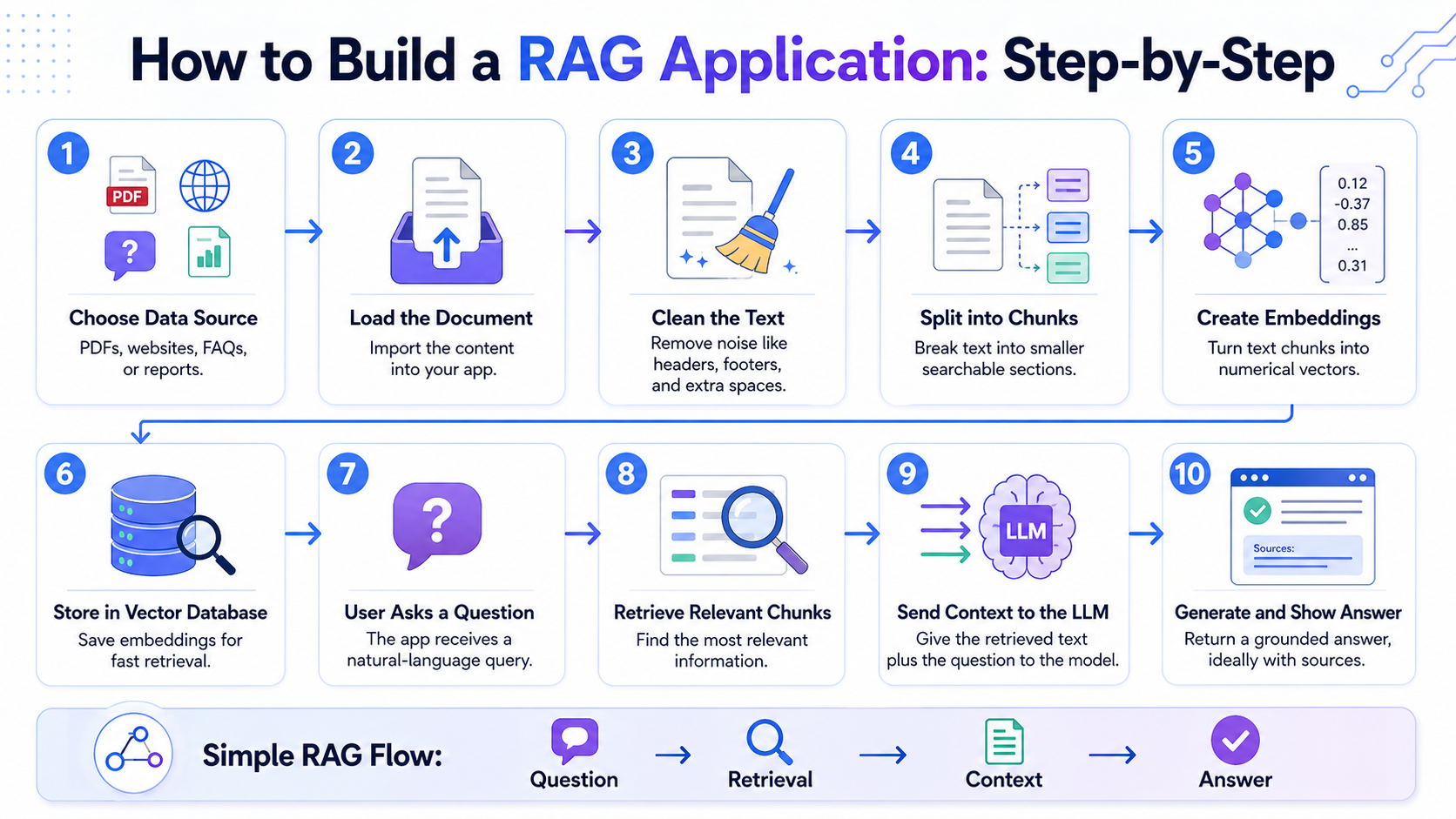
Here is the basic process:
| Step | What You Need to Do | Why It Matters |
| 1. Choose your data source | Select a PDF, text file, FAQ page, policy document, or report. | The quality of your RAG app depends heavily on the quality of your source material. |
| 2. Load the document | Use a document loader to read the file inside your application. | The app needs to understand the document before it can search through it. |
| 3. Clean the text | Remove unnecessary spaces, repeated headers, footers, page numbers, and broken text. | Clean text improves retrieval quality. |
| 4. Split the text into chunks | Break the document into smaller sections. | Smaller chunks make it easier for the system to find relevant information. |
| 5. Create embeddings | Convert each text chunk into a numerical representation. | Embeddings help the system search by meaning, not just by exact keywords. |
| 6. Store embeddings in a vector database | Save the embeddings in tools like ChromaDB, FAISS, Pinecone, or Weaviate. | The vector database allows fast similarity search. |
| 7. Ask a user question | Take a question from the user through a simple interface. | This starts the retrieval process. |
| 8. Retrieve relevant chunks | Search the vector database for the most relevant text sections. | The model gets only the information needed to answer the question. |
| 9. Send context to the AI model | Pass the retrieved text and the user’s question to the LLM. | The model uses the retrieved content to generate a grounded answer. |
| 10. Show the final answer | Display the answer to the user, preferably with source references. | This makes the app more useful and trustworthy. |
A simple RAG flow can be understood like this:
User question → Search relevant document chunks → Send chunks to AI model → Generate answer → Show answer to user
For example, suppose you upload a course brochure into your RAG application. A student asks, “What are the eligibility criteria for this course?” The app first searches the brochure, finds the section related to eligibility, sends that section to the AI model, and then generates a clear answer.
For a beginner project, you can follow this simple build plan:
| Stage | Beginner Task |
| Stage 1 | Build a basic app that reads one PDF. |
| Stage 2 | Add chunking and embeddings. |
| Stage 3 | Store the embeddings in a vector database. |
| Stage 4 | Connect the app with an LLM. |
| Stage 5 | Create a simple Streamlit or Gradio interface. |
| Stage 6 | Test the app with 10–15 real questions. |
| Stage 7 | Improve the answers by adjusting chunk size, prompt, and retrieval settings. |
The most important part is testing. Many beginners think that once the app gives an answer, the project is complete. But a good RAG application must be tested with different types of questions. Try direct questions, broad questions, confusing questions, and questions where the answer is not available in the document. This will help you understand whether your app is retrieving the right information or simply generating general answers.
At the beginner level, your aim should be simple: build an app that answers accurately from one document. Once that works well, you can move to advanced features like multiple document search, citations, chat history, user authentication, and deployment.
Common Mistakes Beginners Make While Building RAG Apps
Building a RAG application is not only about connecting documents with an AI model. The quality of the final answer depends on how well the documents are prepared, how accurately the system retrieves information, and how clearly the model is instructed to respond. Beginners often make small mistakes that can reduce the accuracy of the entire app.
Here are some common mistakes to avoid:
| Mistake | What Happens | How to Avoid It |
| Using messy documents | The app retrieves broken, repeated, or confusing text. | Clean the text before creating embeddings. |
| Poor chunking | Important information gets split badly or mixed with unrelated text. | Test different chunk sizes and overlap settings. |
| Relying only on keyword search | The app may miss answers written in different words. | Use embeddings or hybrid search for better retrieval. |
| Not adding source references | Users may not know where the answer came from. | Add citations or document references wherever possible. |
| Sending too much context to the model | The answer may become vague or expensive to generate. | Retrieve only the most relevant chunks. |
| Not handling “unknown” answers | The model may guess when the answer is not in the document. | Instruct the model to say when information is not available. |
| Ignoring evaluation | The app may look fine but fail on real user questions. | Test with different question types before deployment. |
A very common beginner mistake is assuming that the language model alone will fix everything. In reality, a RAG app is only as good as its retrieval system. If the wrong information is retrieved, the final answer will also be weak, even if the model is powerful. For example, if a user asks, “What is the refund deadline?”, but the system retrieves a general course description instead of the refund policy, the AI model may produce an incomplete or incorrect answer. This is not mainly a model problem. It is a retrieval problem.
Another mistake is not checking how the app behaves when the answer is missing from the documents. A good RAG app should not invent information. It should clearly say something like, “The provided document does not mention this information.” This makes the application more trustworthy. Beginners should also avoid building with too many documents at once. Start small. Use one clean document, test it properly, and then expand the system. This helps you understand where errors are coming from and how to improve them.
In simple terms, the goal is not just to make the app answer. The goal is to make the app answer from the right source, with the right context, and with the right level of confidence.
How to Improve and Deploy Your RAG Application in 2026
Once your basic RAG application is working, the next step is to improve its quality and usability for real users. A beginner app may work well with a single document, but a practical RAG application requires higher accuracy, faster search, clear source references, and a smooth user experience.
Here are some ways to improve your RAG app:
| Improvement | Why It Matters |
| Add citations | Users can check where the answer came from. |
| Improve chunking | Better chunks help the system retrieve more accurate information. |
| Use hybrid search | Combines keyword search and semantic search for better results. |
| Add reranking | Reorders retrieved results so the most useful context appears first. |
| Add filters | Users can search by document type, date, department, topic, or category. |
| Improve the prompt | Clear instructions help the AI answer more accurately. |
| Add fallback responses | The app should say when the answer is not available in the documents. |
| Monitor user questions | Helps you understand what users are asking and where the app is failing. |
Deployment is also an important step. If you are building a small demo project, you can deploy it using beginner-friendly platforms like Streamlit Cloud, Gradio, Hugging Face Spaces, or Render. If you are building a business-level RAG app, you may need cloud services like AWS, Google Cloud, Microsoft Azure, or Vercel, along with stronger security and user access controls.
Before deployment, test your app properly. Ask questions that are directly answered in the document, questions that need multiple sections, and questions where the answer is not present. This will show whether your app is retrieving the right information or simply generating confident-sounding answers.
A good RAG application should not only be intelligent; it should also be reliable. It should answer from trusted sources, mention where the information came from, avoid guessing, and give users a clear experience. As you grow more confident, you can explore advanced features such as chat memory, multi-document reasoning, agentic RAG, voice-based search, and enterprise knowledge assistants.
In 2026, RAG is one of the most practical ways to build useful AI applications. For beginners, the best approach is to start small, build a simple document Q&A app, test it carefully, and then keep improving it step by step.
Conclusion
Building a RAG application may look difficult at first, but the basic idea is simple. A RAG app helps an AI model answer from real information instead of depending only on its general knowledge. It searches the right documents, finds the most useful content, and then uses that content to generate a clear answer. For beginners, the best way to start is with a small project, such as a PDF question-answering app. Once the basic version works well, you can improve it with better chunking, citations, reranking, filters, and deployment. In 2026, RAG is one of the most useful skills for anyone who wants to build practical AI tools for business, education, research, customer support, or personal productivity.