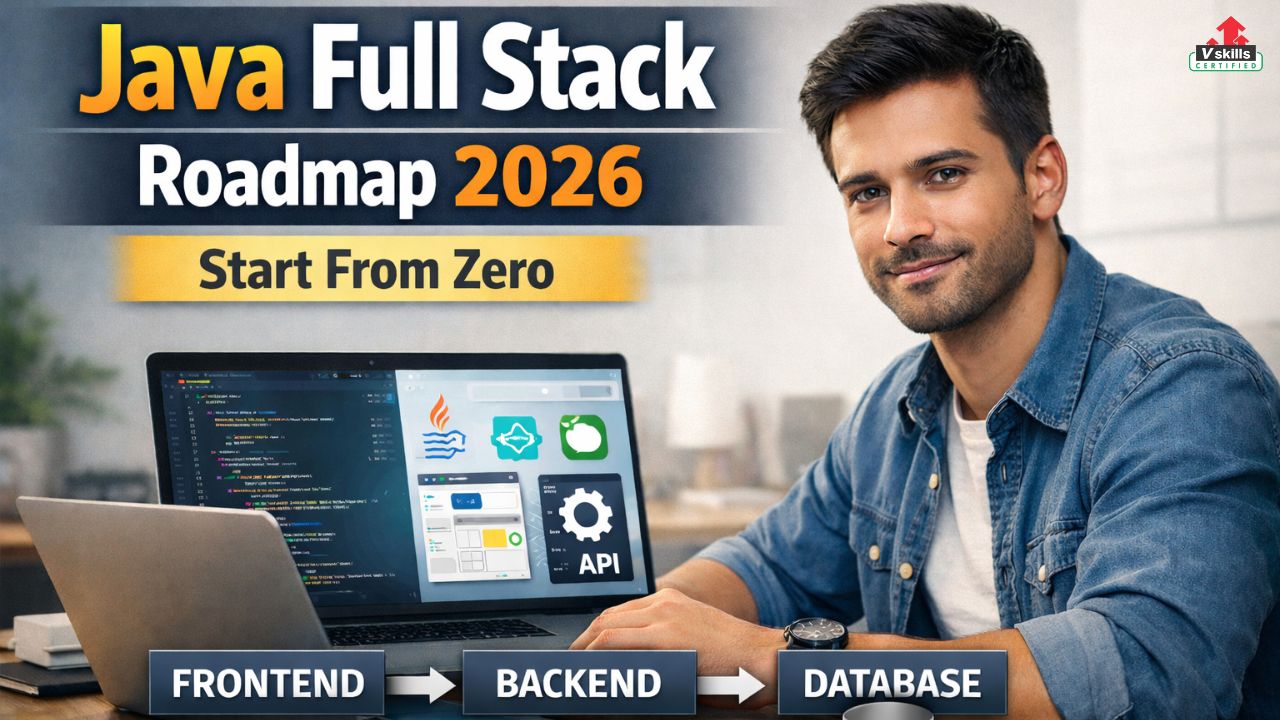
A Java full stack developer builds complete web applications from end to end. This means you work on the frontend (what users see in the browser), the backend (server-side logic and APIs), and the database (where data is stored). In 2026, Java full stack roles remain strong because Java is still a top choice for large companies, especially in banking, enterprise software, e-commerce, and high-traffic systems.
If you are starting from zero, the biggest challenge is not difficulty, it is confusion. There are too many tools, too many course options, and no clear order. This blog solves that problem. You will get a step-by-step roadmap that starts with Java fundamentals, then moves to web basics, frontend development, Spring Boot backend, databases, security, and finally deployment. By the end, you will know exactly what to learn, in what sequence, what projects to build, and how to become job-ready for a Java full stack developer role in 2026.
Target Audience
- Complete beginners who want a clear, step-by-step path to become a Java full stack developer in 2026
- Students and freshers preparing for internships, placements, and entry-level developer roles
- Backend learners (Java basics done) who now want to add frontend skills and become full stack
- Non-CS graduates who are ready to learn with consistent practice and project building
- Working professionals switching from support, testing, or non-development roles into software development
By the end of this roadmap, you will have a structured learning order, a practical project plan, and a checklist of skills that hiring managers typically look for in Java full stack roles.
What is Java Full Stack Development?
Java full stack development means you can build and ship a complete web application on your own (or contribute across layers in a team). In 2026, companies expect a full stack developer to be comfortable with both product-style development and basic engineering disciplines like clean code, version control, testing, and deployment.
A Java full-stack developer typically works on three layers:
- 1) Frontend (Client Side) – This is the part users interact with in the browser. You build pages, layouts, forms, and interactive features. Tech commonly used: HTML, CSS, JavaScript, and usually React
- 2) Backend (Server Side) – This is where business logic lives. You create APIs, handle user authentication, manage data flow, and connect everything to the database. Tech commonly used: Java + Spring Boot
- 3) Database (Data Layer) – This is where the application stores and retrieves data reliably. You design tables, write queries, and ensure data is consistent and fast to access. Common choices: MySQL or PostgreSQL (SQL first)
What makes “full stack” valuable in 2026?
- You can build faster because you understand the whole system
- You can debug issues across frontend, backend, and database
- You can communicate better with teams and ship cleaner features
In the next section, we will start the roadmap with the exact prerequisites and the correct learning order so you do not waste time.
Prerequisites and Setup Required
Before you jump into Java, Spring Boot, or React, set up the basics so your learning stays smooth and you do not get stuck on avoidable issues.
1) Minimum prerequisites
- Comfortable using a laptop/PC regularly
- Basic logic understanding (if this happens, do that)
- Consistency matters more than a computer science background
2) Tools to install (starter stack)
- Java JDK (latest stable)
- IDE: IntelliJ IDEA Community (recommended) or Eclipse
- Git (version control)
- GitHub account (to store and showcase projects)
- Postman (API testing later)
- Database tool: pgAdmin (PostgreSQL) or MySQL Workbench
3) Folder and project discipline
Create one main folder: Java-Full-Stack-Roadmap-2026. Inside it, keep these folders:
- java-basics
- dsa-practice
- frontend-projects
- springboot-projects
- fullstack-capstone
4) Time plan (beginner-friendly)
- 60–90 minutes daily is enough if you stay consistent
- Split your time:
- 40% learning concepts
- 60% practice (coding + small tasks)
Java Full Stack Developer Step-by-Step Learning Guide
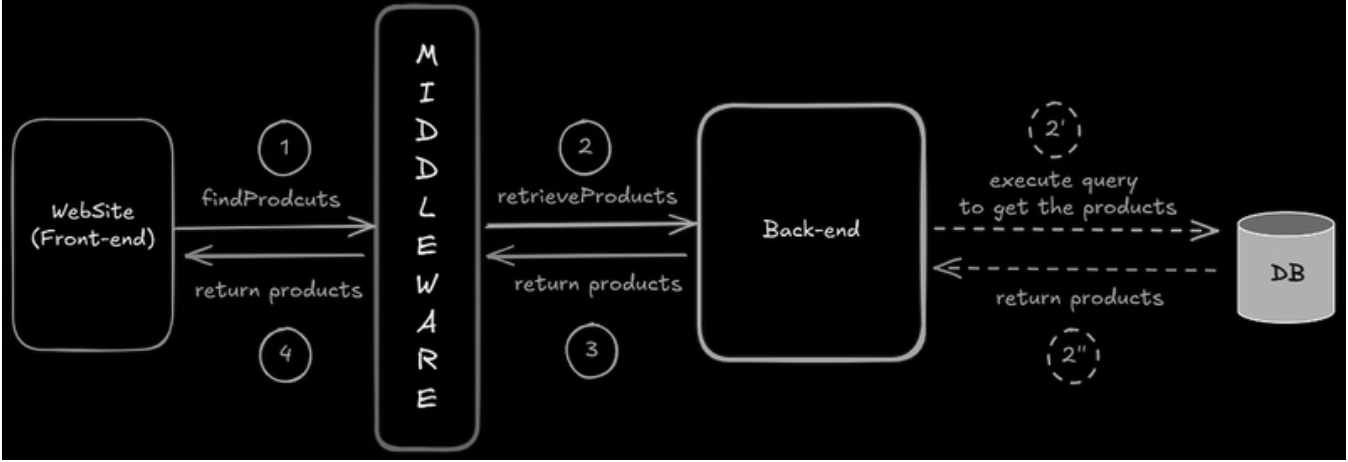
If you want to become a Java Full Stack Developer, think of it as learning how the web works from end to end. You will build what users see, power it with backend logic, connect it to databases, and deploy it like a real product. Java Full Stack Developer is all about building complete, real-world applications from scratch. You start with Java fundamentals, move into creating user-friendly interfaces, power them with strong backend logic, connect everything to databases, and finally deploy your work like a real product. Step by step, you learn how the web truly works end to end, turning ideas into fully functional applications that companies actually use.
Step 1: Learn Java programming fundamentals
This step builds your base. If you rush it, Spring Boot and full stack work will feel confusing later.
What should you learn?
- Variables, data types, operators
- Input/output (Scanner), basic debugging
- Conditions (if/else, switch)
- Loops (for, while, do-while)
- Methods (parameters, return types, scope)
- Arrays (1D, 2D basics)
- Strings (common operations, StringBuilder basics)
How to practice (simple routine):
- After each topic, write 5–10 small programs on your own
- Solve 1–3 problems daily (easy first, then medium)
- Focus on writing without copying, even if it takes longer
Targets for this stage:
- 50–100 small problems total
- Comfort with loops, arrays, and strings (these matter the most)
Mini tasks to confirm you are ready to move on:
- Calculator (basic operations + switch menu)
- Marks and grade calculator
- Menu-driven ATM style program (balance, deposit, withdraw)
- String utilities (reverse a string, count vowels, check palindrome)
- Array utilities (find max/min, second largest, remove duplicates)
Step 2: Master Object-Oriented Programming (OOP)
OOP is the core of Java and the base of Spring Boot style coding. This step makes your backend learning much easier.
Core topics to learn:
- Classes and objects
- Encapsulation (private variables + getters/setters)
- Constructors (default, parameterized)
- Inheritance (extends) and composition (has-a relationship)
- Polymorphism (method overloading, method overriding)
- Abstraction (abstract classes, interfaces)
- Exception handling (try/catch, throw/throws, custom exceptions)
- Collections framework (List, Set, Map) + generics basics
How to practice OOP properly:
- Write small programs using multiple classes (not everything in one file)
- Use proper structure: separate classes, clear methods, clean naming
- Add simple validation and exception handling (do not ignore errors)
Mini projects (console-based, OOP-focused):
- Library Management System (Book, Member, Issue/Return flow)
- Student Result System (Student, Subject, Grade logic)
- Bank Account System (Account, Transaction, deposit/withdraw, statements)
- Inventory System (Product, Category, stock updates)
Ready-to-move-on checklist:
- You can design 3–5 classes for a problem without confusion
- You can explain why you used inheritance vs composition
- You can use List/Map confidently to store and retrieve objects
- You can handle invalid input using exceptions without the program crashing
Step 3: Learn DSA for interviews (parallel track)
You should start DSA early, but you do not need to finish it before building projects. The best approach is to run DSA in parallel with your full stack learning, because placements and interviews will test problem solving along with your projects.
What to learn (in a practical order):
- Big-O basics (time and space complexity)
Arrays and strings (patterns, two pointers, sliding window basics) - Hashing (HashMap, HashSet usage)
- Stack and queue
- Linked list
- Sorting and searching (binary search basics)
- Trees (binary tree, BST basics)
- Recursion basics and simple backtracking
How to practice:
- Solve 1–3 problems daily
- Track problems by topic so you can revise later
- Write solutions first, then optimize (do not jump to shortcuts)
Targets for this stage:
- 150–250 problems over 3–5 months (steady pace)
- Strong grip on arrays, strings, hashing, and basic trees
Mini tasks to confirm progress:
- Solve common patterns: anagram checks, subarray sums, longest substring type problems
- Implement stack/queue and linked list operations yourself once
- Write binary search variations (first/last occurrence, lower/upper bound)
Step 4: Learn Web and HTTP fundamentals (before frameworks)
Many beginners struggle in full stack because they start React or Spring Boot without understanding how the web actually works. This step removes that confusion and makes API development and frontend-backend connection much easier.
What you must understand:
- How the internet and web apps work (client-server basics)
- HTTP methods: GET, POST, PUT, DELETE
- Status codes (200, 201, 400, 401, 403, 404, 500)
- Headers and body (what goes where)
- JSON format and how APIs return data
- REST basics (resources, endpoints, request/response)
- Cookies vs sessions (basic difference)
- CORS (why frontend sometimes cannot call backend)
- Authentication basics (what login really means in web apps)
How to practice this step:
- Use a public API and test requests in Postman
- Send requests with query params and request bodies
- Observe headers, status codes, and responses
Outcome checklist:
- You can explain what happens when you open a website
- You can read an API request and understand method, URL, headers, body
- You can test APIs in Postman and interpret errors clearly
Step 5: Learn frontend fundamentals (HTML, CSS, JavaScript)
This step helps you build real user interfaces and prepares you for React later. Do not skip JavaScript basics, because React becomes difficult if your JS is weak.
What you should learn:
- HTML: semantic tags, forms, inputs, tables, basic accessibility
- CSS: box model, flexbox, grid, responsive design, basic positioning
- JavaScript: variables and functions, arrays/objects, DOM manipulation, events, fetch API, promises, async/await, ES6 basics (let/const, arrow functions, destructuring)
How to practice:
- Build small UI sections daily (forms, navbars, cards, tables)
- Add JavaScript interactions (validation, filters, dynamic lists)
- Use at least 2 public APIs to practice fetch and async code
Projects to build (portfolio friendly):
- Responsive landing page with a contact form (with validation)
- To-do list app (add/edit/delete, local storage)
- Weather app (API based, search + display results)
- Simple expense tracker (add entries, totals, filters)
Ready-to-move-on checklist:
- You can build a responsive page without copying layouts
- You can manipulate the DOM and handle events confidently
- You can call an API using fetch and display results on the page
Step 6: Learn a frontend framework (recommended: React)
React is the most common frontend framework used with Java backends in full stack roles. Learn React after you have basic JavaScript and DOM confidence.
What to learn in React (order that works well):
- Components, props, state
- JSX basics and rendering lists
- Handling forms and input states
- useEffect for API calls and side effects
- React Router for navigation
- Managing state across components (Context first, Redux only if needed)
- Error handling, loading states, basic optimization habits
How to practice React properly:
- Convert your JavaScript projects into React versions
- Focus on clean component structure (small reusable components)
- Practice API integration and form handling in React
React projects (good for interviews):
- Task manager with filters, sorting, and local storage
- Product listing app with search, category filters, and a cart
- Dashboard app that fetches data from an API and shows tables/cards
Ready-to-move-on checklist:
- You can create multi-page React apps with routing
- You can manage forms, validation, and API calls cleanly
- You can structure a project into components without making one huge file
Step 7: Learn backend fundamentals (Java for backend thinking)
Before Spring Boot, you should understand what the backend is responsible for and how backend code is typically structured. This will help you write cleaner APIs and avoid building messy projects.
What you should understand:
- What an API is and why frontend needs it
- Request and response flow (client sends request, server processes, server returns response)
- REST basics in practice (resources, endpoints, CRUD mapping)
- Backend structure in real projects (controller, service, repository idea)
- Data validation and error handling (what to accept, what to reject, how to respond)
- Logging basics (why logs matter in debugging production issues)
How to practice this step:
- Read API documentation of a public service and understand endpoints
- Use Postman to send requests and understand responses
- Write small Java programs that simulate backend style logic (input → validation → output)
Outcome checklist:
- You can explain what happens when a user submits a form on a website
- You can design basic endpoints for a simple app (for example: users, products, orders)
- You can clearly differentiate between business logic and data storage logic
Step 8: Learn Spring Boot (your main backend framework)
Spring Boot is the standard backend framework for Java full stack roles. Once you learn it properly, you can build production-style APIs.
What you must learn (in a clean order):
- Creating a Spring Boot project and understanding the folder structure
- REST controllers (GET, POST, PUT, DELETE)
- DTOs (request/response objects) and validation annotations
- Service layer (business logic) and dependency injection
- Exception handling (global exception handler)
- JPA/Hibernate basics (entities, repositories, relationships)
- Pagination and sorting
- API documentation (Swagger/OpenAPI)
- Basic logging and application configuration (application.properties / yml)
How to practice Spring Boot properly:
- Build one API at a time, do not try to build a full product on day one
- Test every endpoint with Postman
- Keep clean layers: controller only handles requests, service holds logic, repository talks to database
Spring Boot practice projects:
- Notes API (CRUD + search + pagination)
- Blog API (users, posts, comments with relationships)
- Inventory API (products, categories, stock updates)
Ready-to-move-on checklist:
- You can create CRUD APIs with validation and proper status codes
- You can connect Spring Boot to a SQL database and use JPA repositories
- You can handle errors cleanly and return meaningful responses to the frontend
Step 9: Learn databases properly (SQL first)
Databases are not optional for full stack. Most real applications depend on well-structured data, and interviews often test SQL directly. Learn SQL first even if you plan to use MongoDB later.
What you must learn:
- Tables, rows, columns, data types
- Primary key, foreign key, constraints
- Relationships (one-to-one, one-to-many, many-to-many)
- Joins (inner, left, right) and when to use them
- Group by, having, aggregate functions
- Indexing basics (why queries become slow and how indexes help)
- Normalization basics (how to avoid messy data)
How to practice:
- Write queries daily using sample datasets
- Design simple schemas on your own (users, orders, products)
- Practice joins and group by until they feel natural
How to integrate with Spring Boot:
- Use JPA for basic CRUD, but still understand what SQL runs underneath
- Learn entity relationships and how they map to tables
- Avoid writing everything as a single table in projects
Ready-to-move-on checklist:
- You can design tables and relationships for a basic app
- You can write joins and group by queries confidently
- You can connect Spring Boot to PostgreSQL/MySQL and perform CRUD
Step 10: Add authentication and security (must for real projects)
A project without login and authorization often looks “demo-level”. Adding security makes your project closer to real industry applications and strengthens your interview story.
What you should learn:
- Authentication vs authorization (they are different)
- Password hashing (never store plain passwords)
- JWT basics (token creation, validation, expiry)
- Role-based access control (user vs admin)
- CORS basics (frontend-backend communication)
- Spring Security fundamentals (filters, configuration, protected routes)
What to build in your project:
- Signup and login endpoints
- JWT-based authentication
- Protected APIs (only logged-in users can access)
- Admin-only APIs (role-based restrictions)
- Basic frontend integration (store token, attach token to API calls)
Ready-to-move-on checklist:
- You can implement login/signup with hashed passwords
- You can secure endpoints with JWT and roles
- Your frontend can call protected APIs successfully without breaking due to CORS or token issues
Step 11: Learn databases properly (SQL first)
Databases are not optional for full stack. Most real applications depend on well-structured data, and interviews often test SQL directly. Learn SQL first even if you plan to use MongoDB later.
What you must learn:
- Tables, rows, columns, data types
- Primary key, foreign key, constraints
- Relationships (one-to-one, one-to-many, many-to-many)
- Joins (inner, left, right) and when to use them
- Group by, having, aggregate functions
- Indexing basics (why queries become slow and how indexes help)
- Normalization basics (how to avoid messy data)
How to practice:
- Write queries daily using sample datasets
- Design simple schemas on your own (users, orders, products)
- Practice joins and group by until they feel natural
How to integrate with Spring Boot:
- Use JPA for basic CRUD, but still understand what SQL runs underneath
- Learn entity relationships and how they map to tables
- Avoid writing everything as a single table in projects
Ready-to-move-on checklist:
- You can design tables and relationships for a basic app
- You can write joins and group by queries confidently
- You can connect Spring Boot to PostgreSQL/MySQL and perform CRUD
Step 12: Add authentication and security (must for real projects)
A project without login and authorization often looks “demo-level”. Adding security makes your project closer to real industry applications and strengthens your interview story.
What you should learn:
- Authentication vs authorization (they are different)
- Password hashing (never store plain passwords)
- JWT basics (token creation, validation, expiry)
- Role-based access control (user vs admin)
- CORS basics (frontend-backend communication)
- Spring Security fundamentals (filters, configuration, protected routes)
What to build in your project:
- Signup and login endpoints
- JWT-based authentication
- Protected APIs (only logged-in users can access)
- Admin-only APIs (role-based restrictions)
- Basic frontend integration (store token, attach token to API calls)
Ready-to-move-on checklist:
- You can implement login/signup with hashed passwords
- You can secure endpoints with JWT and roles
- Your frontend can call protected APIs successfully without breaking due to CORS or token issues
Step 13: Deployment and release basics (how to ship your project)
A project that runs only on your laptop is not a complete full stack project. In 2026, even for entry-level roles, showing that you can deploy and run your app in a real environment is a strong hiring signal.
What you should learn:
- Build process for frontend and backend (what “build” actually means)
- Environment variables (where to store secrets like DB password, JWT secret)
- Basic deployment concepts (server, domain, HTTPS basics)
- How to deploy frontend and backend separately
- Docker basics (very valuable): images, containers, Dockerfile, docker-compose
What to deploy (practical approach):
- Deploy your React frontend
- Deploy your Spring Boot backend as a hosted service
- Host your database (or use a managed database option)
- Make sure the deployed frontend can call the deployed backend (CORS + API base URL)
Ready-to-move-on checklist:
- You have at least 1 full stack project deployed and shareable
- You can explain how your app runs in production (frontend, backend, DB)
- Your secrets are not committed to GitHub
Step 14: Build 3 portfolio projects (recommended set)
Your projects should prove that you can build real features, not just a basic CRUD form. A strong portfolio usually has 3 projects at different difficulty levels.
Project 1 (Beginner): Full stack CRUD application
What it should include:
- Frontend: React CRUD pages
- Backend: Spring Boot CRUD APIs
- Database: PostgreSQL or MySQL
- Features: search, pagination, sorting, clean UI, proper validation
Good examples: - Notes app, simple inventory tracker, student management system
Project 2 (Intermediate): Authentication + roles project
What it should include:
- Signup/login with JWT
- Role-based access (admin/user)
- Protected routes on frontend
- Good error handling and clean API responses
Good examples: - Expense tracker with user accounts, personal finance tracker, mini job board
Project 3 (Advanced): Capstone project (end-to-end product feel)
What it should include:
- Multiple modules (users + core feature + admin controls)
- Proper database relationships
- Dashboard or analytics view
- One “advanced” feature such as file upload, email notifications, caching, or search
Good examples: - E-commerce (without payment is fine), appointment booking, learning platform, job portal
Ready-to-move-on checklist:
- At least 2 projects are deployed
- All projects have clean READMEs with setup steps and feature lists
- You can explain architecture: frontend flow, backend layers, database design
Step 15: Interview preparation roadmap (how to become job-ready)
Once you have foundations and projects, shift focus to interview readiness. For Java full stack roles, interviews usually test Java basics, DSA, Spring Boot, SQL, and project depth.
What to prepare for coding rounds:
- Arrays, strings, hashing, stacks/queues, basic trees
- Time complexity and clean logic
- Writing readable code, not just correct code
What to prepare for backend rounds:
- REST API design (naming, status codes, idempotency)
- Spring Boot structure (controller-service-repository)
- JPA basics and common pitfalls (N+1, lazy vs eager basics)
- SQL queries and schema design
- Authentication flow (JWT, roles) and common security mistakes
What to prepare for full stack/project rounds:
- Clear explanation of your project features and trade-offs – Common issues you solved (CORS, validation, deployment, DB relationships)
- How you would scale or improve your app (caching, pagination, indexing)
Final job-ready checklist:
- 3 portfolio projects (at least 2 deployed)
- Solid Java + OOP + collections understanding
- Consistent DSA practice with revision
- Spring Boot + SQL confidence
- Ability to explain and defend your project decisions in detail
Step 16-Learning plan
This plan is designed to keep your learning structured and project-focused. You will build skills in the correct order and still keep DSA going alongside, so you are not stuck later during interviews.
- Weeks 1–2: Java fundamentals
Focus on writing Java daily. Cover variables, conditions, loops, methods, arrays, and strings. Practice small programs alongside each topic and start solving easy problems every day. - Weeks 3–4: OOP + collections
Learn classes, objects, constructors, encapsulation, inheritance, polymorphism, abstraction, and exception handling. Start using List and Map for storing objects. Build one small console project using multiple classes. - Weeks 5–6: DSA fundamentals (parallel but serious)
Strengthen arrays, strings, hashing, stacks, and queues. Keep solving problems daily. The goal is to learn common patterns and improve speed without memorising solutions. - Weeks 7–8: Web + frontend basics
Learn HTTP, REST, JSON, and API usage. Then move to HTML, CSS, and JavaScript. Build at least two small frontend projects. Practice API calls using fetch. - Weeks 9–10: React
Learn components, state, props, hooks, routing, forms, and API integration. Convert one JavaScript project into React. Build a React CRUD app that talks to an API (you can use a dummy API initially). - Weeks 11–12: Spring Boot fundamentals
Learn controllers, services, repositories, validation, exception handling, and JPA. Build a CRUD API with PostgreSQL/MySQL. Test everything using Postman and document endpoints. - Weeks 13–14: Full stack integration + database depth
Connect React frontend to Spring Boot backend. Add pagination, search, sorting, and clean error handling. Improve database schema and relationships. Make your project feel like a real product. - Weeks 15–16: Authentication + deployment
Add JWT login/signup and role-based access. Deploy your frontend and backend. Clean your GitHub repositories, add READMEs, and prepare to explain your project clearly in interviews. - Ongoing weekly routine (throughout the 16 weeks)
Spend some time every week on revision. Revisit Java basics, OOP, and the DSA topics you previously studied. This is what prevents forgetting and keeps you interview-ready.
By the end of 16 weeks, you should have a clear portfolio, real full stack skills, and enough interview preparation to apply for internships or entry-level Java full stack roles.
Common Mistakes to Avoid
Many people start learning full stack, work hard for weeks, and still feel stuck because of a few predictable mistakes. If you avoid these early, your progress will be much faster and your projects will look more professional.
1) Starting Spring Boot too early
If your Java basics and OOP are weak, Spring Boot feels like memorising annotations without understanding. This usually leads to confusion and poor project structure.
2) Skipping JavaScript fundamentals
A lot of learners jump to React quickly, but React is still JavaScript. If you do not understand DOM, events, async/await, and API calls, you will struggle with real frontend work.
3) Ignoring SQL and database design
Using only JPA without understanding SQL creates weak backend skills. Interviews frequently test joins, group by, schema design, and you also need SQL knowledge to debug performance issues later.
4) Making only “toy projects”
If your projects are only basic CRUD with no real features, they look like practice exercises. Add things like search, pagination, authentication, role-based access, good validations, and clean error handling to make projects feel real.
5) Not using GitHub properly
Many beginners upload projects without README, without commits, and without structure. Recruiters look at your GitHub as proof of discipline and clarity.
6) Not deploying anything
If your project cannot run online, it is harder to prove your skills. Even one deployed full stack app can separate you from many candidates.
7) Writing everything in one file or one layer
Frontend should be component-based, and backend should follow controller-service-repository structure. If everything is mixed, your code becomes hard to maintain and explain in interviews.
8) Avoiding error handling
Real applications fail in many ways: invalid input, server errors, network issues. If you do not handle these properly, your project feels incomplete.
9) Over-learning and under-building
Watching course videos all day feels productive, but real progress happens when you write code and build projects. Your learning should always end in output.
10) Not revising
Without revision, you forget Java, DSA patterns, and even Spring concepts quickly. A weekly revision plan prevents this problem.
Recommended Resources
The goal is not to collect many courses. The goal is to pick one strong resource for each skill area, finish it properly, and build projects alongside it. When you choose any course, check for three things: clear explanations, coding assignments, and at least one or two projects. If a course is only lectures, it will feel good while watching, but it will not make you job-ready. Here are the top 5 recommendations –
- Official Java Documentation (Oracle Java Tutorials and Java Docs)
Use this as your primary reference while learning Java fundamentals, OOP, collections, and core concepts. It is accurate and helps you build strong basics without confusion. - MDN Web Docs (Web fundamentals + JavaScript)
This is the best place to learn how the web works (HTTP, APIs) and to build solid HTML, CSS, and JavaScript fundamentals, especially DOM, events, and async concepts. - Official React Documentation
Use this to learn React the correct way, especially components, hooks, forms, routing concepts, and best practices. It is updated, clear, and avoids outdated patterns. - Official Spring Boot / Spring Framework Documentation
Use this for Spring Boot REST APIs, dependency injection, validation, exception handling, Spring Data JPA, and Spring Security basics. It is the most reliable reference for backend learning. - LeetCode (DSA and interview practice)
Use this for consistent DSA practice, pattern-building, and interview preparation. Start topic-wise, revise wrong questions, and slowly move towards mixed problem sets.
Expert Corner
Learning Java full stack in 2026 becomes much easier when you stop trying to learn everything at once and instead follow a structured path. Build a strong Java base first, get comfortable with OOP and collections, and keep DSA running in parallel so you are interview-ready. Then learn the web fundamentals, master HTML/CSS/JavaScript, and move to React only after your JavaScript is stable. On the backend, focus on Spring Boot with clean API design, proper validation, solid database understanding, and basic security. Finally, make your work visible through real projects, clean GitHub repositories, and at least one deployed full stack application.
If you stay consistent, prioritize practice over passive learning, and keep projects at the center, you will not only learn faster but you will also have proof of skill that recruiters can trust.