

If you want to learn Selenium and start a career in automation testing, you are already moving in the right direction. Selenium is one of the most widely used automation testing tools for testing web applications, helping companies speed up software delivery while improving accuracy and efficiency. For beginners, getting started with Selenium may seem overwhelming at first, especially with concepts like test scripts, frameworks, and browser automation. But with the right roadmap, consistent practice, and a clear understanding of the basics, learning Selenium becomes much easier and more practical. In this guide, you will explore a step-by-step approach to understanding Selenium, building automation testing skills, and confidently beginning your journey in test automation.
Software testing has become an important part of the software development process. Every website or web application needs to be tested properly before users start using it. Earlier, most testing work was done manually, where testers had to check every button, form, link, login page, and feature one by one. This process takes a lot of time, especially when the same test has to be repeated again and again. This is where Selenium becomes useful. Selenium is one of the most popular automation testing tools for testing web applications. It helps testers automate repeated browser actions such as opening a website, entering login details, clicking buttons, filling forms, checking search results, and verifying whether a page is working correctly.
For beginners, Selenium is a good tool to learn because it is open-source, widely used in companies, and supports popular programming languages like Java, Python, JavaScript, and C#. It is especially helpful for students, freshers, manual testers, and working professionals who want to move into automation testing.
What is the Selenium Testing Tool?
Selenium is an open-source automation testing tool for testing web applications. In simple words, Selenium helps testers check whether a website is working properly by automatically performing actions that a real user would normally do. For example, instead of manually opening a website, typing a username and password, clicking the login button, and checking whether the dashboard opens, Selenium can do all these steps automatically through a test script. Selenium is mainly used for browser automation. This means it can control browsers like Chrome, Firefox, Edge, and Safari to test different parts of a web application.
Selenium can be used to:
- Open a website automatically
- Click buttons and links
- Fill forms
- Enter login details
- Select dropdown options
- Check whether text, images, or buttons are visible
- Test the same website on different browsers
- Run repeated tests faster than manual testing
One of the biggest reasons Selenium is popular is that it supports many programming languages. Beginners can use Selenium with Java, Python, JavaScript, C#, Ruby, and other languages. However, Java and Python are usually the most common choices for beginners. Selenium is not a single tool. It has different components, but beginners mainly need to know these three:
- Selenium IDE is a simple record-and-playback tool. It is useful for beginners because it allows them to record browser actions without writing much code.
- Selenium WebDriver is the most important part of Selenium. It allows testers to write automation scripts and directly control the browser.
- Selenium Grid is used to run tests on multiple browsers, devices, or systems at the same time. This is more useful at an advanced level.
For beginners, the best starting point is Selenium WebDriver because it helps you understand real automation testing. Once you learn how to write basic scripts, locate elements on a webpage, and run tests in a browser, Selenium becomes easier to understand and apply in real projects.
Basic Skills You Should Acquire to Learn Selenium
Before learning Selenium, it is important to build a few basic skills. Selenium is not very difficult, but it becomes confusing if you directly start writing automation scripts without understanding how testing, programming, and web pages work.
Here are the main skills beginners should learn before starting Selenium.
1. Basic Understanding of Software Testing
Before automation testing, you should know what software testing means. Testing is the process of checking whether a website, app, or software is working as expected.
You should understand basic testing concepts such as:
- What is a test case?
- What is a bug?
- What is manual testing?
- What is automation testing?
- What is functional testing?
- What is regression testing?
For example, if you are testing a login page, you should know what needs to be checked. You may test whether the user can log in with correct details, whether an error appears for wrong details, and whether the password field is working properly.
2. Manual Testing Basics
Many beginners make the mistake of jumping directly into automation. However, automation testing becomes easier when you first understand manual testing.
Manual testing teaches you how to think like a tester. You learn how to check different scenarios, find bugs, write test cases, and understand user behaviour.
For example, before automating a registration form, you should manually test it first. You should check required fields, invalid email formats, password rules, submit button behaviour, and error messages.
Once you understand these things manually, it becomes easier to automate them using Selenium.
3. Basic Programming Knowledge
Selenium works with programming languages. You do not need to become an expert programmer, but you should know the basics of at least one language.
Beginners usually choose:
- Java
- Python
- JavaScript
Python is easier for beginners because its syntax is simple. Java is also widely used in Selenium jobs, especially in many companies.
You should learn basic programming concepts such as:
- Variables
- Data types
- If-else conditions
- Loops
- Functions or methods
- Classes and objects
- Basic error handling
These concepts will help you write and understand Selenium scripts properly.
4. Basic HTML and CSS Knowledge
Selenium interacts with elements on a webpage. These elements can be buttons, text boxes, links, dropdowns, checkboxes, and forms.
To find and control these elements, you need basic knowledge of HTML and CSS.
For example, a login button may have an ID, class name, or XPath. Selenium uses these details to locate the button and click it.
You do not need to become a web developer, but you should understand:
- HTML tags
- Input fields
- Buttons
- Links
- Forms
- ID and class attributes
- Basic CSS selectors
This will make it easier to understand locators in Selenium.
5. Understanding of Browsers and Web Applications
Since Selenium is mainly used for web application testing, you should understand how websites work in a browser.
You should know how to:
- Open developer tools in a browser
- Inspect elements
- Check page loading
- Understand URLs
- Identify buttons, links, and forms
- Notice how a page changes after clicking or submitting something
For example, when you right-click on a button and select “Inspect,” you can see the HTML code behind that button. This helps you find the correct locator for Selenium automation.
6. Patience and Regular Practice
Selenium is a practical skill. You cannot learn it properly by only watching tutorials. You need to write scripts, make mistakes, fix errors, and test different websites.
At the beginning, you may face errors with locators, browser drivers, waits, or code syntax. This is normal. With regular practice, these errors become easier to solve.
The best approach is to start small. First, automate simple tasks like opening a website, clicking a button, or entering text in a search box. After that, move to login pages, forms, dropdowns, and full test cases.
Step-by-Step Roadmap to Learn Selenium
Learning Selenium becomes easier when you follow a proper roadmap. Many beginners feel confused because they try to learn automation, coding, frameworks, and tools all at once. Instead of doing everything together, it is better to learn Selenium step by step.
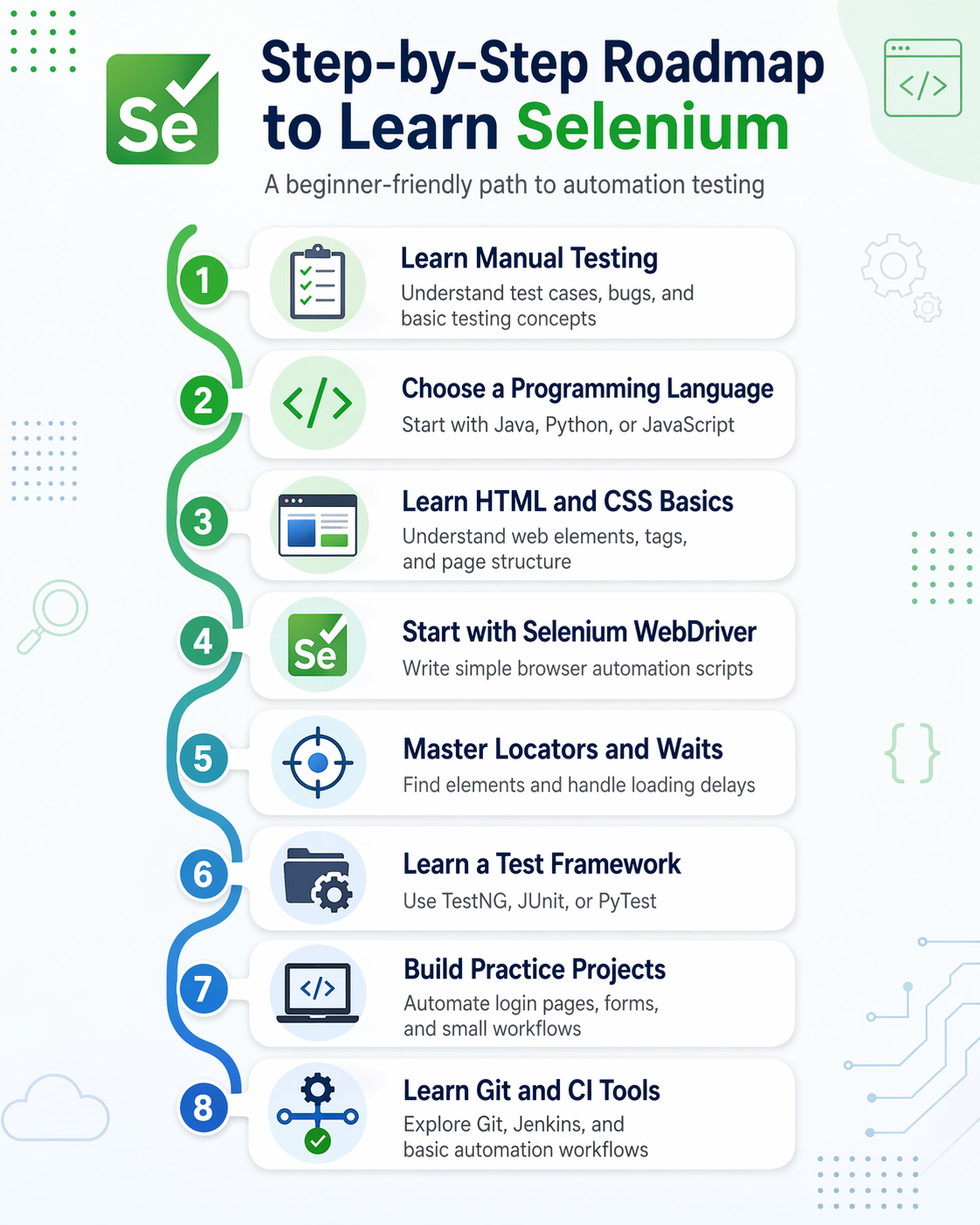
Step 1: Learn Manual Testing Basics First
Before starting Selenium, understand how manual testing works. This will help you know what exactly needs to be automated. Start with basic topics like:
- Test cases
- Test scenarios
- Bug reporting
- Functional testing
- Regression testing
- Smoke testing
- Sanity testing
For example, before automating a login page, you should first know what test cases are needed for that page. You may check valid login, invalid password, blank fields, error messages, and logout functionality. Automation is useful only when you know what to test.
Step 2: Choose One Programming Language
Selenium needs a programming language to write automation scripts. As a beginner, do not try to learn many languages at the same time. Choose one language and become comfortable with its basics. The most common choices are:
| Language | Good For |
| Java | Commonly used in Selenium jobs |
| Python | Easier for beginners |
| JavaScript | Useful for web development and testing |
If you are completely new to coding, Python can be a good starting point. If your goal is to apply for Selenium automation testing jobs, Java is also a strong option because many companies use Java with Selenium.
Step 3: Understand HTML, CSS, and Web Elements
Selenium works by finding elements on a webpage and performing actions on them. These elements can be buttons, links, text boxes, checkboxes, dropdowns, and forms. To work with these elements, you should understand basic HTML and CSS. Focus on:
- HTML tags
- ID and class attributes
- Input fields
- Buttons
- Links
- Forms
- CSS selectors
- Browser inspect tool
For example, if you want Selenium to click a login button, Selenium first needs to find that button on the webpage. This is done using locators such as ID, name, XPath, or CSS selector.
Step 4: Start with Selenium WebDriver
Once you know the basics of testing, programming, and HTML, you can start learning Selenium WebDriver. Selenium WebDriver allows you to control a browser through code. You can use it to open websites, click buttons, enter text, and verify results. Start with simple scripts such as:
- Open Google in Chrome
- Search for a keyword
- Open a login page
- Enter username and password
- Click the login button
- Close the browser
At this stage, your goal should not be to write perfect code. Your goal should be to understand how Selenium communicates with the browser.
Step 5: Learn Locators Properly
Locators are one of the most important parts of Selenium. A locator helps Selenium find a specific element on a webpage. Common Selenium locators include:
- ID
- Name
- Class name
- Tag name
- Link text
- Partial link text
- XPath
- CSS selector
For beginners, ID and name are usually easier to understand. XPath and CSS selectors are more powerful but need more practice. If your locators are wrong, your Selenium script will fail. That is why learning locators properly is very important.
Step 6: Practice Browser Actions and Waits
After learning locators, practice different browser actions. Selenium can perform many actions that users normally do on a website. You should practice:
- Clicking buttons
- Typing in text boxes
- Selecting dropdown values
- Handling checkboxes
- Handling radio buttons
- Uploading files
- Handling alerts
- Moving between windows or tabs
You should also learn waits. Sometimes a webpage takes time to load. If Selenium tries to click an element before it appears, the script may fail. Waits help Selenium pause until the element is ready. The two most important types are:
- Implicit wait
- Explicit wait
Explicit wait is usually better because it waits for a specific condition.
Step 7: Learn Test Frameworks
Once you can write simple Selenium scripts, the next step is to learn a test framework. A framework helps you organise and run your test cases properly.
Popular frameworks include:
| Programming Language | Common Frameworks |
| Java | TestNG, JUnit |
| Python | PyTest, unittest |
| JavaScript | Mocha, Jest |
With a framework, you can group test cases, run multiple tests, generate reports, and manage test results in a better way.
Step 8: Build Small Automation Projects
The best way to learn Selenium is by building projects. Do not only watch tutorials. Create small automation tasks and practice regularly. You can start with projects like:
- Automating a login page
- Testing a registration form
- Automating a search box
- Testing an e-commerce cart
- Checking broken links on a website
- Testing dropdowns and filters
- Creating a basic end-to-end user journey
For example, you can automate a simple e-commerce flow where the user searches for a product, adds it to the cart, and checks whether the cart page opens correctly.
Step 9: Learn Git, Jenkins, and Basic CI/CD
- After learning the basics of Selenium, you can slowly move towards tools used in real companies.
- Git helps you manage your code. Jenkins helps you run automated tests automatically. CI/CD helps teams test software faster during development.
- As a beginner, you do not need to master everything immediately. But having basic knowledge of these tools can make your Selenium profile stronger.
Step 10: Keep Practising with Real Websites
Selenium is learned best through practice. Choose demo websites made for automation testing and practice different scenarios. Practice should include:
- Login testing
- Form testing
- Search testing
- Table handling
- Alert handling
- Window handling
- File upload testing
- End-to-end testing
The more you practice, the more confident you become. Selenium is not just about writing code. It is about understanding user behaviour, identifying test scenarios, and automating them in a clean and reliable way.
Important Selenium Concepts Beginners Must Know
Once you understand the basic roadmap, the next step is to learn the most important Selenium concepts. These concepts will help you write better automation scripts and understand how Selenium actually works.
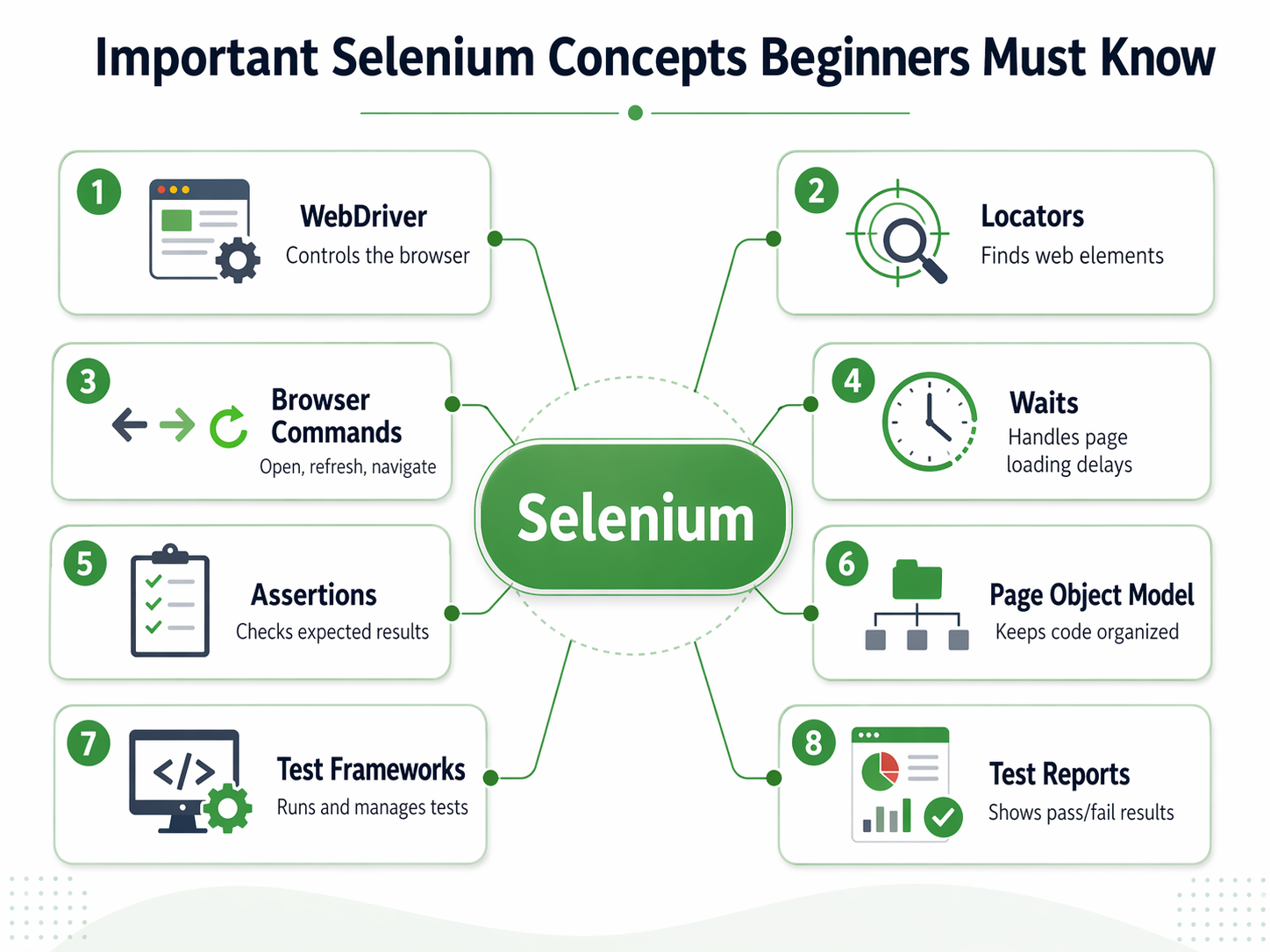
1. Selenium WebDriver
Selenium WebDriver is the main part of Selenium. It helps your code communicate with the browser. With WebDriver, you can perform actions such as:
- Open a browser
- Visit a website
- Click buttons
- Type text in input fields
- Select dropdown options
- Read text from a webpage
- Close the browser after testing
For example, if you want to test a login page, WebDriver will open the browser, enter the username and password, click the login button, and check whether the user reaches the correct page.
2. Locators
Locators help Selenium find elements on a webpage. A webpage has many elements such as buttons, links, forms, images, text boxes, and dropdowns. Selenium needs a way to identify the exact element it has to work with. Common locators in Selenium include:
| Locator | What It Does |
| ID | Finds an element using its unique ID |
| Name | Finds an element using the name attribute |
| Class Name | Finds an element using its class |
| Link Text | Finds a link using its exact text |
| XPath | Finds elements using the webpage structure |
| CSS Selector | Finds elements using CSS rules |
For beginners, ID and name are easier to use. XPath and CSS selectors are more powerful, but they need more practice.
3. Browser Commands
Browser commands are used to control the browser during automation. These commands help Selenium open pages, move between pages, refresh pages, and close the browser. Common browser actions include:
- Opening a URL
- Maximising the browser window
- Going back to the previous page
- Moving forward
- Refreshing the page
- Closing the browser
For example, if you are testing an e-commerce website, Selenium can open the homepage, move to the product page, go back to the previous page, and refresh the cart page.
4. Web Element Commands
Web element commands are used to perform actions on webpage elements. These are the commands that make Selenium behave like a real user. You can use web element commands to:
- Click a button
- Type in a text box
- Clear existing text
- Read visible text
- Check whether an element is displayed
- Check whether a checkbox is selected
- Submit a form
For example, when testing a search bar, Selenium can type a keyword, click the search button, and check whether the search results appear.
5. Waits in Selenium
Waits are very important in Selenium. Sometimes a webpage takes a few seconds to load. If Selenium tries to click a button before it appears, the test may fail. Waits help Selenium wait until the element is ready.
The two common types of waits are:
| Type of Wait | Meaning |
| Implicit Wait | Waits for a fixed time before throwing an error |
| Explicit Wait | Waits until a specific condition is met |
Explicit wait is usually better because it waits only until the required element is available. This makes the test more reliable. For example, if a login page takes time to show the dashboard, explicit wait can tell Selenium to wait until the dashboard heading becomes visible.
6. Handling Dropdowns, Alerts, and Checkboxes
Web applications often have different types of elements. Selenium allows you to handle them through automation scripts. You should learn how to handle:
- Dropdown menus
- Radio buttons
- Checkboxes
- Alert pop-ups
- Confirmation messages
- File upload buttons
- Multiple windows or tabs
For example, while testing a registration form, you may need to select a country from a dropdown, choose gender using a radio button, accept terms through a checkbox, and submit the form.
7. Assertions
Assertions are used to check whether the actual result matches the expected result. Without assertions, Selenium will only perform actions, but it will not properly verify whether the test has passed or failed. For example, after entering the correct login details, you may expect the dashboard page to open. An assertion can check whether the dashboard heading is visible. Common things you can verify using assertions include:
- Page title
- URL
- Success message
- Error message
- Button visibility
- Text on a page
Assertions make your automation test meaningful because they confirm whether the application is working correctly.
8. Page Object Model
Page Object Model, also called POM, is a design pattern used to organise Selenium code. It helps you keep your code clean, reusable, and easy to maintain. In simple words, each webpage is treated as a separate class or file. For example:
- Login page has its own file
- Registration page has its own file
- Dashboard page has its own file
- Cart page has its own file
This makes your automation project easier to manage. If something changes on the login page, you only need to update the login page file instead of changing code everywhere.
9. Test Frameworks
A test framework helps you run and manage your Selenium test cases properly. It gives structure to your automation project. Popular test frameworks include:
| Language | Framework |
| Java | TestNG, JUnit |
| Python | PyTest, unittest |
| JavaScript | Mocha, Jest |
Frameworks help you:
- Run multiple test cases
- Group tests
- Generate reports
- Mark tests as passed or failed
- Reuse setup and closing steps
Beginners can first learn simple Selenium scripts and then move to test frameworks once they are comfortable.
10. Test Reports
Test reports show the result of your automation testing. They help you understand which test cases passed, which failed, and where the error happened. A good report may include:
- Test case name
- Pass or fail status
- Error message
- Execution time
- Screenshots of failed tests
In real companies, reports are very important because testers, developers, and managers use them to understand the quality of the application.
Quick Recap
| Concept | Why It Is Important |
| WebDriver | Controls the browser |
| Locators | Finds webpage elements |
| Browser Commands | Performs browser actions |
| Web Element Commands | Interacts with buttons, forms, and links |
| Waits | Prevents failures due to slow loading |
| Assertions | Verifies expected results |
| Page Object Model | Keeps code clean and reusable |
| Test Frameworks | Organises and runs test cases |
| Test Reports | Shows testing results clearly |
These Selenium concepts may look technical at first, but they become easier with practice. Beginners should not try to master everything in one day. Start with WebDriver, locators, simple browser actions, and waits. Once you are comfortable with these, move to assertions, frameworks, reports, and Page Object Model.
Best Practice Projects to Build Selenium Skills
The best way to learn Selenium is to build small projects. Reading theory and watching tutorials can help you understand the basics, but real learning happens when you write test scripts yourself. Practice projects help you understand how Selenium works with real web pages, forms, buttons, dropdowns, alerts, and user journeys. As a beginner, you do not need to start with a complex project. Start with simple tasks and slowly move towards complete automation flows.
1. Automate a Login Page
A login page is one of the easiest and most useful projects for beginners. Almost every web application has a login feature, so this project helps you understand real testing scenarios. You can practice:
- Opening a login page
- Entering username and password
- Clicking the login button
- Checking successful login
- Testing the wrong password
- Verifying error messages
- Logging out after login
For example, you can write a Selenium script that enters valid login details and checks whether the user reaches the dashboard page. Then, you can test invalid details and check whether the correct error message appears.
2. Test a Registration Form
Registration forms are great for learning from automation. They usually include text boxes, drop-downs, radio buttons, checkboxes, and submit buttons. You can practice:
- Filling in the name, email, phone number, and password fields
- Selecting gender or user type
- Choosing options from a dropdown
- Accepting terms and conditions
- Submitting the form
- Checking validation messages
This project helps you understand how Selenium handles different types of web elements.
3. Automate Search Functionality
Search functionality is another beginner-friendly project. Many websites have search bars, so this is a useful skill to practice. You can automate:
- Opening a website
- Typing a search keyword
- Clicking the search button
- Checking whether results appear
- Verifying whether the search keyword is shown on the results page
For example, you can test whether searching for “laptop” on a demo e-commerce website shows relevant product results.
4. Test Dropdowns, Checkboxes, and Radio Buttons
Many beginners struggle with dropdowns, checkboxes, and radio buttons. That is why it is useful to create a separate practice project for them. You can practice:
- Selecting a value from a dropdown
- Clicking a checkbox
- Selecting a radio button
- Verifying whether the option is selected
- Changing selected options
This will help you become more comfortable with different form elements used in websites.
5. Automate an E-Commerce Flow
Once you are comfortable with basic projects, you can try a simple e-commerce automation project. You can automate a flow like:
- Open an e-commerce website
- Search for a product
- Open the product page
- Add the product to cart
- Go to the cart page
- Verify the product name and price
- Remove the product from cart
This project is useful because it feels close to real-world testing. It teaches you how to automate a complete user journey instead of testing only one page.
6. Check Broken Links on a Website
A broken link project is also useful for beginners. It helps you understand how automation can be used to check website quality. You can write a script to:
- Open a webpage
- Collect all links from the page
- Check whether each link is working
- Identify links that return errors
- Print broken links in the output
This project is slightly more advanced, but it is very useful for building practical Selenium knowledge.
7. Create a Mini End-to-End Test Project
After completing small projects, you can combine everything into one mini end-to-end project. For example, you can automate this full flow:
- Open website
- Register a new user
- Log in with the same user
- Search for a product
- Add the product to cart
- Verify the cart
- Log out
This type of project can also be added to your resume or GitHub profile. It shows that you understand how to automate complete user journeys, not just small actions.
Quick Project Ideas for Beginners
| Project | What You Will Learn |
| Login page automation | Text fields, buttons, assertions |
| Registration form testing | Forms, dropdowns, checkboxes |
| Search box automation | Input fields and result verification |
| E-commerce cart testing | End-to-end workflow automation |
| Broken link checker | Link handling and validation |
| Alert handling project | Pop-ups and browser alerts |
| File upload testing | Upload buttons and file paths |
| Mini automation framework | Code organisation and reusable scripts |
Selenium becomes easier when you practice consistently. Start with one small project, understand the errors, fix them, and then move to the next project. Over time, these projects will help you build confidence and prepare for real automation testing work.

Common Mistakes Beginners Make While Learning Selenium
Many beginners start learning Selenium with excitement, but they often get stuck because they follow the wrong approach. Selenium is not just about copying code from tutorials. It requires a basic understanding of testing, programming, web elements, and real user behaviour. Here are some common mistakes beginners should avoid.
1. Starting Selenium Without Learning Manual Testing
One of the biggest mistakes is directly jumping into Selenium without understanding manual testing. Selenium is an automation tool, but before automation, you should know what needs to be tested. For example, before automating a login page, you should know the basic test cases:
- Log in with the correct details
- Log in with the wrong password
- Log in with blank fields
- Check error messages
- Check the logout functionality
If you do not know how to write test cases manually, you may struggle to create meaningful automation scripts.
2. Ignoring Programming Basics
Selenium requires coding. Beginners often try to automate websites without learning basic programming concepts first. This creates confusion when they see errors in the script. You should understand:
- Variables
- Loops
- If-else conditions
- Functions or methods
- Classes and objects
- Error handling
You do not need to become an expert programmer, but you should be comfortable with the basics. This will help you understand Selenium scripts instead of just copying them.
3. Depending Too Much on Copy-Paste Code
Copying code from tutorials can help in the beginning, but it should not become a habit. If you only copy-paste scripts without understanding them, you will not be able to fix errors or write your own test cases. A better approach is:
- First, copy the code and run it
- Then, read each line carefully
- Change small parts of the code
- Try the same logic on another website
- Write the script again without looking at the tutorial
This will improve your confidence and problem-solving ability.
4. Not Understanding Locators Properly
Locators are one of the most important parts of Selenium. If Selenium cannot find the correct element, the test will fail. Beginners often use weak or incorrect locators. For example, they may use long XPath values copied from the browser without understanding them. These XPaths may break when the webpage changes slightly. It is better to learn different locator types, such as:
- ID
- Name
- CSS selector
- XPath
- Link text
- Partial link text
Start with simple locators like ID and name. Then slowly learn XPath and CSS selectors properly.
5. Ignoring Waits
Many Selenium scripts fail because the webpage does not load immediately. A button, form, or message may take a few seconds to appear. If Selenium tries to interact with it too early, the test may fail. This is why waits are important. Beginners should learn:
- Implicit wait
- Explicit wait
- Fluent wait
Explicit wait is especially useful because it waits for a specific condition, such as a button becoming clickable or a message becoming visible.
6. Not Practising on Realistic Projects
Watching videos is not enough to learn Selenium. Beginners sometimes complete many tutorials but still cannot write a script independently. The best way to improve is to build small practice projects, such as:
- Login page automation
- Registration form testing
- Search box testing
- Dropdown handling
- E-commerce cart automation
- Broken link checking
Projects help you understand real problems like changing locators, slow-loading pages, alerts, windows, and validation messages.
7. Trying to Learn Everything at Once
Selenium has many topics, and beginners often try to learn all of them together. This can become overwhelming. Do not try to learn Selenium WebDriver, TestNG, PyTest, Jenkins, Git, Cucumber, Docker, and CI/CD all at the same time. Follow a simple order:
- Testing basics
- Programming basics
- HTML and CSS basics
- Selenium WebDriver
- Locators and waits
- Test frameworks
- Practice projects
- Git and CI/CD basics
This makes the learning process easier and more structured.
8. Not Reading Error Messages
Beginners often panic when a Selenium script fails. But error messages usually tell you what went wrong. For example:
- Element not found means Selenium could not locate the element.
- A timeout error means the element did not appear within the waiting time.
- Stale element error means the page changed and the old element reference is no longer valid.
- No such window error means Selenium is trying to use a window that is not available.
Instead of ignoring errors, read them carefully. Understanding errors is one of the best ways to improve in automation testing.
9. Not Organising Code Properly
In the beginning, writing all the code in one file may look easy. But as your project grows, messy code becomes difficult to manage. Beginners should slowly learn how to organise code using:
- Separate files for different pages
- Reusable methods
- Page Object Model
- Clear test case names
- Proper folder structure
This will make your Selenium projects look more professional.
10. Expecting to Become an Expert Too Quickly
Selenium takes time to learn. Many beginners feel disappointed when their scripts fail repeatedly. But errors are a normal part of automation testing. The right approach is to start small and practice regularly. First, automate simple tasks like opening a website and clicking a button. Then move to forms, waits, dropdowns, alerts, and complete user journeys.
Quick Recap
| Mistake | Better Approach |
| Skipping manual testing | Learn test cases and basic testing concepts first |
| Ignoring coding basics | Learn one programming language step by step |
| Copy-pasting scripts | Understand and modify the code |
| Weak locators | Learn ID, name, XPath, and CSS selector |
| Ignoring waits | Use explicit waits for dynamic pages |
| Only watching tutorials | Build small practice projects |
| Learning everything together | Follow a structured roadmap |
| Ignoring errors | Read and understand error messages |
| Messy code | Use Page Object Model and reusable methods |
| Expecting fast results | Practice consistently with patience |
Avoiding these mistakes will make your Selenium learning journey much smoother. Selenium becomes easier when you build strong basics, write scripts regularly, and learn from errors instead of fearing them.
Career Opportunities After Learning Selenium
After learning Selenium, beginners can apply for different roles in software testing and quality assurance. Selenium is useful because many companies want testers who can reduce manual work, run repeated tests faster, and improve the quality of web applications. Selenium alone is a good starting point, but your career opportunities become stronger when you combine it with programming, testing frameworks, Git, Jenkins, and basic API testing.
1. Automation Tester
An Automation Tester writes scripts to test web applications automatically. This role is suitable for people who already understand manual testing and want to move into automation. Main responsibilities include:
- Writing Selenium test scripts
- Automating repeated test cases
- Running tests on different browsers
- Finding and reporting bugs
- Maintaining automation scripts when the website changes
This is one of the most common job roles after learning Selenium.
2. QA Engineer
A QA Engineer checks the overall quality of a software product. This role may include both manual testing and automation testing. A QA Engineer usually works on:
- Creating test cases
- Testing new features
- Running regression tests
- Automating important user journeys
- Working with developers to fix bugs
- Ensuring that the final product works properly
For beginners, this can be a good entry-level role because it allows them to learn both manual and automation testing.
3. Software Test Engineer
A Software Test Engineer focuses on testing software applications before they are released to users. Selenium is often used in this role for web application testing. This role may involve:
- Functional testing
- Regression testing
- UI testing
- Browser compatibility testing
- Writing automation scripts
- Preparing test reports
If you want to build a long-term career in testing, Software Test Engineer is a strong starting point.
4. Selenium Test Analyst
A Selenium Test Analyst works specifically on Selenium-based automation testing. This role requires a good understanding of test cases, locators, waits, assertions, and test frameworks. The work usually includes:
- Understanding testing requirements
- Selecting test cases for automation
- Writing Selenium scripts
- Reviewing failed test cases
- Preparing automation reports
- Improving test coverage
This role is suitable for people who want to specialise in Selenium automation.
5. Test Automation Engineer
A Test Automation Engineer usually works at a slightly advanced level. This role is not just about writing Selenium scripts. It also includes building automation frameworks and integrating tests with tools like Jenkins and Git. Skills required for this role include:
- Selenium WebDriver
- Java or Python
- TestNG, JUnit, or PyTest
- Page Object Model
- Git
- Jenkins
- Basic CI/CD knowledge
- Test reporting tools
This role is a good career goal after you have gained some practical experience.
6. Skills That Can Improve Your Selenium Career
To get better job opportunities, do not stop at Selenium only. Try to add related skills step by step.
| Skill | Why It Helps |
| Java or Python | Helps you write automation scripts |
| Manual testing | Helps you understand what to automate |
| HTML and CSS | Helps you understand web elements |
| XPath and CSS selectors | Helps you find elements correctly |
| TestNG, JUnit, or PyTest | Helps you organise and run test cases |
| Page Object Model | Helps you write clean and reusable code |
| Git | Helps you manage your code |
| Jenkins | Helps you run tests automatically |
| API testing basics | Adds more value to your testing profile |
| SQL basics | Helps you test data-related features |
7. Career Growth Path in Selenium Testing
A beginner can start with basic testing roles and slowly move towards advanced automation roles.
| Career Level | Possible Role |
| Beginner | Manual Tester, QA Trainee, Junior QA Engineer |
| Entry Level | Selenium Tester, Automation Tester |
| Mid Level | QA Engineer, Software Test Engineer |
| Advanced Level | Test Automation Engineer, QA Automation Lead |
| Senior Level | Test Architect, QA Manager, SDET |
As you gain experience, you can also move towards SDET roles. SDET means Software Development Engineer in Test. This role requires stronger coding skills and deeper automation knowledge.
8. Why Selenium Is Still Useful for Beginners
Selenium is still one of the best tools for beginners because it gives a strong foundation in browser automation. Even if you later learn other tools, Selenium helps you understand how automation testing works.
It teaches you:
- How to identify test scenarios
- How to automate browser actions
- How to work with web elements
- How to handle real website behaviour
- How to write reusable test scripts
- How to verify results using assertions
For a beginner, Selenium can be the first step towards a stable career in software testing, automation testing, and quality assurance. The key is to keep practising, build small projects, and slowly add advanced tools to your skill set.
Salary After Learning Selenium in India
Salary after learning Selenium depends on your experience, programming skills, location, company type, and how well you understand automation frameworks. A beginner who knows only basic Selenium may start with an entry-level QA or testing role, while someone who knows Selenium with Java or Python, TestNG or PyTest, Git, Jenkins, API testing, and SQL can earn better packages.
In India, Selenium automation-related roles generally fall in the range of around ₹4 lakh to ₹9 lakh per year for many early to mid-level roles. Glassdoor reports the average salary for Selenium Automation Testing in India at around ₹5.6 lakh per year, while Selenium Automation Test Engineer roles average around ₹5.81 lakh per year. PayScale also reports the average salary for QA/Test Automation Engineer roles in India at around ₹5.98 lakh per year.
| Career Level | Possible Role | Approximate Salary Range in India |
| Beginner | Manual Tester, QA Trainee, Junior QA Engineer | ₹2 lakh to ₹4.5 lakh per year |
| Entry Level | Selenium Tester, Automation Tester | ₹3.5 lakh to ₹6.5 lakh per year |
| Mid Level | QA Engineer, Software Test Engineer | ₹5 lakh to ₹9 lakh per year |
| Advanced Level | Test Automation Engineer, Senior QA Automation Engineer | ₹8 lakh to ₹15 lakh per year |
| Senior Level | QA Lead, Test Architect, SDET | ₹12 lakh to ₹25 lakh+ per year |
These figures are approximate and can vary widely. Product-based companies, large IT firms, fintech companies, SaaS companies, and global capability centres may offer higher salaries, especially to candidates who can build automation frameworks instead of only writing basic Selenium scripts. To increase your salary, do not depend on Selenium alone. Try to build a stronger testing profile with:
- Selenium WebDriver with Java or Python
- TestNG, JUnit, or PyTest
- Page Object Model
- Git and Jenkins
- Basic CI/CD knowledge
- API testing
- SQL basics
- Good debugging and reporting skills
For beginners, the first goal should be to get a testing role and build practical project experience. Once you can confidently automate real user journeys, create reusable scripts, and work with testing frameworks, your chances of moving into better-paying automation testing roles become much stronger.
Conclusion
Learning Selenium is a practical step for anyone who wants to build a career in automation testing. Beginners should start with manual testing basics, learn one programming language, understand HTML and web elements, and then move step by step into Selenium WebDriver, locators, waits, frameworks, and practice projects. The key is not to rush the process, but to build small automation scripts regularly and learn from errors. With the right practice and supporting skills like Java or Python, Git, Jenkins, API testing, and SQL, Selenium can help you move from basic testing roles to better automation testing opportunities.