Certified Selenium Automation Tester using Java

How It Works

  1. 1. Select Certification & Register
  2. 2. Receive Online e-Learning Access (LMS)
  3. 3. Take exam online anywhere, anytime
  4. 4. Get certified & Increase Employability

Test Details

  • Duration: 60 minutes
  • No. of questions: 50
  • Maximum marks: 50, Passing marks: 25 (50%).
  • There is NO negative marking in this module.
  • Online exam.

Benefits of Certification


$59.00 /-
Download Brochure

Selenium has become the industry-standard tool for automating web application testing, and professionals who can pair it with Java are in high demand across IT services, product companies, and QA teams. The Vskills Certified Selenium Automation Tester using Java certification validates your ability to design, build, and execute automated test scripts using Selenium WebDriver and Java — from basic element interactions to full test automation frameworks. Backed by Vskills' govt. certification, this course equips you with practical, job-ready skills that are directly applicable in real-world testing environments.

Why This Course?

Manual testing alone can no longer keep pace with the speed of modern software releases. Companies across banking, e-commerce, healthcare, and product engineering are actively building automation-first QA teams, and Selenium with Java remains the most widely adopted skill combination for this shift. This course is built to take you from foundational Java and Selenium concepts through to advanced framework design — including TestNG, Maven, Cucumber, and CI/CD integration with Jenkins — so you're not just learning a tool, but learning how automation testing works in a real project environment. Whether you're preparing for interviews, upskilling in your current role, or transitioning into test automation for the first time, this course gives you a structured, exam-ready path to get there.

What Makes This Course Stand Out?

Unlike scattered tutorials or single-topic courses, this certification takes a complete, end-to-end approach — starting with Java fundamentals and Selenium basics, and progressing all the way to building a production-style test automation framework from scratch. You'll work through real browser automation scenarios (dropdowns, iframes, alerts, dynamic tables), learn industry-relevant tools like TestNG, Maven, Git, Jenkins, and Cucumber, and cover practical skills often left out of basic courses — such as Excel-driven data testing, database connections to test cases, cross-browser testing with Selenium Grid, and Chrome DevTools Protocol (CDP) integration. The govt. certification you earn on completion adds a recognized credential to your resume, backed by a curriculum designed around what employers are actually hiring for.

Exam and Certification Details

DetailInformation
Exam FormatOnline — attempt from anywhere, anytime
Number of Questions50 multiple-choice questions
Duration60 minutes
Passing Score25 out of 50 (50%) — no negative marking
Certificate ValidityLifetime — no renewal required
e-Learning AccessLifetime access to LMS and future content updates
ResultInstant — available immediately after exam completion
LanguageEnglish

Who is This Course For?

This certification is suited for software testers and QA professionals looking to move into automation, developers wanting to add testing skills to their profile, and job seekers aiming to break into Selenium-based test automation roles. It's equally valuable for students and freshers looking to strengthen their resume with a practical, in-demand skill, as well as working professionals seeking career progression through a recognized govt. certification.

What you get with your Certification

BenefitWhat It Means for You
Government RecognitionCarry a credential that no private certification body in India can match for official credibility.
Lifetime Valid CertificateEarn it once — your certificate never expires and requires no renewal fee.
Lifetime e-Learning AccessAccess all course content and future updates on the LMS at no extra cost, forever.
Job Profile TaggingYour profile is flagged as vskills certified to recruiters on one of India's largest job portals.
Lifetime Job SupportAccess job listings, placement assistance, and career guidance even years after certification.
Online Exam — Anytime, AnywhereNo exam centre, no fixed date — attempt your exam on your schedule.
Corporate Training AvailableEnroll your entire compliance team with bulk pricing and customized delivery.

What You'll Learn

This course takes you through the complete Selenium automation testing lifecycle — starting with core Java and Selenium fundamentals, moving into advanced WebDriver techniques, and culminating in the design of a real-world test automation framework using TestNG, Maven, Page Object Model, Cucumber, and Jenkins CI/CD. Along the way, you'll gain hands-on experience with version control, cross-browser and cloud testing, and reporting tools used in professional QA environments.

Complete Table of Contents

Module 1. Introduction to Selenium

  • Course Intro
  • Selenium Features
  • WebDriver Architecture

Module 2. Java & Selenium Setup

  • Install Java & Eclipse
  • Set JAVA_HOME (Mac)
  • Browser Driver Classes & WebDriver Interface
  • Running Tests in Chrome
  • Troubleshooting Chrome Invocation
  • Basic WebDriver Methods
  • Selenium Manager (Beta)
  • Running Tests in Firefox & Edge
  • Running Tests in Edge Browser

Module 3. Java Basics for Selenium

  • Course Strategy
  • Variables & Data Types
  • Arrays - Initialize & Retrieve
  • For Loop over Arrays
  • Enhanced For Loop & Conditionals
  • ArrayList vs Arrays
  • Iterating Arrays & ArrayLists
  • Strings & String Methods
  • Creating & Accessing Methods

Module 4. Locator Techniques

  • Importance of Locators
  • ID & Name Locators
  • Class Name & CSS Selector
  • SelectorsHub Plugin
  • Xpath & LinkText Locators
  • Custom Xpath & CSS Selectors
  • Parent-Child Xpath Traverse

Module 5. Advanced Locators & Text Parsing

  • CSS Selectors with Regex
  • Tag Name Locators
  • Xpath from Button Text
  • Parsing Strings for Dynamic Passwords
  • Cross Browser Testing & Inspecting Elements
  • Sibling Xpath Traverse
  • Child to Parent Xpath Traverse
  • Browser Navigation & Window Properties

Module 6. Automating Web Elements

  • Static Dropdowns (Select API)
  • Dropdown Looping UI
  • Dynamic Dropdowns
  • Parent-Child Locator
  • AutoSuggestive Dropdowns
  • Checkboxes & Size
  • Assertions in Automation
  • Calendar UI Handling
  • Validating Disabled/Enabled Elements
  • End-to-End UI Automation
  • Java Alerts

Module 7. Functional Testing Deep Dive

  • Code Formatting & Debugging
  • Add to Cart Example
  • Sending Product Arrays to Cart
  • Programming Logic for Cart Items
  • Debugging Test Flow
  • Fixing Inconsistent Locators

Module 8. Synchronization & Waits

  • Implicit Wait
  • Explicit Wait
  • Waits - Real-Time Scenario
  • Implicit Wait Examples
  • Explicit Wait Examples
  • Fluent Wait
  • Custom Methods with Fluent Wait
  • Fluent Wait Exercise

Module 9. Ajax, Windows & iFrames

  • Ajax/Mouse Interactions
  • Actions Class Example
  • Window Handles
  • Child Windows Example
  • Handling Frames
  • Frames Example

Module 10. Real-Time Exercises

  • Print Links Count
  • Limiting WebDriver Scope
  • Opening Links in New Tabs
  • Getting Child Tab Titles
  • Calendar UI Handling
  • Generic Calendar Method

Module 11. Practical Problem Solving

  • Scrolling with JavaScriptExecutor
  • Handling Table Grids
  • String Parsing Exercise

Module 12. Miscellaneous Topics

  • HTTPS Certifications
  • Chrome Options - Proxies & Plugins
  • Maximizing Window & Deleting Cookies
  • Taking Screenshots
  • Broken Links Strategy
  • Status Codes via Open Connection
  • Iterating Links for Broken Link Check
  • Soft Assertions

Module 13. Java Streams for Web Tables

  • Section Overview
  • Java Streams Basics
  • Sorting Web Tables
  • Custom Methods with Streams Mapper
  • Automating Pagination
  • Filtering Web Tables

Module 14. Selenium 4 Features

  • Relative Locators
  • Relative Locators Example
  • Multiple Windows/Tabs
  • Partial Element Screenshot
  • Element Height & Width Capture

Module 15. Framework: TestNG Basics

  • Why TestNG
  • Running Tests without Compiler
  • XML Configuration
  • Prioritizing Testcases
  • Include/Exclude Testcases
  • Package-Level Execution with Regex
  • TestNG Annotations - Part 1
  • TestNG Annotations - Part 2
  • Groups Functionality
  • Annotation Helper Attributes
  • Parameterizing from XML
  • DataProvider - Part 1
  • DataProvider - Part 2
  • Listeners Interface
  • Parallel Execution & Reports

Module 16. Java OOP for Frameworks

  • Inheritance via TestNG Annotations
  • Parameterized Constructor & this Keyword
  • Super Keyword in Constructors

Module 17. Framework: Maven Project Setup

  • Framework Design FAQs
  • Create Maven Project
  • Ecommerce Demo App
  • WebDriverManager - Login & Product List
  • Add to Cart with Streams
  • Explicit Wait for Sync
  • Verify Cart & Checkout
  • End-to-End Purchase Script

Module 18. Framework: Page Object Model

  • What is Page Object Model
  • Page Object Classes - Login
  • Action Methods for Page Factory
  • Abstract Components for Reuse
  • Page Object - Product Catalogue
  • Fixing App Slowness
  • Common Methods in Abstract Component
  • Full Refactor to POM

Module 19. Framework: Test Configuration

  • Base Test Class
  • Initialize Driver & Launch App
  • Error Validation Test
  • Test Strategy by Modules
  • Test Methods with Dependencies
  • Parallel Execution & Groups

Module 20. Framework: Test Strategy

  • Parameterization Overview
  • HashMap with Data Provider
  • Reading JSON Data
  • Screenshot Utility for Failed Tests

Module 21. Framework: Extent Reports

  • Extent Reports Overview
  • Integrating with TestNG Listeners
  • Attaching Screenshots on Failure
  • ThreadLocal for Concurrency
  • IRetryAnalyzer for Flaky Tests

Module 22. Framework: Maven & Jenkins CI/CD

  • Running Tests via Maven Commands
  • Global Parameters at Runtime
  • Installing Jenkins Locally
  • Integrating Framework with Jenkins
  • Headless Mode in Jenkins
  • Scheduling Jenkins Jobs

Module 23. Framework: Cucumber Integration

  • Cucumber Coverage Overview
  • Cucumber Terminologies
  • Cucumber Setup & Feature Files
  • Step Definitions & Regex
  • Selenium Code in Step Definitions
  • TestNG Runner for Cucumber
  • Tags & Background Keywords

Module 24. Framework Interview Questions

  • Interview Questions - Part 1
  • Interview Questions - Part 2
  • Framework Architecture Diagram

Module 25. Git Version Control

  • Introduction to Git
  • GitHub Overview
  • Git Config & Repositories
  • Pushing Code to Remote
  • Staging & Commit
  • Remote Repository Setup
  • Git Commands Example - 1
  • Git Commands Example - 2
  • Branching in Git
  • Resolving Merge Conflicts

Module 26. CI/CD with Jenkins & GitHub

  • CI/CD Overview
  • GitHub Config & Push Framework
  • Jenkins Installation & Plugins
  • GitHub Webhook Trigger

Module 27. Excel Data-Driven Testing

  • Apache POI API
  • Accessing Excel Data
  • Rows & Cells from Sheet
  • Conditional Data Retrieval
  • Excel Driven Testing - 1
  • Excel Driven Testing - 2
  • Excel Driven Testing - 3
  • DataProvider & Excel Integration
  • DataProvider Multidimensional Array
  • Excel Dependencies Setup
  • Excel to DataProvider Demo

Module 28. File Upload/Download (Excel)

  • File Upload with sendKeys
  • Toast Messages with Explicit Wait
  • Xpath for Table Row/Column
  • Excel Utilities Assignment
  • End-to-End Excel Upload Solution

Module 29. Selenium Grid Testing

  • What is Selenium Grid
  • Grid Infrastructure Setup
  • Node Machines & Grid Health
  • Desired Capabilities & Remote WebDriver
  • Executing Scripts on Grid Nodes

Module 30. Chrome DevTools (CDP)

  • What Are Chrome DevTools
  • Device Metrics Override
  • Execute CDP Command
  • Localization Testing
  • Extracting Network Responses
  • Intercepting Network/API Responses
  • Testing Failed Network Requests
  • Blocking Network Requests
  • Emulating Network Speed
  • Basic Authentication
  • Logging JS Errors

Module 31. Database Connectivity

  • Connecting Database to Tests
  • MySQL Download
  • MySQL Server Connection
  • Creating Database
  • Creating Tables
  • Inserting Records
  • JDBC API Integration
  • DB to Selenium - Part 1
  • DB to Selenium - Part 2

Module 32. AutoIT File Handling

  • Window Authentication Pop-Ups
  • Handling Pop-Ups via URL
  • What Is AutoIT
  • Inspecting Window Objects
  • File Upload with AutoIT
  • Downloading Files
  • Configuring Download Path

Module 33. Cloud Cross-Browser Testing

  • Cross Browser Testing on Cloud
  • BrowserStack Execution

Module 34. Maven Build Tool

  • Importance of Maven
  • Installing & Configuring Maven
  • Maven Project Terminologies
  • POM.xml & Dependencies
  • Surefire Plugin
  • TestNG & Maven Integration
  • Maven Profiling

Module 35. Java OOP Basics I

  • While Loop Usage
  • While Loop Mechanics
  • Nested For Loops
  • Loops Exercise - Pyramid
  • Loops Exercise - Inverted Pyramid
  • What Is Interface
  • Interfaces in Java Classes
  • Abstract Classes vs Interfaces
  • Inheritance Usage
  • Inheritance Types Examples
  • Function Overloading
  • Overriding vs Overloading
  • Arrays Usage
  • Initializing Arrays
  • Multi-Dimensional Arrays
  • Smallest Number in Matrix Exercise
  • Arrays Interview Question

Module 36. Core Java II

  • Date Class
  • Calendar Objects
  • Role of Constructors
  • Types of Constructors
  • Super Keyword
  • Super Keyword Usage
  • This Keyword
  • Static vs Non-Static
  • Final Keyword
  • Packages Usage
  • Types of Packages
  • Access Modifiers
  • Public vs Private
  • Types of Exceptions
  • Try-Catch Mechanism
  • Finally Block

Module 37. Java Collections API

  • What Are Collections
  • ArrayList Implementation
  • ArrayList Examples
  • Set Interface
  • HashSet with Iterator

Module 38. Cucumber Behaviour-Driven Data - Framework

  • Advantages of BDD

Career Outcomes for Certified Professional

Earning the Vskills Selenium Automation Tester Certification credential opens doors to some of the most in-demand roles in the software industry today. As businesses increasingly rely on automation to accelerate their release cycles, skilled Selenium professionals are actively sought by startups, product companies, and global MNCs alike.

Job RoleIndustryAvg. Salary (India)Experience Level
Automation Test EngineerIT Services, Fintech₹4 – ₹7 LPAFresher – 2 years
Selenium QA EngineerProduct, BFSI, IT₹6 – ₹10 LPA1 – 3 years
QA Automation LeadMNC, Consulting₹12 – ₹18 LPA3 – 6 years
SDET (Software Dev Engineer in Test)E-commerce, Cloud₹15 – ₹25 LPA2 – 5 years
Test Automation ArchitectEnterprise, Product₹22 – ₹35 LPA6 – 10 years
DevOps QA / Quality Engineering ManagerSaaS, MNC, Startup₹25 – ₹45 LPA10+ years

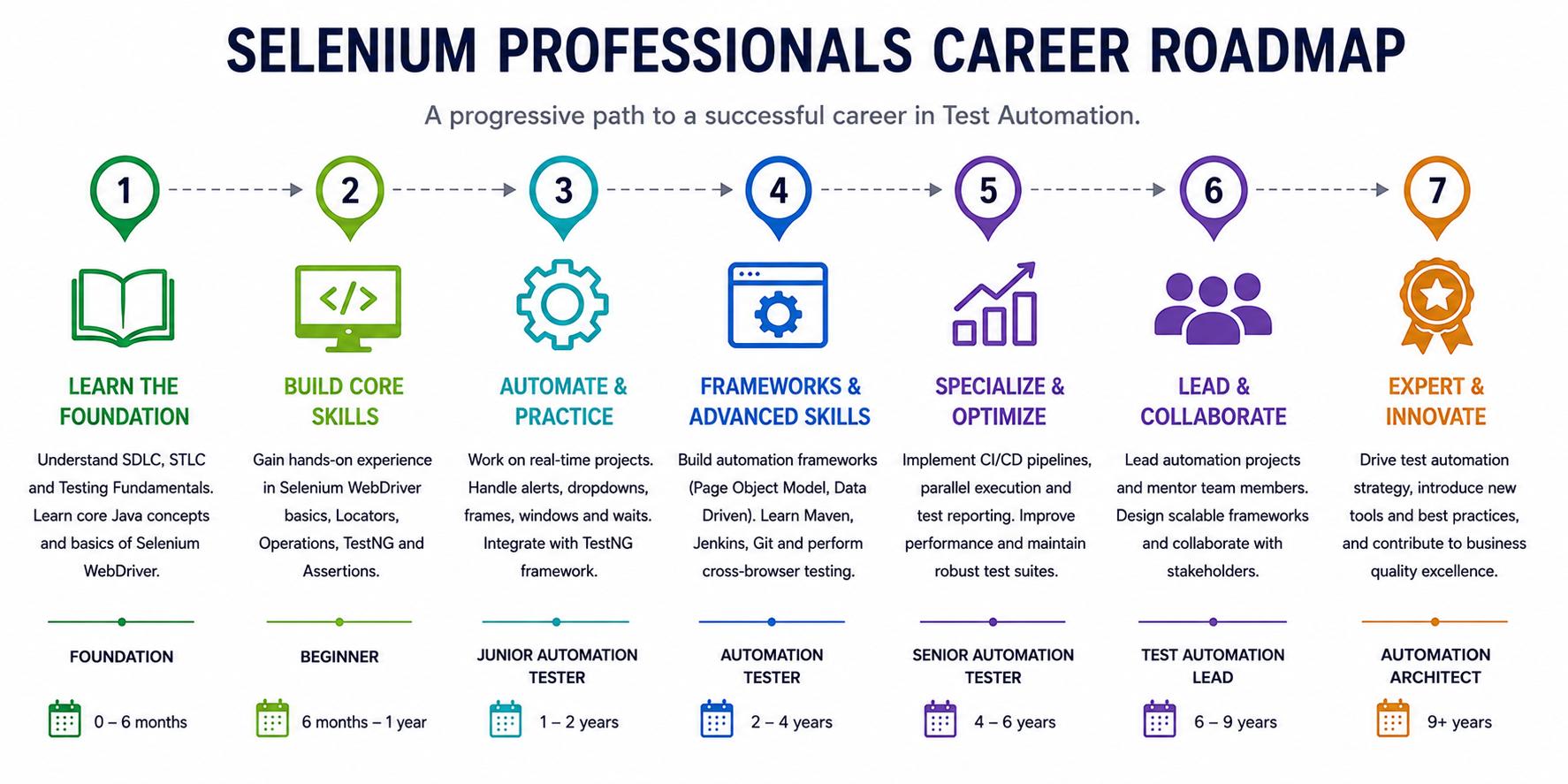
Selenium Automation Testing Career Roadmap


Selenium Automation Tester using Java Sample Questions

https://www.vskills.in/certification/selenium-automation-tester-using-java-sample-questions

Selenium Automation Tester using Java Practice Questions

https://www.vskills.in/practice/selenium-automation-tester-using-java

Selenium Automation Tester using Java Interview Questions

https://www.vskills.in/interview-questions/selenium-automation-tester-using-java-interview-questions

Companies that hire Selenium Automation Tester

Selenium remains one of the most in-demand testing skills in the industry, with organizations across IT services, product engineering, and e-commerce actively hiring certified automation testers. Companies like Amazon, Google, Microsoft, Dell, Wipro, TCS, Mindtree, and Tech Mahindra regularly recruit professionals skilled in Selenium and Java-based test automation, making this certification a strong addition to your resume.


Domain Expert Interview Series

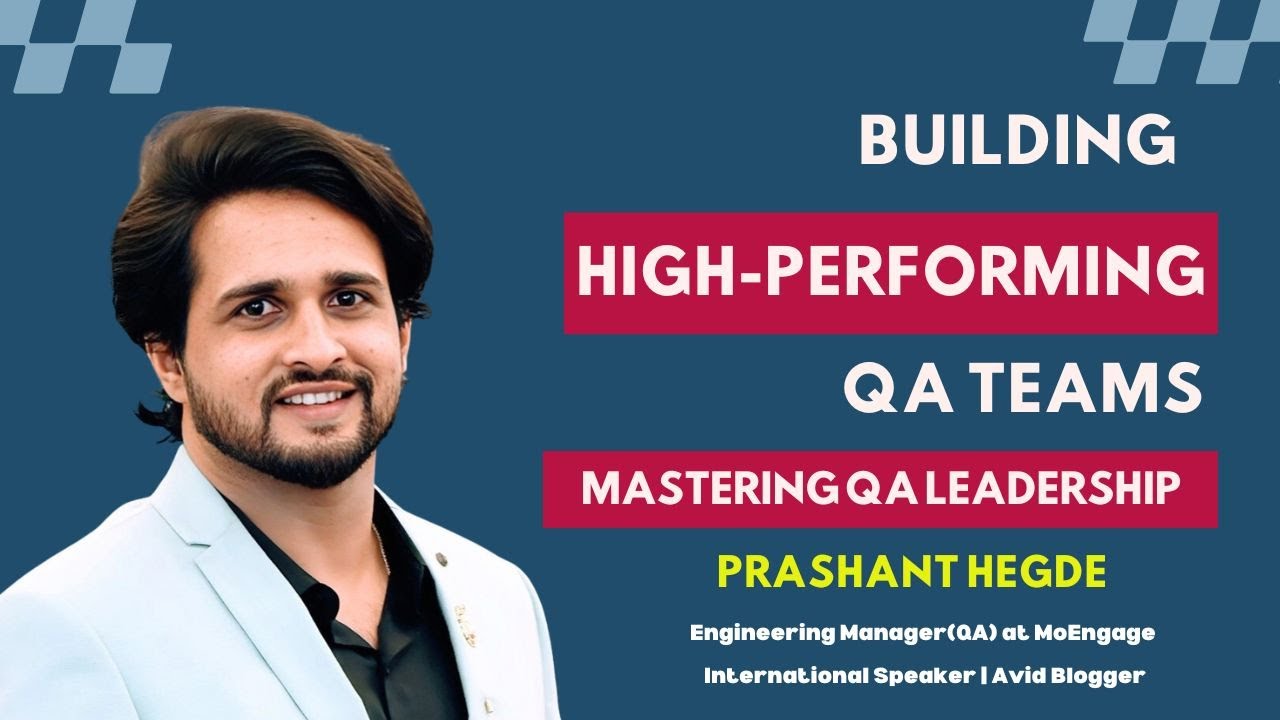
Good Tester vs Average Tester | Learn the Top Skills to become a Good Tester - LalitKumar Bhamare Unlocking Wisdom: A Heart-to-Heart with Ms. Pallavi Sharma, Founder 5 Elements Learning Building High-Performance Teams | Mastering QA leadership | Prashant Hegde How to start a Career in Automation Testing | Learn with Automation Testing Expert Mastering Test Automation with Andrew Knight | Automation Panda | Playwright Pro 

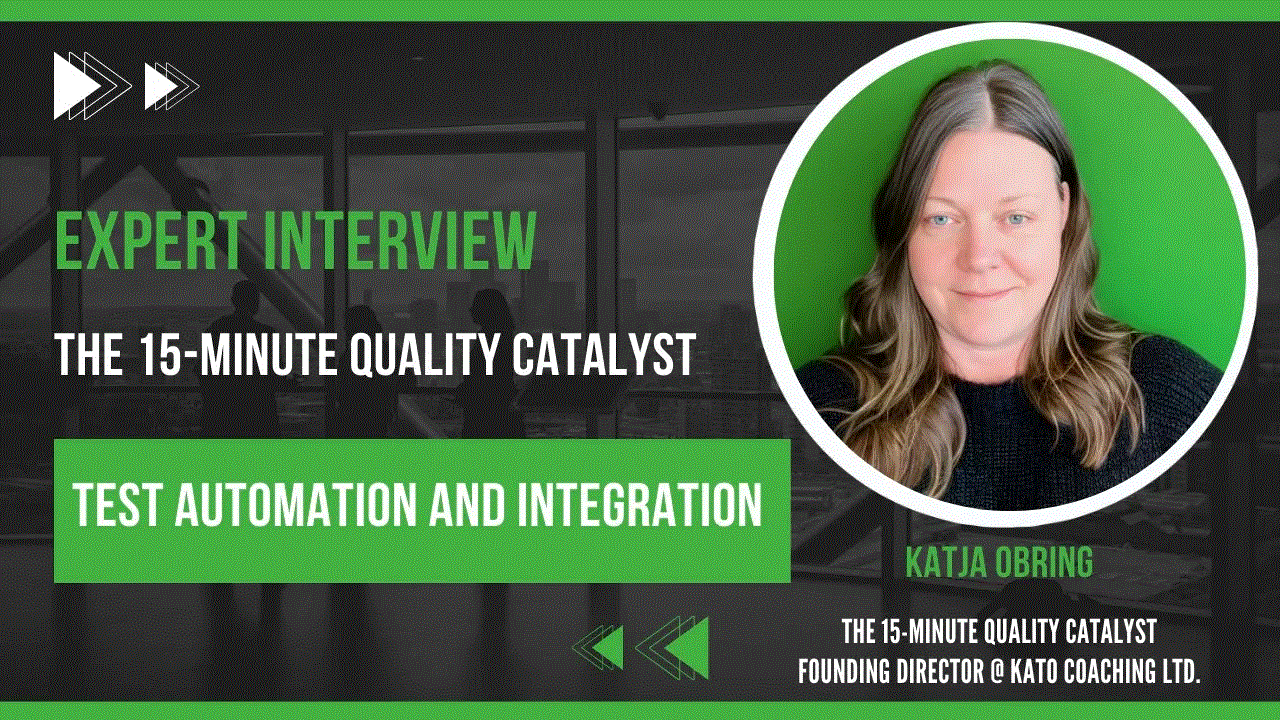
Automation Testing vs Manual Testing | Learn with Software Testing & Agile Expert Learn Top Test Automation Skills - Katja Obring | The 15 Minute Quality Catalyst  Interview with Automation Testing Expert - Mr. Palanikumar T Learn 5 Most important skills to become a successful Software Engineer | Learn with Rahul Parwal   Become a Successful Technical Architect | Engineering Leader - Sahil Puri | Become Job Ready  

5 Skills to Become a Successful Test Automation Engineer | Become Job Ready with Vskills  Interview with Performance Engineering Expert - Rahul Kumar Singh -  Interview with Software Testing & QA Expert - Ravi Ranjan Interview with Performance Testing Expert - Gourab Mitra

Selenium Automation Tester Related Blogs

Selenium Automation Tester Jobs

Checkout the various job openings for Selenium Automation Tester, click here..

Selenium Automation Tester Internships

Vskills runs its flagship internship programm where bright interns work with academic council, click to know.

Selenium Automation Tester using Java – Frequently Asked Questions

Get answers about eligibility, exam pattern, career scope, validity, jobs and enrolment for Vskills Certified Selenium Automation Tester using Java Certification.

It is a govt. certification that validates your skills in automating web application testing using Selenium WebDriver with Java, covering everything from basic scripting to advanced framework design.
No prior experience is required. The course starts with Java fundamentals and basic Selenium concepts before progressing to advanced topics, making it suitable for beginners as well as working professionals.
This certification is ideal for software testers, QA professionals, developers, freshers, and job seekers looking to build or strengthen their skills in Selenium-based test automation.
The course covers Java fundamentals, Selenium WebDriver, locator strategies, synchronization and waits, TestNG, Maven, Page Object Model, Git, Jenkins CI/CD, Cucumber, database connectivity, and cross-browser testing, among other topics.
Yes, it is a govt. certification from Vskills, a recognized certification body, and is designed around skills that employers actively look for in automation testing roles.
The exam is conducted online and includes objective-type questions that assess your understanding of Selenium, Java, and test automation framework concepts.
Once earned, the Vskills certification does not expire and remains valid as a credential on your resume and professional profile.
Yes, the course includes a complete framework-building module covering TestNG, Maven, Page Object Model, Cucumber integration, and CI/CD with Jenkins.
The course is heavily hands-on, with real-world exercises covering web element automation, dynamic tables, dropdowns, alerts, and end-to-end test scenarios.
You'll gain working knowledge of TestNG, Maven, Git, Jenkins, Cucumber, Apache POI for Excel handling, and Chrome DevTools Protocol (CDP), among other tools used in professional QA teams.
Yes, the course is structured to take learners from Java and Selenium basics through to advanced automation testing skills, making it a practical starting point for a career switch.
Yes, the course covers cross-browser testing using Selenium Grid as well as cloud-based testing through third-party vendors.
It demonstrates verified, job-ready skills in Selenium automation testing, helping you stand out in job applications, salary negotiations, and career progression opportunities.
You'll be prepared for roles such as Automation Test Engineer, QA Automation Engineer, SDET, and Selenium Developer, among other test automation positions.
Yes, if you do not pass the exam, you can retake it by paying a re-examination fee of Rs. 799 + GST. You can book your exam retake here.

TABLE OF CONTENT


Module 1. Introduction to Selenium

  • Course Intro
  • Selenium Features
  • WebDriver Architecture

Module 2. Java & Selenium Setup

  • Install Java & Eclipse
  • Set JAVA_HOME (Mac)
  • Browser Driver Classes & WebDriver Interface
  • Running Tests in Chrome
  • Troubleshooting Chrome Invocation
  • Basic WebDriver Methods
  • Selenium Manager (Beta)
  • Running Tests in Firefox & Edge
  • Running Tests in Edge Browser

Module 3. Java Basics for Selenium

  • Course Strategy
  • Variables & Data Types
  • Arrays - Initialize & Retrieve
  • For Loop over Arrays
  • Enhanced For Loop & Conditionals
  • ArrayList vs Arrays
  • Iterating Arrays & ArrayLists
  • Strings & String Methods
  • Creating & Accessing Methods

Module 4. Locator Techniques

  • Importance of Locators
  • ID & Name Locators
  • Class Name & CSS Selector
  • SelectorsHub Plugin
  • Xpath & LinkText Locators
  • Custom Xpath & CSS Selectors
  • Parent-Child Xpath Traverse

Module 5. Advanced Locators & Text Parsing

  • CSS Selectors with Regex
  • Tag Name Locators
  • Xpath from Button Text
  • Parsing Strings for Dynamic Passwords
  • Cross Browser Testing & Inspecting Elements
  • Sibling Xpath Traverse
  • Child to Parent Xpath Traverse
  • Browser Navigation & Window Properties

Module 6. Automating Web Elements

  • Static Dropdowns (Select API)
  • Dropdown Looping UI
  • Dynamic Dropdowns
  • Parent-Child Locator
  • AutoSuggestive Dropdowns
  • Checkboxes & Size
  • Assertions in Automation
  • Calendar UI Handling
  • Validating Disabled/Enabled Elements
  • End-to-End UI Automation
  • Java Alerts

Module 7. Functional Testing Deep Dive

  • Code Formatting & Debugging
  • Add to Cart Example
  • Sending Product Arrays to Cart
  • Programming Logic for Cart Items
  • Debugging Test Flow
  • Fixing Inconsistent Locators

Module 8. Synchronization & Waits

  • Implicit Wait
  • Explicit Wait
  • Waits - Real-Time Scenario
  • Implicit Wait Examples
  • Explicit Wait Examples
  • Fluent Wait
  • Custom Methods with Fluent Wait
  • Fluent Wait Exercise

Module 9. Ajax, Windows & iFrames

  • Ajax/Mouse Interactions
  • Actions Class Example
  • Window Handles
  • Child Windows Example
  • Handling Frames
  • Frames Example

Module 10. Real-Time Exercises

  • Print Links Count
  • Limiting WebDriver Scope
  • Opening Links in New Tabs
  • Getting Child Tab Titles
  • Calendar UI Handling
  • Generic Calendar Method

Module 11. Practical Problem Solving

  • Scrolling with JavaScriptExecutor
  • Handling Table Grids
  • String Parsing Exercise

Module 12. Miscellaneous Topics

  • HTTPS Certifications
  • Chrome Options - Proxies & Plugins
  • Maximizing Window & Deleting Cookies
  • Taking Screenshots
  • Broken Links Strategy
  • Status Codes via Open Connection
  • Iterating Links for Broken Link Check
  • Soft Assertions

Module 13. Java Streams for Web Tables

  • Section Overview
  • Java Streams Basics
  • Sorting Web Tables
  • Custom Methods with Streams Mapper
  • Automating Pagination
  • Filtering Web Tables

Module 14. Selenium 4 Features

  • Relative Locators
  • Relative Locators Example
  • Multiple Windows/Tabs
  • Partial Element Screenshot
  • Element Height & Width Capture

Module 15. Framework: TestNG Basics

  • Why TestNG
  • Running Tests without Compiler
  • XML Configuration
  • Prioritizing Testcases
  • Include/Exclude Testcases
  • Package-Level Execution with Regex
  • TestNG Annotations - Part 1
  • TestNG Annotations - Part 2
  • Groups Functionality
  • Annotation Helper Attributes
  • Parameterizing from XML
  • DataProvider - Part 1
  • DataProvider - Part 2
  • Listeners Interface
  • Parallel Execution & Reports

Module 16. Java OOP for Frameworks

  • Inheritance via TestNG Annotations
  • Parameterized Constructor & this Keyword
  • Super Keyword in Constructors

Module 17. Framework: Maven Project Setup

  • Framework Design FAQs
  • Create Maven Project
  • Ecommerce Demo App
  • WebDriverManager - Login & Product List
  • Add to Cart with Streams
  • Explicit Wait for Sync
  • Verify Cart & Checkout
  • End-to-End Purchase Script

Module 18. Framework: Page Object Model

  • What is Page Object Model
  • Page Object Classes - Login
  • Action Methods for Page Factory
  • Abstract Components for Reuse
  • Page Object - Product Catalogue
  • Fixing App Slowness
  • Common Methods in Abstract Component
  • Full Refactor to POM

Module 19. Framework: Test Configuration

  • Base Test Class
  • Initialize Driver & Launch App
  • Error Validation Test
  • Test Strategy by Modules
  • Test Methods with Dependencies
  • Parallel Execution & Groups

Module 20. Framework: Test Strategy

  • Parameterization Overview
  • HashMap with Data Provider
  • Reading JSON Data
  • Screenshot Utility for Failed Tests

Module 21. Framework: Extent Reports

  • Extent Reports Overview
  • Integrating with TestNG Listeners
  • Attaching Screenshots on Failure
  • ThreadLocal for Concurrency
  • IRetryAnalyzer for Flaky Tests

Module 22. Framework: Maven & Jenkins CI/CD

  • Running Tests via Maven Commands
  • Global Parameters at Runtime
  • Installing Jenkins Locally
  • Integrating Framework with Jenkins
  • Headless Mode in Jenkins
  • Scheduling Jenkins Jobs

Module 23. Framework: Cucumber Integration

  • Cucumber Coverage Overview
  • Cucumber Terminologies
  • Cucumber Setup & Feature Files
  • Step Definitions & Regex
  • Selenium Code in Step Definitions
  • TestNG Runner for Cucumber
  • Tags & Background Keywords

Module 24. Framework Interview Questions

  • Interview Questions - Part 1
  • Interview Questions - Part 2
  • Framework Architecture Diagram

Module 25. Git Version Control

  • Introduction to Git
  • GitHub Overview
  • Git Config & Repositories
  • Pushing Code to Remote
  • Staging & Commit
  • Remote Repository Setup
  • Git Commands Example - 1
  • Git Commands Example - 2
  • Branching in Git
  • Resolving Merge Conflicts

Module 26. CI/CD with Jenkins & GitHub

  • CI/CD Overview
  • GitHub Config & Push Framework
  • Jenkins Installation & Plugins
  • GitHub Webhook Trigger

Module 27. Excel Data-Driven Testing

  • Apache POI API
  • Accessing Excel Data
  • Rows & Cells from Sheet
  • Conditional Data Retrieval
  • Excel Driven Testing - 1
  • Excel Driven Testing - 2
  • Excel Driven Testing - 3
  • DataProvider & Excel Integration
  • DataProvider Multidimensional Array
  • Excel Dependencies Setup
  • Excel to DataProvider Demo

Module 28. File Upload/Download (Excel)

  • File Upload with sendKeys
  • Toast Messages with Explicit Wait
  • Xpath for Table Row/Column
  • Excel Utilities Assignment
  • End-to-End Excel Upload Solution

Module 29. Selenium Grid Testing

  • What is Selenium Grid
  • Grid Infrastructure Setup
  • Node Machines & Grid Health
  • Desired Capabilities & Remote WebDriver
  • Executing Scripts on Grid Nodes

Module 30. Chrome DevTools (CDP)

  • What Are Chrome DevTools
  • Device Metrics Override
  • Execute CDP Command
  • Localization Testing
  • Extracting Network Responses
  • Intercepting Network/API Responses
  • Testing Failed Network Requests
  • Blocking Network Requests
  • Emulating Network Speed
  • Basic Authentication
  • Logging JS Errors

Module 31. Database Connectivity

  • Connecting Database to Tests
  • MySQL Download
  • MySQL Server Connection
  • Creating Database
  • Creating Tables
  • Inserting Records
  • JDBC API Integration
  • DB to Selenium - Part 1
  • DB to Selenium - Part 2

Module 32. AutoIT File Handling

  • Window Authentication Pop-Ups
  • Handling Pop-Ups via URL
  • What Is AutoIT
  • Inspecting Window Objects
  • File Upload with AutoIT
  • Downloading Files
  • Configuring Download Path

Module 33. Cloud Cross-Browser Testing

  • Cross Browser Testing on Cloud
  • BrowserStack Execution

Module 34. Maven Build Tool

  • Importance of Maven
  • Installing & Configuring Maven
  • Maven Project Terminologies
  • POM.xml & Dependencies
  • Surefire Plugin
  • TestNG & Maven Integration
  • Maven Profiling

Module 35. Java OOP Basics I

  • While Loop Usage
  • While Loop Mechanics
  • Nested For Loops
  • Loops Exercise - Pyramid
  • Loops Exercise - Inverted Pyramid
  • What Is Interface
  • Interfaces in Java Classes
  • Abstract Classes vs Interfaces
  • Inheritance Usage
  • Inheritance Types Examples
  • Function Overloading
  • Overriding vs Overloading
  • Arrays Usage
  • Initializing Arrays
  • Multi-Dimensional Arrays
  • Smallest Number in Matrix Exercise
  • Arrays Interview Question

Module 36. Core Java II

  • Date Class
  • Calendar Objects
  • Role of Constructors
  • Types of Constructors
  • Super Keyword
  • Super Keyword Usage
  • This Keyword
  • Static vs Non-Static
  • Final Keyword
  • Packages Usage
  • Types of Packages
  • Access Modifiers
  • Public vs Private
  • Types of Exceptions
  • Try-Catch Mechanism
  • Finally Block

Module 37. Java Collections API

  • What Are Collections
  • ArrayList Implementation
  • ArrayList Examples
  • Set Interface
  • HashSet with Iterator

Module 38. Cucumber Behaviour-Driven Data - Framework

  • Advantages of BDD

Write a review

Please login or register to review

 For Support