Certified Mobile Testing (Appium) Professional

How It Works

  1. 1. Select Certification & Register
  2. 2. Receive Online e-Learning Access (LMS)
  3. 3. Take exam online anywhere, anytime
  4. 4. Get certified & Increase Employability

Test Details

  • Duration: 60 minutes
  • No. of questions: 50
  • Maximum marks: 50, Passing marks: 25 (50%).
  • There is NO negative marking in this module.
  • Online exam.

Benefits of Certification

  • Government certification
  • Certification valid for life
  • Lifelong e-learning access
  • Learning Hours: 30+ hrs.
  • Life Time Job Support
  • Updated June 2026

$59.00 /-
Download Brochure

Mobile applications have become the primary touchpoint between businesses and their customers, making mobile testing one of the most in-demand skills in the software industry today. Appium is the industry-standard open-source framework used by QA professionals worldwide to automate testing of native, hybrid, and web apps across Android, iOS, and Windows platforms. The Vskills Certified Mobile Testing (Appium) Professional certification validates your ability to design, write, and execute automated mobile test scripts using Appium — and does so with the credibility of a Government of India recognised credential that stays valid for life.

Why This Course?

The demand for mobile automation testers is growing rapidly as companies shift from manual to automated testing pipelines. Yet skilled Appium professionals remain scarce, giving certified candidates a clear advantage in the job market. This certification is designed for working professionals and fresh graduates alike, requiring no prior automation experience to get started. You learn directly from structured, exam-aligned study material that covers everything from environment setup and test script writing to CI/CD integration and cloud-based device testing.

Beyond the certificate itself, Vskills tags your profiles on job board and LinkedIn, shares your CV with its Job Centre network of 4,000+ recruiters, and provides lifetime access to updated learning material — all at a one-time cost with no renewal fees.

What makes this Course Stand Out?

  • Government Recognition: The certification is Government verified, adding institutional credibility that private certifications cannot match.
  • Lifetime Validity: Your certificate never expires and requires no renewal. Pass once and hold the credential permanently.
  • Hard Copy Certificate: Receive a physical certificate in addition to the digital credential, accepted by employers across India and abroad.
  • Recruiter Network Access: Vskills shares your profile with over 4,000 companies actively hiring through its recruiter network.
  • Free Practice Tests: Access sample questions and practice tests to validate your exam readiness before appearing for the certification.
  • Lifetime Learning Material: Study material is available online for life and is regularly updated to reflect the latest Appium releases and industry practices.

What You'll Learn

This certification covers the complete Appium ecosystem — from foundational concepts and environment configuration to advanced topics like cross-platform testing, parallel execution, and integration with CI/CD tools. The curriculum is structured to take you from zero to job-ready, covering both Android and iOS automation, programming fundamentals in Java, and real-world testing frameworks used in enterprise environments.

Complete Table of Content

Introduction to Appium and Course

  • Course Agenda
  • Appium Features
  • Appium Internal Architecture

Appium Installation Instructions for Windows and Mac

  • Download Java, Android Studio, and Node Software for Appium Setup
  • Set Environment Variable Paths of All Software in Windows
  • Set Environment Variable Paths of All Software in MAC
  • Configure Android Virtual Device/Emulator and Install Appium Server
  • Setting Up Appium Maven Project with Java Client Dependencies

Getting Started with Mobile Testing Using Appium Code

  • What are Desired Capabilities and the First Program to Invoke the App
  • What is UIAutomatorViewer and How it Helps Inspect Objects in Android Apps

In-Depth Understanding of Android Native Apps Automation with Appium

  • Automating app UI Using Xpaths and Text Attributes
  • Appium APIs for UI Interaction with IDs and classNames
  • Handling Multiple Similar Objects of Apps with Indexes
  • AndroidUIAutomator Usage in Identifying Objects of Apps
  • TouchActions in Appium (Gestures Automation -1)
  • Tapping and Long Press Events (Gestures Automation -2)
  • Touch Actions Sequence Execution
  • Strategy for Automating Swiping Event (Gestures Automation -3)

Advanced Gestures Automation with Key Events Handling Using Appium

  • Demo on Swiping the Clock - Practice Exercises
  • How to Automate Scrolling? Gestures Automation -5
  • Drag and Drop on Native Apps with Appium (Gesture Automation -6)

Automation on Real Android Device Apps with Appium and Its Rules

  • Configuring a Real Device to System to Run Appium Tests
  • Exercises on Real Device - Native Apps Automation

Real-Time Ecommerce App – End to End Practice Exercises

  • Introduction to App Features and Test Cases to Automate
  • Test Case in Filling the Form Details for Shopping
  • Verifying Toast Messages for Error Validations
  • Test Case - Scrolling in Product List Example with Appium Android Scroll
  • Test Case - Dynamically Selecting Product by Scanning List Based on Text
  • Test Case - Validating the Orders in Checkout Page
  • Test Case- Validating Total Amount Generated Functionality
  • Code Optimization with User-Defined Functions

Hybrid App Automation with Appium to Switch from Apps to Web Browser

  • Test Case - Validating Mobile Gestures of App ( Tap, Long Press)
  • How to Handle Objects When Rendered in Web View
  • Test Case -Automate Hybrid App with Context Switch

Mobile Chrome Browsers Automation with Appium – Real-Time Examples

  • Desired Capabilities to Run Appium Tests on Mobile Browser
  • How to Inspect Chrome Mobile Browser Locators - Tips and Tricks
  • How to Scroll and Put Assertions on Browser Tests with Appium

Getting Started with iOS Automation Using Appium on MAC

  • Install Xcode and Iphone 12 Simulator
  • Define IOS Desired Capabilities and Invoke the App Through Code
  • Inspect IOS Objects with Appium Inspector

Automate iOS Advance Gestures Functionalities with Appium

  • Automate Scrolling on IOS Apps
  • Appium IOS Automation Part 5 - Automate Picker Wheels (Dropdowns)
  • Appium IOS Automation -Automate Sliders with IOS Element Class
  • Strategy in Working with IOS Gestures and App Download
  • Performing Long Press Events with IOS Touch Action Class
  • Performing Tapping Events with IOS Touch Action Class

iOS Real Device Automation Testing Guidelines with an Example

  • Install Software for Real Device Automation
  • UDID, XcodeOrgId Generation for Real Device Testing
  • Bundle Id Generation and Running the Tests

Framework Learning Plan

  • How to Start Learning from This Course

Appium Framework – Part 1 – Learn TestNG Basics

  • TestNG Installation and Setup in Eclipse
  • Run Basic TestNG Tests with Test Annotation
  • Testing Xml File Configuration and Its Importance
  • Prioritizing the Test Cases with TestNG
  • Include and Exclude Mechanism to Control Test Cases
  • Executing the Test Cases at Package Level with regex
  • TestNG Annotations - Part 1
  • TestNG Annotations - Part 2
  • Usage of Groups Functionality in TestNG
  • Annotation's Helper Attributes with Examples
  • Parameterizing from TestNG xml File
  • DataProvider Annotation -Parameterizing Test Cases - 1
  • DataProvider Annotation -Parameterizing Test Cases - 2
  • Listeners Interface in TestNG Framework
  • Running Tests in Parallel and Generating Reports

Framework Part 2 – Maven (Build Management Tool)

  • Introduction to Maven
  • Configuration of Maven
  • Creating Maven Project and Understanding its Terminologies
  • Understanding POM.xml File and Its Dependencies
  • Importance of surefirePlugin in Executing Tests
  • Integration of TestNG with Maven
  • Switching the Tests with Maven Profiling

Framework Part 3 – Jenkins – Continuous Integration Tool

  • Importance of Jenkins in Test Frameworks
  • Install and Configure Jenkins
  • Configuring Jenkin Settings and Workspace

Pageobject Pattern and Page Factory

  • What is Page Object Model?
  • Page Factory Annotations FindBy
  • Practical Example Explaining Page Factory Model-1
  • Practical Example Explaining Page Factory Model-2
  • Appium Hybrid Framework Design Part – 1 (Design Patterns)
  • Maven Project Template Creation with Workspace Setup
  • Configuring Dependencies of the Project in Pom.xml
  • Creating Driver Base class for Framework
  • Initializing Smart Global Properties from Config Properties File
  • Converting Project into TestNG and Eliminating Hardcoded Paths
  • Implementing Page Objects for Tests in Framework

Appium Hybrid Framework Design Part – 2 (Building Utilities)

  • Make Tests Objects Independent to Drive from Object Classes
  • Start and Stop Appium Server Programmatically Through Java
  • Building Common Utilities for Appium Server Invoke Code
  • Starting Emulator on Fly Through Code with User Inputs
  • Fixing Framework Bug by Debugging Code

Reporting and CI/CD Integration for the Appium Framework – Part 3

  • Capturing Screenshot on Test Failures Using TestNG Listeners
  • Generating Excellent Client Html Reports for Test Execution
  • Parameterizing Test Data from External Sources Using Data Provider
  • Convert Project to Maven Compatible by Updating pom.xml
  • Sending Global Properties from Maven Commands into Tests
  • Integrating Framework Repo into Jenkins CI Tool

Running Appium Framework on the Cloud Servers with Parallel Execution

  • How to Utilize Cloud Infrastructure such as Browser Stack to Run Appium Tests
  • Run Tests on Cloud by Building Generic Capabilities Utility in the Framework
  • Run Appium Tests in Parallel on Cloud with TestNG xml Changes

Understanding Version Control System GIT

  • Introduction to GIT
  • Importance of GitHub and its Uses
  • Creating Git Config and Repositories
  • How to Push Code to Remote Repository
  • Understanding Staging and Commit in Git
  • Add Remote Repository and Push the Committed Code
  • End to End Working Example on Git Commands -1
  • End to End Working Example on Git Commands -2
  • Importance of Branching in GIT
  • How to Resolve Merge Conflicts with GIT

Database Connection to Selenium/Appium Test Cases

  • Steps to Connect Database to Selenium Test Cases
  • MySQL Download Instructions
  • MySQL Server Connection Procedure
  • Creating Database in MySQL Server
  • Creating Tables in Databases
  • JDBC ODBC Connection Overview
  • Integration of Database with JDBC API
  • Steps to Connect Database Info to Selenium - 1
  • Steps to Connect Database Info to Selenium - 2

Java OOPS Basics for Appium/Selenium

  • Java First Program Basics
  • Java Program Principles
  • Classes and Objects in Java
  • Strings in Java
  • Interface Concepts
  • Practical Usage of Interface
  • Runtime Polymorphism
  • Inheritance Concepts
  • Practical Usage of Inheritance
  • Coding Basics-1
  • Coding Basics-2
  • Introduction to Arrays
  • Single-Dimensional and Multidimensional Arrays Usage
  • Examples of Arrays
  • Array Interview Questions
  • Programming Example
  • Reverse String -Interview Question
  • Date Class Concepts
  • Working with Calendar Objects in Java
  • Access Modifiers Basics
  • How Constructor Plays a Crucial Role
  • Types of Constructors and Their Usage

Defect Tracking Tool

  • Defect Management tool- Bugzilla
  • Bugzilla Features- Logging a Bug
  • Bugzilla Features -Search Mechanism for Tracking Bugs
  • Common Practices in Bugzilla Tool
  • Bugzilla Preference Feature

Exam and Certification Details

Detail Information
Exam Format Online — attempt from anywhere, anytime
Number of Questions 50 multiple-choice questions
Duration 60 minutes
Passing Score 25 out of 50 (50%) — no negative marking
Certificate Validity Lifetime — no renewal required
e-Learning Access Lifetime access to LMS and future content updates
Result Instant — available immediately after exam completion
Language English

Who is this course for?

This certification is suitable for a wide range of candidates looking to build or advance a career in mobile test automation.

  • Software Testers and QA Engineers who want to move from manual testing to automation and add a recognised credential to their profile.
  • Software Developers who want to expand their skill set to include mobile testing and quality assurance practices.
  • Automation Engineers already working with Selenium or other web automation tools who want to extend their expertise to mobile platforms.
  • Fresh Graduates and Engineering Students from computer science or IT backgrounds who want to enter the QA automation field with a government-recognised certification.
  • IT Professionals in roles adjacent to testing — such as business analysts, project managers, or DevOps engineers — who want a working understanding of mobile test automation.

Companies that hire Mobile Testing (Appium) Professional

Organisations across IT services, product companies, banking, e-commerce, and consulting actively recruit Appium-certified professionals for their mobile QA teams. Some of the leading companies that hire mobile automation testers include:

Tata Consultancy Services, Infosys, Wipro, HCL Technologies, Tech Mahindra, Cognizant, Accenture, Capgemini, IBM India, Mphasis, Persistent Systems, Mindtree, L&T Infotech, Hexaware Technologies, NIIT Technologies, Amazon India, Flipkart, Paytm, Zomato, Swiggy, PhonePe, Razorpay, etc.

Career Outcomes

A Vskills Certified Mobile Testing (Appium) Professional is equipped to take on mid-to-senior level roles in mobile QA and automation across industries. The certification is recognised by leading IT recruiters and opens doors to roles in both service-based and product-based companies. Mobile automation testers command competitive salaries, with demand continuing to grow as mobile-first development becomes the norm across sectors including fintech, e-commerce, healthtech, and edtech.

Job Role Industry Experience Level Avg. Salary (India)
Mobile Test Automation Engineer IT Services, Fintech Fresher – 2 years ₹3.5 – ₹6 LPA
Appium Test Engineer E-commerce, Fintech 2 – 4 years ₹6 – ₹10 LPA
Senior QA Automation Engineer IT Services, Banking 4 – 6 years ₹10 – ₹16 LPA
Mobile QA Lead Product Companies, MNC 6 – 9 years ₹16 – ₹24 LPA
Test Automation Architect Enterprise, Consulting 9+ years ₹24 – ₹35 LPA
QA Manager / Quality Engineering Manager SaaS, MNC, IT Services 8+ years ₹20 – ₹32 LPA

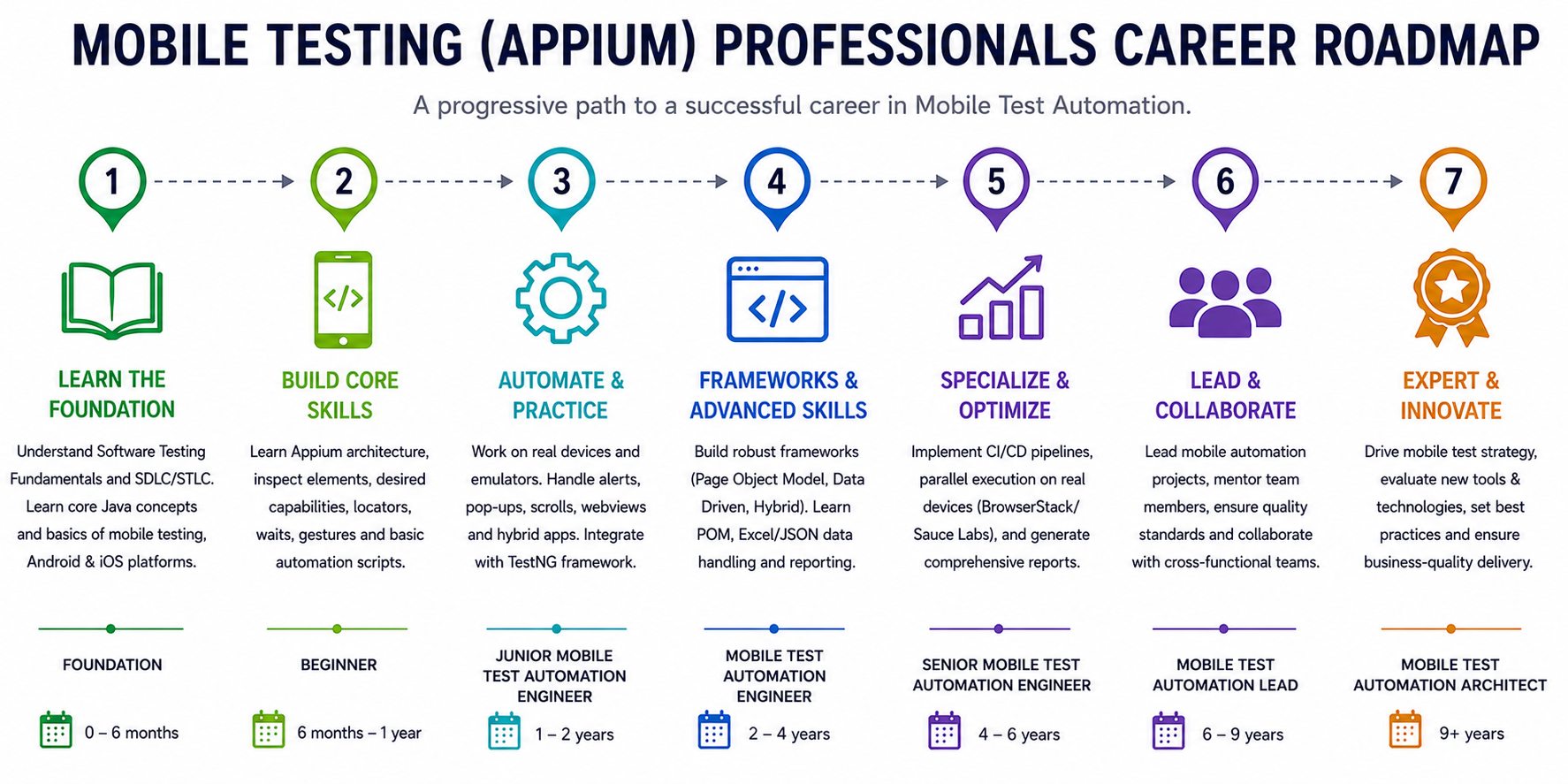
Appium Testing Professionals Career Roadmap

Mobile Testing (Appium) Sample Questions

https://www.vskills.in/certification/mobile-testing-appium-professional-sample-questions

Mobile Testing (Appium) Practice Questions

https://www.vskills.in/practice/appium

Mobile Testing (Appium) Interview Questions

https://www.vskills.in/interview-questions/management-interview-questions/mobile-testing-appium-interview-questions

Mobile Testing (Appium) Tutorials

https://www.vskills.in/certification/tutorial/mobile-testing-appium-tutorials/

Domain Expert Interview Series

Good Tester vs Average Tester | Learn the Top Skills to become a Good Tester - LalitKumar BhamareUnlocking Wisdom: A Heart-to-Heart with Ms. Pallavi Sharma, Founder 5 Elements LearningBuilding High-Performance Teams | Mastering QA leadership | Prashant HegdeHow to start a Career in Automation Testing | Learn with Automation Testing ExpertMastering Test Automation with Andrew Knight | Automation Panda | Playwright Pro


Automation Testing vs Manual Testing | Learn with Software Testing & Agile ExpertLearn Top Test Automation Skills - Katja Obring | The 15 Minute Quality Catalyst Interview with Automation Testing Expert - Mr. Palanikumar TLearn 5 Most important skills to become a successful Software Engineer | Learn with Rahul Parwal Become a Successful Technical Architect | Engineering Leader - Sahil Puri | Become Job Ready


5 Skills to Become a Successful Test Automation Engineer | Become Job Ready with Vskills Interview with Performance Engineering Expert - Rahul Kumar Singh - Interview with Software Testing & QA Expert - Ravi RanjanInterview with Performance Testing Expert - Gourab Mitra

Mobile Testing (Appium) Related Blogs

5 Appium Mobile Testing Certification and Courses to start your career in 2022

10 Best Software testing certifications to improve your career in the 2022

Mobile Testing (Appium) Jobs

Checkout the various job openings for Mobile Testing (Appium), click here..

Mobile Testing (Appium) Internships

Vskills runs its flagship internship programme where bright interns work with academic council, click to know more details..

Mobile Testing (Appium) Professional Certification – Frequently Asked Questions

Get answers about eligibility, exam pattern, career scope, validity, jobs and enrolment for Vskills Certified Mobile Testing (Appium) Professional.

The Vskills Certified Mobile Testing (Appium) Professional is a government-recognised certification that validates your skills in automating mobile application testing using the Appium framework. It covers Android and iOS automation, test script writing, framework integration, and mobile testing best practices.
This certification is ideal for software testers, QA engineers, automation engineers, software developers, and fresh graduates from IT or computer science backgrounds who want to build or advance a career in mobile test automation. It is equally suitable for professionals already working with tools like Selenium who want to extend their expertise to mobile platforms.
No prior experience in Appium is required. The certification is structured to take candidates from foundational concepts through to advanced automation techniques. A basic understanding of any programming language — preferably Java — is helpful but not mandatory to begin preparation.
The exam covers a wide range of topics including Appium architecture and design, setting up the test environment, Android and iOS automation, desired capabilities, element location strategies, writing and executing test scripts, TestNG integration, the Page Object Model, handling gestures and alerts, data-driven testing, parallel testing, cloud device farms, CI/CD integration with Jenkins and Git, and mobile testing best practices.
The Vskills Certified Mobile Testing (Appium) Professional exam is conducted online. Candidates can appear for the exam from the comfort of their home or office. The exam is objective-type (multiple choice) and must be completed within one year from the date of registration.
The certification is valid for life. Unlike many industry certifications that require periodic renewal or re-examination, a Vskills certificate once earned does not expire and does not attract any renewal fee.
After clearing the exam, certified candidates receive a hard copy certificate along with a digital certificate. Vskills also tags your profile as Vskills Certified on job portals and LinkedIn, shares your CV through the Job Centre with over 4,000 empanelled recruiters, and provides lifetime access to updated online study material.
Vskills provides comprehensive online study material covering all exam topics, which is accessible for life and regularly updated. Candidates also receive hard copy study material. Additionally, free practice tests and sample questions are available to help assess exam readiness before the actual test.
Selenium is a web browser automation tool used for testing web applications on desktop browsers. Appium extends the Selenium WebDriver protocol to support mobile platforms, enabling automation of native, hybrid, and mobile web applications on Android, iOS, and Windows devices. Appium uses the same WebDriver API as Selenium, making it easy for Selenium-experienced testers to transition to mobile automation.
Appium supports multiple programming languages including Java, Python, JavaScript, Ruby, C#, and PHP. The Vskills certification curriculum primarily focuses on Java, which is the most widely used language for Appium test automation in enterprise environments across India.
Yes. Mobile test automation is a high-demand skill across IT services companies, product firms, fintech, e-commerce, and consulting organisations. Companies such as TCS, Infosys, Wipro, Cognizant, Accenture, Amazon, Flipkart, Paytm, and PhonePe actively hire Appium-certified professionals. The Vskills government recognition and recruiter network further increase your visibility to hiring managers.
Salaries vary based on experience and employer. Entry-level mobile automation engineers in India typically earn between Rs. 3.5 and Rs. 6 LPA, while professionals with 4 to 6 years of experience can expect Rs. 10 to Rs. 16 LPA. Senior roles such as Test Automation Architect or QA Manager can command Rs. 24 LPA and above depending on the organisation and location.
The Vskills Job Centre is a dedicated placement support service that shares the CVs of certified candidates with over 4,000 companies in its recruiter network. This gives you direct visibility with hiring managers and HR teams at companies actively looking for certified mobile testing professionals, without any additional cost.
You can enrol directly through the Vskills website by visiting the Mobile Testing (Appium) Professional certification page, selecting your preferred exam date, and completing the payment process. Once enrolled, you get immediate access to the online study material and practice tests to begin your preparation.

TABLE OF CONTENT


Introduction to Appium and Course

  • Course Agenda
  • Appium Features
  • Appium Internal Architecture

Appium Installation Instructions for Windows and Mac

  • Download Java, Android Studio, and Node Software for Appium Setup
  • Set Environment Variable Paths of All Software in Windows
  • Set Environment Variable Paths of All Software in MAC
  • Configure Android Virtual Device/Emulator and Install Appium Server
  • Setting Up Appium Maven Project with Java Client Dependencies

Getting Started with Mobile Testing Using Appium Code

  • What are Desired Capabilities and the First Program to Invoke the App
  • What is UIAutomatorViewer and How it Helps Inspect Objects in Android Apps

In-Depth Understanding of Android Native Apps Automation with Appium

  • Automating app UI Using Xpaths and Text Attributes
  • Appium APIs for UI Interaction with IDs and classNames
  • Handling Multiple Similar Objects of Apps with Indexes
  • AndroidUIAutomator Usage in Identifying Objects of Apps
  • TouchActions in Appium (Gestures Automation -1)
  • Tapping and Long Press Events (Gestures Automation -2)
  • Touch Actions Sequence Execution
  • Strategy for Automating Swiping Event (Gestures Automation -3)

Advanced Gestures Automation with Key Events Handling Using Appium

  • Demo on Swiping the Clock - Practice Exercises
  • How to Automate Scrolling? Gestures Automation -5
  • Drag and Drop on Native Apps with Appium (Gesture Automation -6)

Automation on Real Android Device Apps with Appium and Its Rules

  • Configuring a Real Device to System to Run Appium Tests
  • Exercises on Real Device - Native Apps Automation

Real-Time Ecommerce App – End to End Practice Exercises

  • Introduction to App Features and Test Cases to Automate
  • Test Case in Filling the Form Details for Shopping
  • Verifying Toast Messages for Error Validations
  • Test Case - Scrolling in Product List Example with Appium Android Scroll
  • Test Case - Dynamically Selecting Product by Scanning List Based on Text
  • Test Case - Validating the Orders in Checkout Page
  • Test Case- Validating Total Amount Generated Functionality
  • Code Optimization with User-Defined Functions

Hybrid App Automation with Appium to Switch from Apps to Web Browser

  • Test Case - Validating Mobile Gestures of App ( Tap, Long Press)
  • How to Handle Objects When Rendered in Web View
  • Test Case -Automate Hybrid App with Context Switch

Mobile Chrome Browsers Automation with Appium – Real-Time Examples

  • Desired Capabilities to Run Appium Tests on Mobile Browser
  • How to Inspect Chrome Mobile Browser Locators - Tips and Tricks
  • How to Scroll and Put Assertions on Browser Tests with Appium

Getting Started with iOS Automation Using Appium on MAC

  • Install Xcode and Iphone 12 Simulator
  • Define IOS Desired Capabilities and Invoke the App Through Code
  • Inspect IOS Objects with Appium Inspector

Automate iOS Advance Gestures Functionalities with Appium

  • Automate Scrolling on IOS Apps
  • Appium IOS Automation Part 5 - Automate Picker Wheels (Dropdowns)
  • Appium IOS Automation -Automate Sliders with IOS Element Class
  • Strategy in Working with IOS Gestures and App Download
  • Performing Long Press Events with IOS Touch Action Class
  • Performing Tapping Events with IOS Touch Action Class

iOS Real Device Automation Testing Guidelines with an Example

  • Install Software for Real Device Automation
  • UDID, XcodeOrgId Generation for Real Device Testing
  • Bundle Id Generation and Running the Tests

Framework Learning Plan

  • How to Start Learning from This Course

Appium Framework – Part 1 – Learn TestNG Basics

  • TestNG Installation and Setup in Eclipse
  • Run Basic TestNG Tests with Test Annotation
  • Testing Xml File Configuration and Its Importance
  • Prioritizing the Test Cases with TestNG
  • Include and Exclude Mechanism to Control Test Cases
  • Executing the Test Cases at Package Level with regex
  • TestNG Annotations - Part 1
  • TestNG Annotations - Part 2
  • Usage of Groups Functionality in TestNG
  • Annotation's Helper Attributes with Examples
  • Parameterizing from TestNG xml File
  • DataProvider Annotation -Parameterizing Test Cases - 1
  • DataProvider Annotation -Parameterizing Test Cases - 2
  • Listeners Interface in TestNG Framework
  • Running Tests in Parallel and Generating Reports

Framework Part 2 – Maven (Build Management Tool)

  • Introduction to Maven
  • Configuration of Maven
  • Creating Maven Project and Understanding its Terminologies
  • Understanding POM.xml File and Its Dependencies
  • Importance of surefirePlugin in Executing Tests
  • Integration of TestNG with Maven
  • Switching the Tests with Maven Profiling

Framework Part 3 – Jenkins – Continuous Integration Tool

  • Importance of Jenkins in Test Frameworks
  • Install and Configure Jenkins
  • Configuring Jenkin Settings and Workspace

Pageobject Pattern and Page Factory

  • What is Page Object Model?
  • Page Factory Annotations FindBy
  • Practical Example Explaining Page Factory Model-1
  • Practical Example Explaining Page Factory Model-2
  • Appium Hybrid Framework Design Part – 1 (Design Patterns)
  • Maven Project Template Creation with Workspace Setup
  • Configuring Dependencies of the Project in Pom.xml
  • Creating Driver Base class for Framework
  • Initializing Smart Global Properties from Config Properties File
  • Converting Project into TestNG and Eliminating Hardcoded Paths
  • Implementing Page Objects for Tests in Framework

Appium Hybrid Framework Design Part – 2 (Building Utilities)

  • Make Tests Objects Independent to Drive from Object Classes
  • Start and Stop Appium Server Programmatically Through Java
  • Building Common Utilities for Appium Server Invoke Code
  • Starting Emulator on Fly Through Code with User Inputs
  • Fixing Framework Bug by Debugging Code

Reporting and CI/CD Integration for the Appium Framework – Part 3

  • Capturing Screenshot on Test Failures Using TestNG Listeners
  • Generating Excellent Client Html Reports for Test Execution
  • Parameterizing Test Data from External Sources Using Data Provider
  • Convert Project to Maven Compatible by Updating pom.xml
  • Sending Global Properties from Maven Commands into Tests
  • Integrating Framework Repo into Jenkins CI Tool

Running Appium Framework on the Cloud Servers with Parallel Execution

  • How to Utilize Cloud Infrastructure such as Browser Stack to Run Appium Tests
  • Run Tests on Cloud by Building Generic Capabilities Utility in the Framework
  • Run Appium Tests in Parallel on Cloud with TestNG xml Changes

Understanding Version Control System GIT

  • Introduction to GIT
  • Importance of GitHub and its Uses
  • Creating Git Config and Repositories
  • How to Push Code to Remote Repository
  • Understanding Staging and Commit in Git
  • Add Remote Repository and Push the Committed Code
  • End to End Working Example on Git Commands -1
  • End to End Working Example on Git Commands -2
  • Importance of Branching in GIT
  • How to Resolve Merge Conflicts with GIT

Database Connection to Selenium/Appium Test Cases

  • Steps to Connect Database to Selenium Test Cases
  • MySQL Download Instructions
  • MySQL Server Connection Procedure
  • Creating Database in MySQL Server
  • Creating Tables in Databases
  • JDBC ODBC Connection Overview
  • Integration of Database with JDBC API
  • Steps to Connect Database Info to Selenium - 1
  • Steps to Connect Database Info to Selenium - 2

Java OOPS Basics for Appium/Selenium

  • Java First Program Basics
  • Java Program Principles
  • Classes and Objects in Java
  • Strings in Java
  • Interface Concepts
  • Practical Usage of Interface
  • Runtime Polymorphism
  • Inheritance Concepts
  • Practical Usage of Inheritance
  • Coding Basics-1
  • Coding Basics-2
  • Introduction to Arrays
  • Single-Dimensional and Multidimensional Arrays Usage
  • Examples of Arrays
  • Array Interview Questions
  • Programming Example
  • Reverse String -Interview Question
  • Date Class Concepts
  • Working with Calendar Objects in Java
  • Access Modifiers Basics
  • How Constructor Plays a Crucial Role
  • Types of Constructors and Their Usage

Defect Tracking Tool

  • Defect Management tool- Bugzilla
  • Bugzilla Features- Logging a Bug
  • Bugzilla Features -Search Mechanism for Tracking Bugs
  • Common Practices in Bugzilla Tool
  • Bugzilla Preference Feature

Write a review

Please login or register to review

 For Support