
SoapUI Interface

This section is dedicated to SoapUI Interface.
Main Window
The Main Window has the following tools-
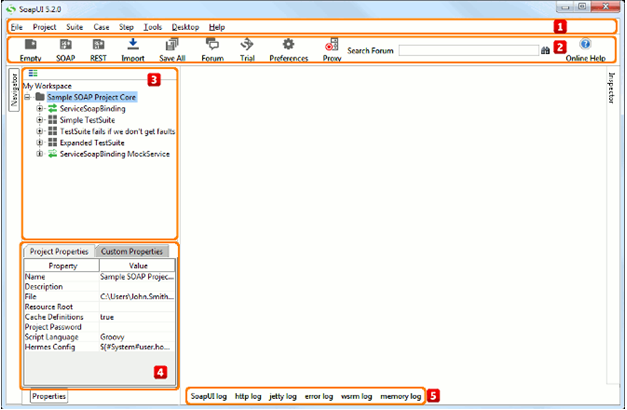
| Option | Description | |
| 1 | Main toolbar | Main toolbar |
| 2 | Icons toolbar | Icon shortcuts toolbar |
| 3 | Navigator Pane | Expandable tree display of workspace content (Read Reference Navigation) |
| 4 | Properties Pane | Lists available predefined workspace properties(Read Reference Navigation) |
| 5 | Log Inspectors | Available log inspectors in the main window |
File Menu
The File Menu has the following tools-
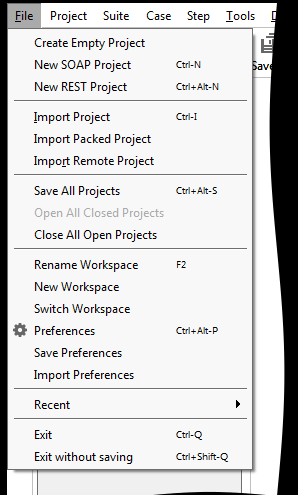
| Option | Description |
| New soapUI Project | Creates a new soapUI project in this workspace |
| Import Project | Adds an existing project into this workspace |
| Import Remote Project | Imports a remote project into this workspace |
| Save All Projects | Saves all projects in the current workspace |
| Open All Closed Projects | Opens all closed projects in the current workspace |
| Close All Opened Projects | Closes all opened projects in the current workspace |
| Rename | Renames this workspace |
| New Workspace | Creates a new workspace |
| Switch Workspaces | Loads another workspace file |
| Clear Workspace | Removes all projects from the workspace |
| Preferences | Sets global soapUI preferences |
| Save Preferences | Saves all global preferences |
| Import Preferences | Imports soapUI settings from another setting -file |
| Recent | Reopens recent items |
| Exit | Saves all projects and exist soapUI |
| Exit Without Saving | Exits SoapUI without saving |
| Online Help | Shows online help |
Tools Menu
The Tool Menu consists of the following tools-
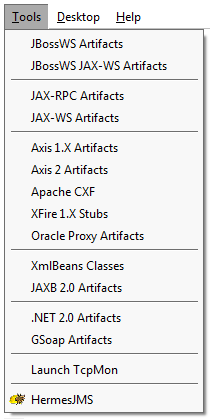
| Option | Description |
| JBossWS Artifacts | Generates JBoss WS artifacts using the JBoss wstools utility |
| JBossWS JAX-WS Artifacts | Generates JBossWS JAX-WS artifacts using JBoss WS wsconsume |
| JAX-RPC Artifacts | Generates JAX-RPC artifacts using wscompile |
| JAX-WS Artifacts | Generates JAX-WS artifacts using wsimport |
| AXIS 1.X Artifacts | Generates AXIS 1.X artifacts using WSDL2Java |
| AXIS 2.X Artifacts | Generates AXIS 2.X artifacts using WSDL2Java |
| Apache CXF | Generates Apache CXF using WSDL2Java utility |
| XFire 1.X Stubs | Generates XFire 1.X stubs using wsgen utility |
| Oracle Proxy Artifacts | Generates Oracle Proxy artifacts using the wsa.jar utility |
| XmlBeans Classes | Generates XmlBeans classes |
| JAXB 2.0 Artifacts | Generates JAXB 2.0 artifacts |
| .NET 2.0 Artifacts | Generates .NET 2.0 artifacts using wsdl.exe |
| GSoap Artifacts | Generates GSoap artifacts using wsdl2h and soap2cpp |
| Launch TcpMon | Launch Tcp Mon for monitoring SOAP traffic |
| HermesJMS | Start Hermes JMS application |
Desktop Menu
The Desktop Menu consists of the following tools-
| Option | Description |
| Switch Window | Prompts to switch to an open editor window |
| Maximize Desktop | Hides or shows the navigator and log tabs |
| Close Current | Close the current tab |
| Close Others | Close all tabs except the current one |
| Close All | Close all windows |
| Open TestCase Layout | Opens TestCase Layout |
Icons Toolbar
The Icons Toolbar has the following options and tools-

| Option | Description |
| Empty | Creates an empty SoapUI project. |
| SOAP | Creates a new SOAP project. |
| REST | Creates a new REST project. |
| Import | Imports an existing soapUI project into the current workspace |
| Save All | Saves all projects in the current workspace |
| Forum | Opens SoapUI forum. |
| Trial | Opens the SoapUI Pro Trial download page. |
| Preferences | Sets global soapUI preferences |
| proxy | Apply proxy defined in global preferences |
| Find | Searches the soapUI support forum |
| Help browser | Show online help |
Log Inspectors
- Firstly, soapUI Log
- Secondly, HTTP Log
- Subsequently, Jetty Log
- Moreover, Error Log
- In addition, Wsrm Log
- Lastly, Memory Log
Make your resume stand out and become a Certified SoapUI Testing Professional. Try free practice tests here!
A great career is just a certification away. So, practice and validate your skills to become Certified SoapUI Testing Professional Now!

